Learn from the best! Meet the four finalists headed to the FINALS of the Power BI Dataviz World Championships! Register now
I have a data set in table as below :
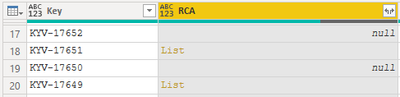
The RCA field has the values coming from an API in the form of records as below which i want to show as a single record separated by "-"
"customfield_47426":[{"self":"https://jira.ihsmarkit.com/rest/api/2/customFieldOption/97317","value":"Other","id":"97317"},{"self":"https://jira.ihsmarkit.com/rest/api/2/customFieldOption/102002","value":"Duplicate Issue","id":"102002"}]So to expand the List i wrote the below logic which works to certain extent
= Table.TransformColumns(
#"Renamed Columns2",
{
{
"RCA",
each Combiner.CombineTextByDelimiter(" - ")(
List.Transform( _ , each if _ = null or _ = "" then 0 else [value] )
),
type text
}
}
)
This gives the output as below with error for the null values
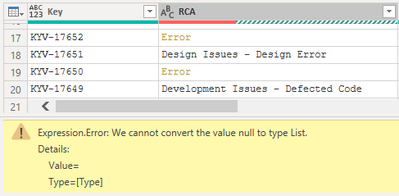
How do i resolve this issue ? I have tried replacing null values with "-" etc but still the same conversion error. I even tried replacing the code as below to insert a string which matches the list record but with empty values but still same error comes.
= Table.ReplaceValue(#"Renamed Columns2",null,"[{""self"":"""",""value"":""NA"",""id"":""""}]",Replacer.ReplaceValue,{"RCA"})
Solved! Go to Solution.
hi @Anonymous
You could try this simple way as below:
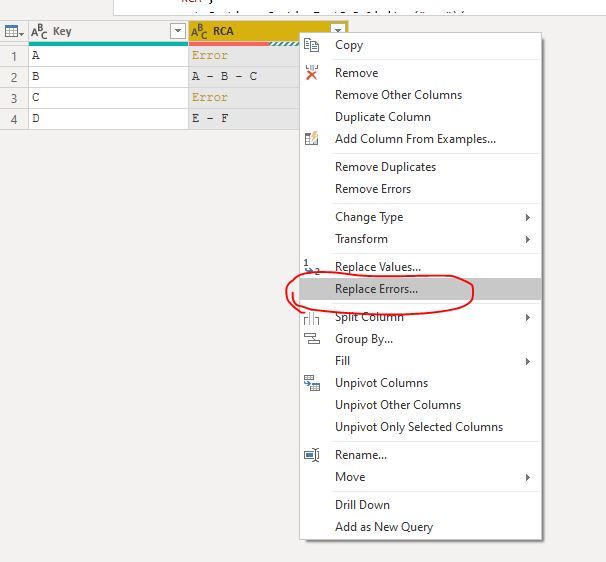
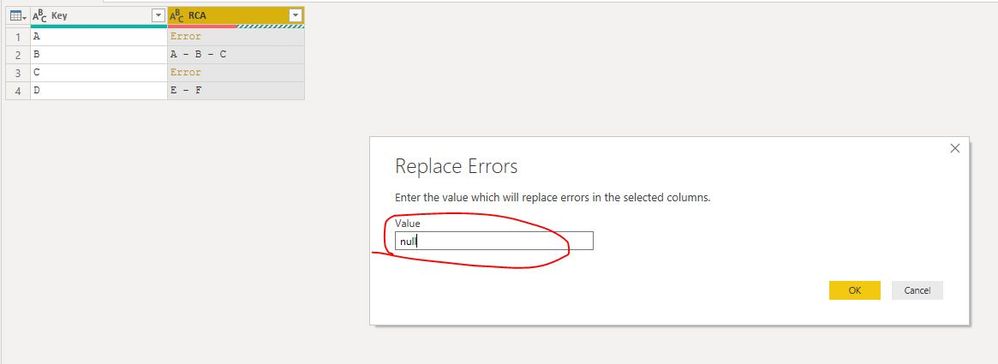
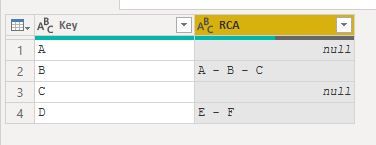
Just add a steps that replace error with null (or other value).
or just nested it in your formula as below:
=Table.ReplaceErrorValues( Table.TransformColumns(
#"Renamed Columns2",
{
{
"RCA",
each Combiner.CombineTextByDelimiter(" - ")(
List.Transform( _ , each if _ = null or _ = "" then 0 else [value] )
),
type text
}
}
) , {{"RCA", null}})
Regards,
Lin
hi @Anonymous
You could try this simple way as below:
Just add a steps that replace error with null (or other value).
or just nested it in your formula as below:
=Table.ReplaceErrorValues( Table.TransformColumns(
#"Renamed Columns2",
{
{
"RCA",
each Combiner.CombineTextByDelimiter(" - ")(
List.Transform( _ , each if _ = null or _ = "" then 0 else [value] )
),
type text
}
}
) , {{"RCA", null}})
Regards,
Lin
Hi @Anonymous ,
I think the problem is that the "null" value is not list type, even you change it to "-", it's also a string type, not list type.
So you can't use the list.transform() function to it.
I think you need to do the if-else firstly, for example, just using:
if RCA is null then 0
else "your combine / list.transform() function
to do it.
Please try.
Aiolos Zhao
Tried it but still same issue , output http://prntscr.com/qkoyuv
= if "RCA" is null then 0 else (Table.TransformColumns(
#"Renamed Columns2",
{
{
"RCA",
each Combiner.CombineTextByDelimiter(" - ")(
List.Transform( _ , each [value] )
),
type text
}
}
))
A new Power BI DataViz World Championship is coming this June! Don't miss out on submitting your entry.
Share feedback directly with Fabric product managers, participate in targeted research studies and influence the Fabric roadmap.
| User | Count |
|---|---|
| 56 | |
| 33 | |
| 33 | |
| 18 | |
| 16 |
| User | Count |
|---|---|
| 67 | |
| 67 | |
| 45 | |
| 30 | |
| 26 |