


This time we’re going bigger than ever. Fabric, Power BI, SQL, AI and more. We're covering it all. You won't want to miss it.
Learn moreDid you hear? There's a new SQL AI Developer certification (DP-800). Start preparing now and be one of the first to get certified. Register now
Hi Team,
Can anyone help me resolve this issue.
This is the sample data set
| computer name | Status |
| A | Software Installed |
| B | Software not installed |
| B | Service not running |
| C | Service not running |
| D | Software Installed |
Expected outcome
| Computer name | Software Installed | Software NotInstalled | Service Not running |
| A | 1 | 0 | 0 |
| B | 0 | 1 | 1 |
| C | 0 | 0 | 1 |
| D | 1 | 0 | 0 |
I have tried grouping the column and then pivot. Added index column, But still getting an error "OLE DB or ODBC error: [Expression.Error] We cannot convert the value true to type Text.." and in the power query when i look into the error it says "Too many elements in the enumeration to complete"
Hi @Anonymous ,
You can follow these steps to try:
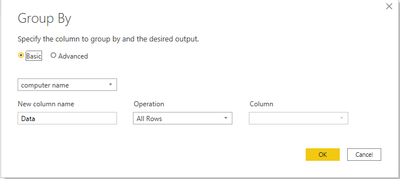
1. Use group by based on 'computer name':
2. Add a custom column using this formula:
=let
B = [Data],
#"Removed Other Columns" = Table.SelectColumns(B,{"Status"}),
#"Grouped Rows1" = Table.Group(#"Removed Other Columns", {"Status"}, {{"Count", each Table.RowCount(_), type number}}),
#"Pivoted Column" = Table.Pivot(#"Grouped Rows1", List.Distinct(#"Grouped Rows1"[Status]), "Status", "Count", List.Sum)
in
#"Pivoted Column"3. Remove 'Data' column and expand 'Custom' column
4. Replace values from null to 0 to get the expected result:
My sample file is attached that hopes to help you, please check and try it: Cannot Convert true to text.pbix
Best Regards,
Yingjie Li
If this post helps then please consider Accept it as the solution to help the other members find it more quickly.
Thank you so much. It worked!!
Please see the below . Getting this error after pivoting
Hi @Anonymous ,
Apart from the solution mentioned,
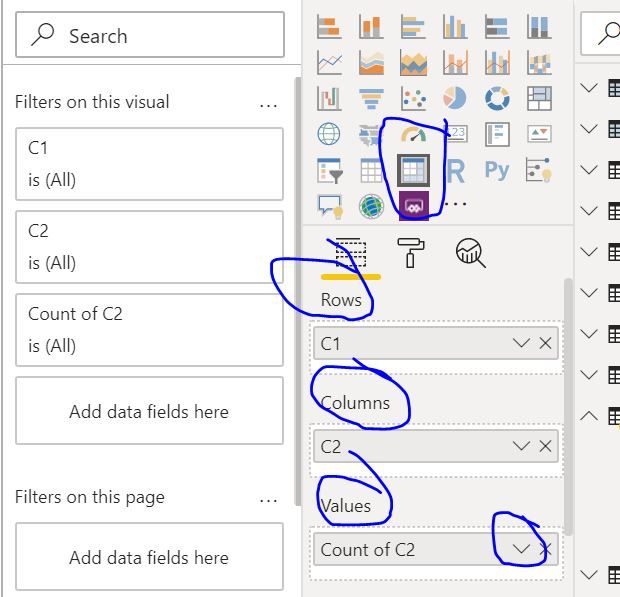
You can simply put it in a matrix visual.
Rows = Computer Name
Column = Status
Value = Count of Status
Regards,
Harsh Nathani
Did I answer your question? Mark my post as a solution! Appreciate with a Kudos!!
Hi , Thanks for responding! But i would need the expected outcome in the power query.
@Anonymous , I doubt you can get without having a numeric column using the unpivot option give below
Check out the April 2026 Power BI update to learn about new features.
Sign up to receive a private message when registration opens and key events begin.
If you have recently started exploring Fabric, we'd love to hear how it's going. Your feedback can help with product improvements.
| User | Count |
|---|---|
| 36 | |
| 33 | |
| 31 | |
| 21 | |
| 16 |
| User | Count |
|---|---|
| 66 | |
| 55 | |
| 31 | |
| 26 | |
| 23 |