FabCon is coming to Atlanta
Join us at FabCon Atlanta from March 16 - 20, 2026, for the ultimate Fabric, Power BI, AI and SQL community-led event. Save $200 with code FABCOMM.
Register now!- Power BI forums
- Get Help with Power BI
- Desktop
- Service
- Report Server
- Power Query
- Mobile Apps
- Developer
- DAX Commands and Tips
- Custom Visuals Development Discussion
- Health and Life Sciences
- Power BI Spanish forums
- Translated Spanish Desktop
- Training and Consulting
- Instructor Led Training
- Dashboard in a Day for Women, by Women
- Galleries
- Data Stories Gallery
- Themes Gallery
- Contests Gallery
- QuickViz Gallery
- Quick Measures Gallery
- Visual Calculations Gallery
- Notebook Gallery
- Translytical Task Flow Gallery
- TMDL Gallery
- R Script Showcase
- Webinars and Video Gallery
- Ideas
- Custom Visuals Ideas (read-only)
- Issues
- Issues
- Events
- Upcoming Events
The Power BI Data Visualization World Championships is back! Get ahead of the game and start preparing now! Learn more
- Power BI forums
- Forums
- Get Help with Power BI
- Desktop
- Re: Can we fix the Filter Dropdown appearing in di...
- Subscribe to RSS Feed
- Mark Topic as New
- Mark Topic as Read
- Float this Topic for Current User
- Bookmark
- Subscribe
- Printer Friendly Page

- Mark as New
- Bookmark
- Subscribe
- Mute
- Subscribe to RSS Feed
- Permalink
- Report Inappropriate Content
Can we fix the Filter Dropdown appearing in different place?
Hi, I am having an issue with the below filter drop down
1. After publishing the dashbaord --> When we click on the drop down filters the screen & options are appeared in different places. However, when i enlarge the filter option aside it is coming in the right away. I have shared the two screenshots for your reference.
Drop down without filter screen:

Note: if you see business group filter appearing below the reset button and i have not used filter screen on the right (i.e., after client search)
Drop down with fiters screen:
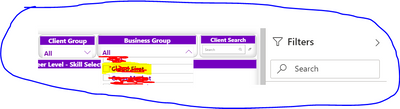
Since, it is very critical delivery for me and need immediate help from you to fix the same
2. I have different pages with similar issue need to fix this at the earliest Kindly support
Solved! Go to Solution.

- Mark as New
- Bookmark
- Subscribe
- Mute
- Subscribe to RSS Feed
- Permalink
- Report Inappropriate Content
Hi @Prabhakaran_Nag ,
This is a known issue, PG Teams are still investigating it.
This appears to be a bug in the newly released Chrome 93 and Edge 93. Using any browser zoom other than 100% will make the browser start working again. 90% or 110% zoom will work fine.
As a workaround:
You can use "+" or "-" to zoom the browser by one unit.
I will continue to follow up on this issue, once there is progress I will promptly feedback to you.
Hope it helps,
Community Support Team _ Caitlyn Yan
If this post helps then please consider Accept it as the solution to help the other members find it more quickly.
- Mark as New
- Bookmark
- Subscribe
- Mute
- Subscribe to RSS Feed
- Permalink
- Report Inappropriate Content
Hi @Prabhakaran_Nag & @mussaenda ,
The ETA for fix is about 9/19/2021 .
I will keep you updated if this issue is progressing or if the fix is completed ahead of schedule.
Hope it helps,
Community Support Team _ Caitlyn Yan
- Mark as New
- Bookmark
- Subscribe
- Mute
- Subscribe to RSS Feed
- Permalink
- Report Inappropriate Content
Hi @Prabhakaran_Nag ,
This is a known issue, PG Teams are still investigating it.
This appears to be a bug in the newly released Chrome 93 and Edge 93. Using any browser zoom other than 100% will make the browser start working again. 90% or 110% zoom will work fine.
As a workaround:
You can use "+" or "-" to zoom the browser by one unit.
I will continue to follow up on this issue, once there is progress I will promptly feedback to you.
Hope it helps,
Community Support Team _ Caitlyn Yan
If this post helps then please consider Accept it as the solution to help the other members find it more quickly.
- Mark as New
- Bookmark
- Subscribe
- Mute
- Subscribe to RSS Feed
- Permalink
- Report Inappropriate Content
Hello @Anonymous ,
Thanks for your help, please kindly update me when the issue has been fixed from the data. we wanted to use the feauture to avoid this kind of deflections.
Regards,
Prabhakaran


- Mark as New
- Bookmark
- Subscribe
- Mute
- Subscribe to RSS Feed
- Permalink
- Report Inappropriate Content
Hi @Prabhakaran_Nag ,
Have you solved the issue?
I am also experiencing the same on my filter dropdown.
It shows correctly on desktop but on service using Edge, it is showing strangely.
I tried to clear, and remove the slicer and re-add, but issue still persists.

- Mark as New
- Bookmark
- Subscribe
- Mute
- Subscribe to RSS Feed
- Permalink
- Report Inappropriate Content
@Prabhakaran_Nag , First try these.
1. Clear browser cache , refresh and try
2. try on another browser and check
3. Clear power bi desktop cache(from option and setting) -> republish -> Clear browser cache , refresh and try
- Mark as New
- Bookmark
- Subscribe
- Mute
- Subscribe to RSS Feed
- Permalink
- Report Inappropriate Content
@amitchandak i have tried the recommend solution, but still it is reappearing the issue.
Note: Cleared cookies and caches, tried with new browser and issue remains same.
Helpful resources

Power BI Dataviz World Championships
The Power BI Data Visualization World Championships is back! Get ahead of the game and start preparing now!

Power BI Monthly Update - December 2025
Check out the December 2025 Power BI Holiday Recap!

FabCon Atlanta 2026
Join us at FabCon Atlanta, March 16-20, for the ultimate Fabric, Power BI, AI and SQL community-led event. Save $200 with code FABCOMM.

| User | Count |
|---|---|
| 38 | |
| 38 | |
| 36 | |
| 28 | |
| 28 |


| User | Count |
|---|---|
| 124 | |
| 88 | |
| 74 | |
| 66 | |
| 65 |


