This is best Fabric, Power BI, SQL and AI community event. How do we know? The last event sold out! Save €200 with code FABCMTY200.
Register nowA new Data Days event is coming soon! This time we’re going bigger than ever. Fabric, Power BI, SQL, AI and more. Don't miss out.
Hello,
I own a report and I can't save format changes or filters in the report, every time I move through the pages and come back, I need apply againg the filters, or pres again the date format "Hierarchy" filter, for example, regardless I press save every time.
Thanks
Hi @Anonymous,
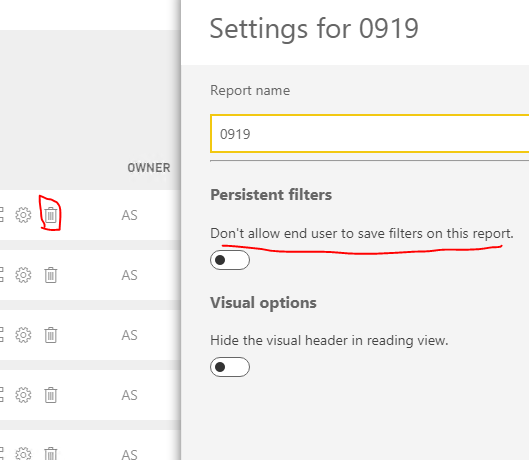
Has the option been enabled in Power Bi Service?
Regards,
Frank
Hi @Anonymous,
Does that make sense? If so, kindly mark my answer as the solution to close the case please. Thanks in advance.
Regards,
Frank
Hi @Anonymous,
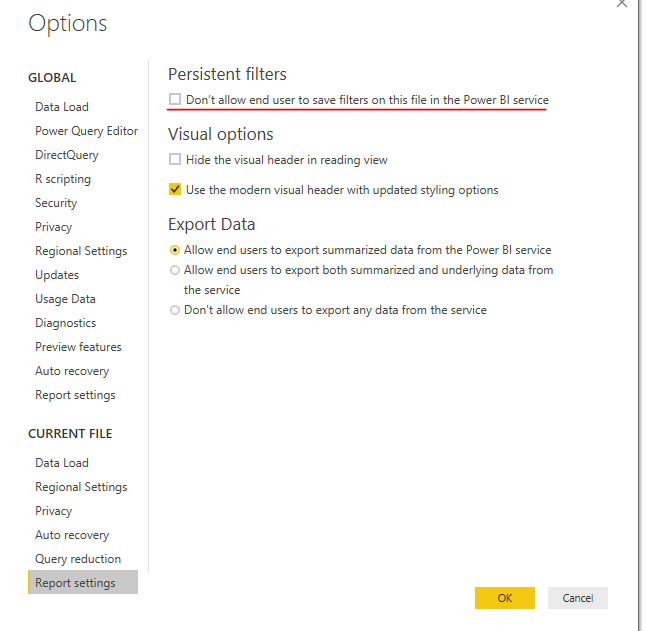
Did you edit the filter in Power BI service or Power BI desktop? If in service side, please disable the option as the picture as below in power BI desktop and republish the report to try again.
Regards,
Frank
Did that...didn't work!
Regards
Charly
Hi @Anonymous,
Before troubleshooting this issue further, can you please check following things based on your answer we will try further.
1)Make sure you have updated version of Power BI Desktop
2)Try to republish your dataset and report once again
3)Check if the changes are saving
4)When you say you owned a report did you develop the report ? and do you have sufficient permissions to the workspace where you have published the report?
I updated with the latest version. It does actualize the data but not format, or page level filters , or report level filters neither the slicer.
And yes I developed the report and puslih it to the server.
Check out the May 2026 Power BI update to learn about new features.
Sign up to receive a private message when registration opens and key events begin.
If you have recently started exploring Fabric, we'd love to hear how it's going. Your feedback can help with product improvements.
| User | Count |
|---|---|
| 29 | |
| 28 | |
| 25 | |
| 19 | |
| 14 |
| User | Count |
|---|---|
| 56 | |
| 48 | |
| 37 | |
| 21 | |
| 20 |