cancel
Showing results for 
Search instead for 
Did you mean: 

The Power BI Data Visualization World Championships is back! Get ahead of the game and start preparing now! Learn more

Reply
Anonymous
Not applicable

Can't get subtotals to calculate correctly

I can't seem to get my measure to correctly calculate both at the row level and at the subtotal level.


For example:


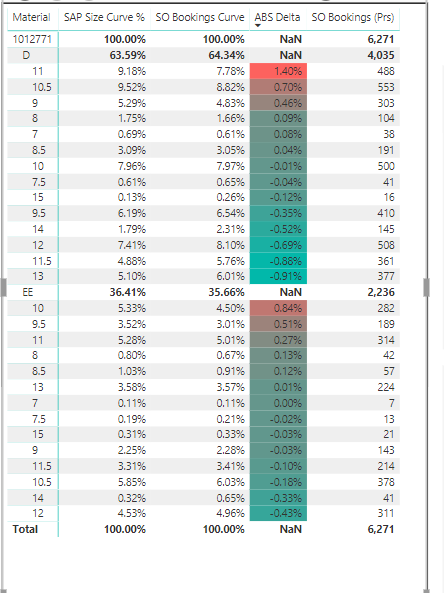
The ABS Delta column is calculating correctly, except for where you see "NaN." I want those values to be the sum of the ABS Delta values that are populated.


I have 3 measures:


SAP Size Curve% =

IF(HASONEVALUE(Dim_Style_Master[Material]),sum(Size_Curve_Upload[Size Curve %]),AVERAGEX(Size_Curve_Upload,Size_Curve_Upload[Size Curve %]))


SO Bookings Curve =CALCULATE(SUM(AllHist_SalesOrders[Adj_SO_QTY]))/CALCULATE(SUM(AllHist_SalesOrders[Adj_SO_QTY]),All(Dim_UPC_Report[Size_Num],Dim_UPC_Report[Width_Dimension]))


ABS_Delta = [SZ_CRV_%] - IF(HASONEVALUE(Dim_UPC_Report[Size_Num]),SUMX(Dim_Style_Master,[SO_Bookings_Curve]),CALCULATE(SUMX(AllHist_SalesOrders,[SO_Bookings_Curve])))


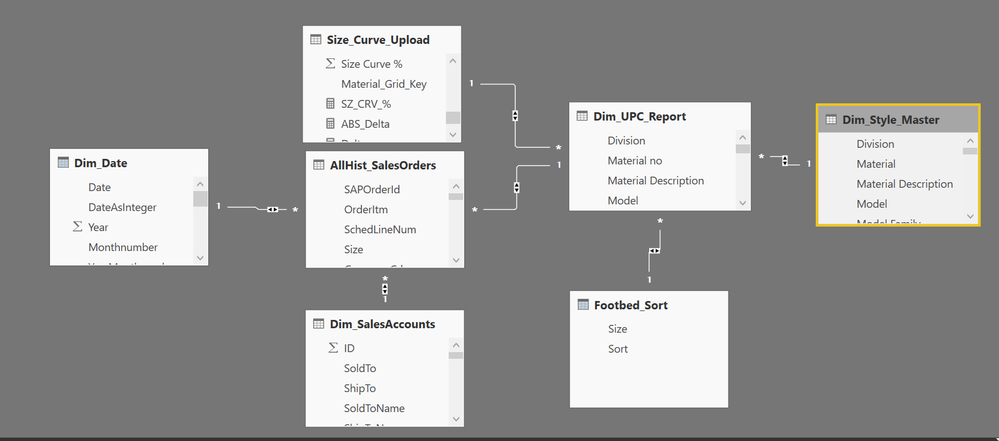
You can also see the data model below to see how the tables link together.


Any suggestions are greatly appreciated!


Thanks
 

Capture.PNGCapture.PNG

4 REPLIES 4
v-juanli-msft
Community Support
Community Support

Hi @Anonymous

Since I can’t see the dataset, it is difficult to analyze.

Please check some modification in “ABS_Delta” measure to see if it works well as you expected

ABS_Delta =
[SZ_CRV_%]
    - IF (
        HASONEVALUE ( Dim_Style_Master[Material] ),
        SUMX ( Dim_Style_Master, [SO_Bookings_Curve] ),
        CALCULATE ( SUMX ( AllHist_SalesOrders, [SO_Bookings_Curve] ) )
    )

Or

ABS_Delta =
IF (
    HASONEVALUE ( Dim_Style_Master[Material] ),
    IF (
        HASONEVALUE ( Dim_UPC_Report[Size_Num] ),
        [SZ_CRV_%] - SUMX ( Dim_Style_Master, [SO_Bookings_Curve] ),
        [SZ_CRV_%] - CALCULATE ( SUMX ( AllHist_SalesOrders, [SO_Bookings_Curve] ) )
    )
)

Best regards

Maggie

Anonymous
Not applicable


Hi Maggie,


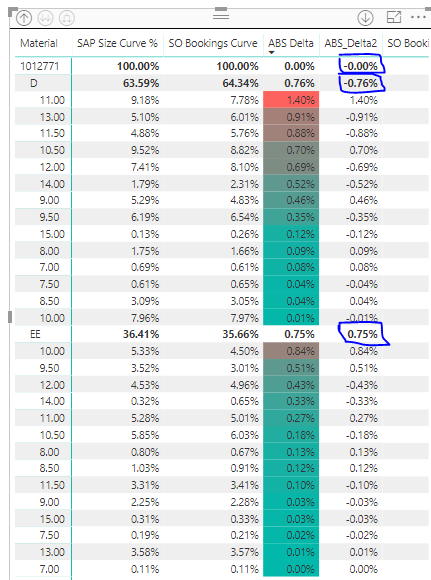
Thanks for your help. Your first suggestion gets me close, but the subtotals and totals are still not calculating correctly (See below). The Subtotal for "D-Width" and "1012771" should be the sum of the "size-num" row values not the aggregate calculation.


Capture.PNG

Hi @Anonymous

Please try this formula

ABS_Delta =
IF (
        HASONEVALUE ( Dim_Style_Master[Material] ),
        [SZ_CRV_%] - SUMX ( Dim_Style_Master, [SO_Bookings_Curve] ),
        [SZ_CRV_%] - CALCULATE ( SUMX ( AllHist_SalesOrders, [SO_Bookings_Curve] ) )
)

Best Regards

Maggie

Anonymous
Not applicable

Hi Maggie,


Thanks for the reply. Unfortanately I am still getting the same result:


ABS_Delta_2 = abs(if(HASONEVALUE(Dim_Style_Master[Material]),[SZ_CRV_%]-SUMX(Dim_Style_Master,[SO_Bookings_Curve]),[SZ_CRV_%]-CALCULATE(SUMX(AllHist_SalesOrders,[SO_Bookings_Curve]))))


Capture.PNG

Helpful resources

Announcements
Power BI DataViz World Championships

Power BI Dataviz World Championships

The Power BI Data Visualization World Championships is back! Get ahead of the game and start preparing now!

November Power BI Update Carousel

Power BI Monthly Update - November 2025

Check out the November 2025 Power BI update to learn about new features.

FabCon Atlanta 2026 carousel

FabCon Atlanta 2026

Join us at FabCon Atlanta, March 16-20, for the ultimate Fabric, Power BI, AI and SQL community-led event. Save $200 with code FABCOMM.