cancel
Showing results for 
Search instead for 
Did you mean: 

Next up in the FabCon + SQLCon recap series: The roadmap for Microsoft SQL and Maximizing Developer experiences in Fabric. All sessions are available on-demand after the live show. Register now

Reply
JohnBerk
New Member

Can't determine relationship between the fields when trying to link multiple tables

I'm trying to link 4 tables together from an existing SQL database

the relationship in SQL is as follows

Client.CLientIdent = ClientAddress.ReferenceIdent

Client.CLientIdent = ClientPhone.ReferenceIdent

Client.CLientIdent = ClientEmail.ReferenceIdent


The ClientIdent is unique for each CLient. The ClientIdent and ReferanceIdent are identical for each individual client. The ClientAddress,ClientPhone and ClientEmail may have multiple lines with the same ReferenceIdent

Have tried linking various way in the manage table realtion with no succcess.  Any help would be appreciated

As long as I'm only trying to display information from the Client table and one other table the link is fine but as soon as I try to add information from the third table I get the error.


I can link the data in SQL as follows if that helps.

FROM [CCH_ENT].[dbo].[CLIENT] CT
left join [cch_ent].[dbo].[CLIENTEMAIL] CE on CE.ReferenceIdent = ct.ClientIdent
left join [cch_ent].[dbo].[CLIENTPHONE] CP on CP.ReferenceIdent = ct.ClientIdent
left join [cch_ent].[dbo].[CLIENTADDRESS] CA on CA.ReferenceIdent = ct.ClientIdent

1 ACCEPTED SOLUTION

Hi @JohnBerk ,

'Can't display the data because Power BI can't determine the relationship between two or more fields.'

You are trying to use two or more fields from tables that are not related. You need to remove the unrelated fields from the visual and then create a relationship between the tables. Once you have done this change, you can add the fields back to the visual. Refer: Create and manage relationships in Power BI Desktop 


In this case, [AddressLine1], [ClientSubId] and [EmailAddress] doesn't have any relationship such as one-to-one or one-to-many. They can just both filtered by 'Client'[ClientId].

You can refer this simliar issue:  Error: Can't determine relationship between fields  


Best Regards,
Yingjie Li

If this post helps then please consider Accept it as the solution to help the other members find it more quickly.

View solution in original post

4 REPLIES 4
dedelman_clng
Community Champion
Community Champion

Hi @JohnBerk  - 


We could use some more information on what exact error message you are getting, what you are expecting to see, etc (see How-to-Get-Your-Question-Answered-Quickly ), but in the meantime, from what you describe, as long as CT, CE, CP and CA are separate tables, and the data is such that there is a unique ID in CT, there should be nothing stopping you from creating a 1-to-many relationship between CT and CE, CT and CP, CT and CA in your model.


You may have to turn on multi-directional filtering if your visuals call for data from multiple child tables. Make sure you're not trying to create any relationships between CE, CP and CA - let them all flow through CT.


Hope this helps

David

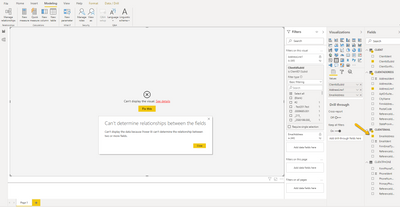
Here is the error when I try and add information from the third table. as soon as I check emailaddress teh error occurs.

JohnBerk_2-1597357537367.png


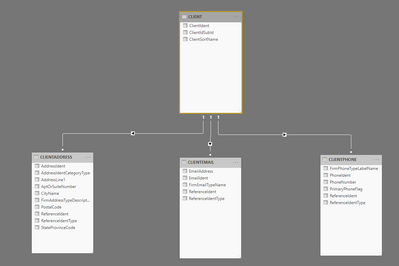
here is the relationship visual.

JohnBerk_0-1597357448384.png


here is the detail on one of the edit relationships. the other two are setup the same fashion

JohnBerk_1-1597357468688.png

I appreciate you reply. I have look at the relationships I'm trying to setup here versus some sample dashboard and do not see what's different to make mine not work.

Hi @JohnBerk ,

'Can't display the data because Power BI can't determine the relationship between two or more fields.'

You are trying to use two or more fields from tables that are not related. You need to remove the unrelated fields from the visual and then create a relationship between the tables. Once you have done this change, you can add the fields back to the visual. Refer: Create and manage relationships in Power BI Desktop 


In this case, [AddressLine1], [ClientSubId] and [EmailAddress] doesn't have any relationship such as one-to-one or one-to-many. They can just both filtered by 'Client'[ClientId].

You can refer this simliar issue:  Error: Can't determine relationship between fields  


Best Regards,
Yingjie Li

If this post helps then please consider Accept it as the solution to help the other members find it more quickly.

Hi @JohnBerk  - the first thing that pops out is you might want to consider storing the IDs as Text rather than numbers so they don't get formatting in exponential notation.


The other thing would be to consider turning on bi-directional filtering on all of the relationships, but I would mess with the storage of the IDs first. PowerBI will often acknowledge that it was able to create a relationship, when in practice the columns really aren't matching (you see this often with a date+time joined to a date - they're not the same value).


Hope this helps

David

Helpful resources

Announcements
New to Fabric survey Carousel

New to Fabric Survey

If you have recently started exploring Fabric, we'd love to hear how it's going. Your feedback can help with product improvements.

Power BI DataViz World Championships carousel

Power BI DataViz World Championships - June 2026

A new Power BI DataViz World Championship is coming this June! Don't miss out on submitting your entry.

FabCon and SQLCon Highlights Carousel

FabCon &SQLCon Highlights

Experience the highlights from FabCon & SQLCon, available live and on-demand starting April 14th.

March Power BI Update Carousel

Power BI Community Update - March 2026

Check out the March 2026 Power BI update to learn about new features.