Join us at FabCon Atlanta from March 16 - 20, 2026, for the ultimate Fabric, Power BI, AI and SQL community-led event. Save $200 with code FABCOMM.
Register now!The Power BI Data Visualization World Championships is back! Get ahead of the game and start preparing now! Learn more
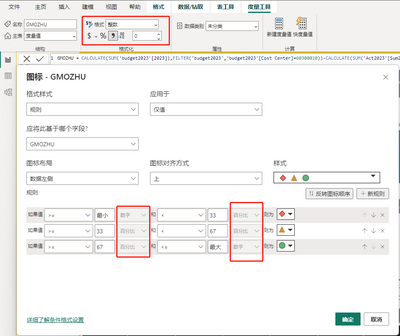
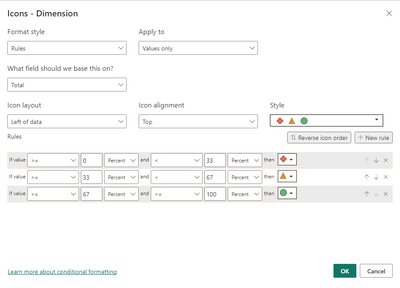
I created a metic as below:
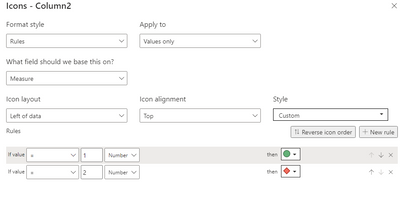
You need to change your measure.
e.g
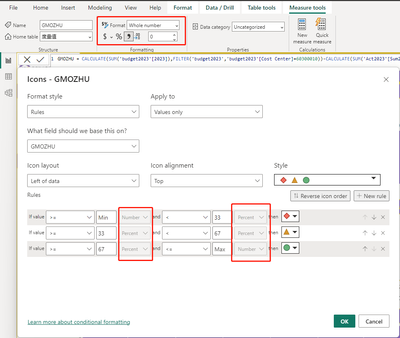
GMOZHU = var a=CALCULATE(SUM('budget2023'[2023]),FILTER('budget2023','budget2023'[Cost Center]=60300010))-CALCULATE(SUM('Act2023'[Sum2023]),FILTER('Act2023','Act2023'[Cost Center]=60300010))
return if(a>=0.33&&a<0.67,1,2)
Then set it to the conditional formatting.
Best Regards!
Yolo Zhu
If this post helps, then please consider Accept it as the solution to help the other members find it more quickly.
Hi Yolo,
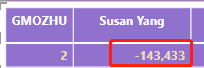
I tried to use the measure, but I got below result:
1. I got the value 1 or 2, which isn't the result I want. I need got the amount value, not 1 or 2 bu VAR.
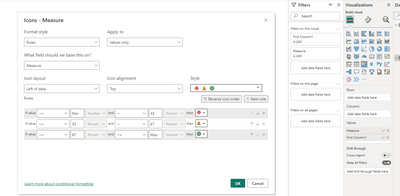
2. I still can't change the rule after I change the measure which you provided.
Thank you for you help, I am not sure why I can't add conditional formatting to this measure.
Please give me some suggestion on it.
BR,
Jackie
After testing, the measure can be used in conditonal formatting well
Try to remove the field from the visual, then add the field to the visual again, and then set the conditional formatting.
Best Regards!
Yolo Zhu
If this post helps, then please consider Accept it as the solution to help the other members find it more quickly.
Hi Yolo,
I tried to remove the measure, then added it back. When I tried to add conditional fomatting on this measure, I got the same problem.... I still can't change the rule...
BR,
Jackie
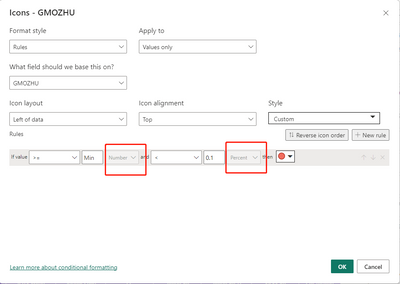
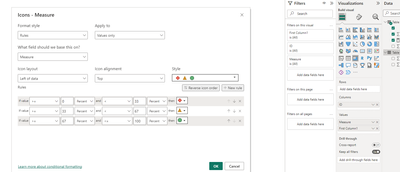
After trying, in the matrix, if you do not place the row table or list, only put the value, at this time the rule cannot be set, do you only place the value without placing the row header or column header?
Atfer putting the column field.
Best Regards!
Yolo Zhu
Picture update.
The Power BI Data Visualization World Championships is back! Get ahead of the game and start preparing now!
Check out the November 2025 Power BI update to learn about new features.
| User | Count |
|---|---|
| 59 | |
| 43 | |
| 42 | |
| 23 | |
| 17 |
| User | Count |
|---|---|
| 190 | |
| 122 | |
| 96 | |
| 66 | |
| 46 |