Join us at FabCon Atlanta from March 16 - 20, 2026, for the ultimate Fabric, Power BI, AI and SQL community-led event. Save $200 with code FABCOMM.
Register now!The Power BI Data Visualization World Championships is back! Get ahead of the game and start preparing now! Learn more
Hi guys,
I have this Formula
répartition hors taille =
VAR SummaryTable = ADDCOLUMNS(
SUMMARIZE('Tableau Dispatch','Base Article'[CODE ARTICLE],'Tableau Dispatch'[Rank dispatch],'Tableau Dispatch'[CODE DEPOT]
),
"Tous dépots",
VAR TOTNOSIZE = CALCULATE(sumx('Tableau Dispatch',[Distribution finale]),ALLSELECTED('Base Article'[CODE ARTICLE]))
RETURN TOTNOSIZE)
RETURN
SUMX(SummaryTable,[Tous dépots])
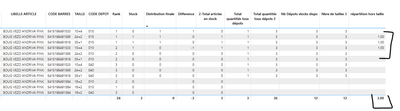
Which provide me this result.
The quantities are Right,
However, i'd like The sum if theses By [CODE DEPOT] not taking in account the [TAILLE] Filtered context.
So instead of 1 in last columns for warehouse 015 i'dl like to have 2 then 1 for the warehouse with only 1 quantity.
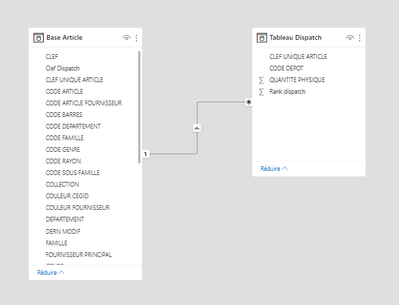
Here is my model
Many thanks in advance!
Solved! Go to Solution.
Hello,
I have found the Solution (sorry for the Spam)
Total quantités tous dépots 3 = CALCULATE([Stock],ALLSELECTED('Base Article'))
Have a nice day!
@SebSchoon1 This looks like a measure totals problem. Very common. See my post about it here: https://community.powerbi.com/t5/DAX-Commands-and-Tips/Dealing-with-Measure-Totals/td-p/63376
Also, this Quick Measure, Measure Totals, The Final Word should get you what you need:
https://community.powerbi.com/t5/Quick-Measures-Gallery/Measure-Totals-The-Final-Word/m-p/547907
Hello,
I have found the Solution (sorry for the Spam)
Total quantités tous dépots 3 = CALCULATE([Stock],ALLSELECTED('Base Article'))
Have a nice day!
The Power BI Data Visualization World Championships is back! Get ahead of the game and start preparing now!
Check out the November 2025 Power BI update to learn about new features.
| User | Count |
|---|---|
| 59 | |
| 46 | |
| 42 | |
| 23 | |
| 17 |
| User | Count |
|---|---|
| 190 | |
| 122 | |
| 96 | |
| 66 | |
| 47 |