Join us at FabCon Atlanta from March 16 - 20, 2026, for the ultimate Fabric, Power BI, AI and SQL community-led event. Save $200 with code FABCOMM.
Register now!The Power BI Data Visualization World Championships is back! Get ahead of the game and start preparing now! Learn more
Hi,
I have a problem with a column in power query editor where I can not convert some rows to a number. For example I have:
Product code
49204832
39405932
43940392
59104323
58371946
EP395821
EP398190
I made this whole column text because I would get an error if it was a number. But now I made this whole column a text column I still get errors where they say: Can not convert EP398190 to a number.
Can someone help me with this problem?
Solved! Go to Solution.
Hi @Anonymous
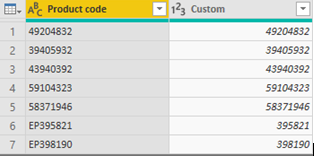
By my test, we can not convert "EP395821" to a number directly. There are two ways to try.
Choose Add Column --> Custom Column
Check the result in Advanced Editor:
let
Source = Table.FromRows(Json.Document(Binary.Decompress(Binary.FromText("PcexEYBACATAXogNgAPlCjA3Z+i/DUffcbPtlqBrFFxmawFDk1/iGbiSNA04VgqHMfY35wVmuf0po8rMDQ==", BinaryEncoding.Base64), Compression.Deflate)), let _t = ((type text) meta [Serialized.Text = true]) in type table [#"Product code" = _t]),
#"Added Custom" = Table.AddColumn(Source, "Custom", each Text.Remove([Product code], {"A".."Z"})),
#"Changed Type" = Table.TransformColumnTypes(#"Added Custom",{{"Custom", Int64.Type}})
in
#"Changed Type"
2.Use Split Column option and IF function to separate numbers and letters , then convert text to number.
Firstly, choose Home --> Split Column --> By Non-Digit to Digit
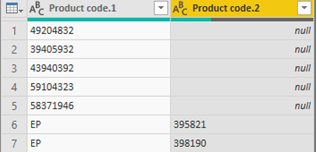
Secondly, choose Add Column --> Custom Column
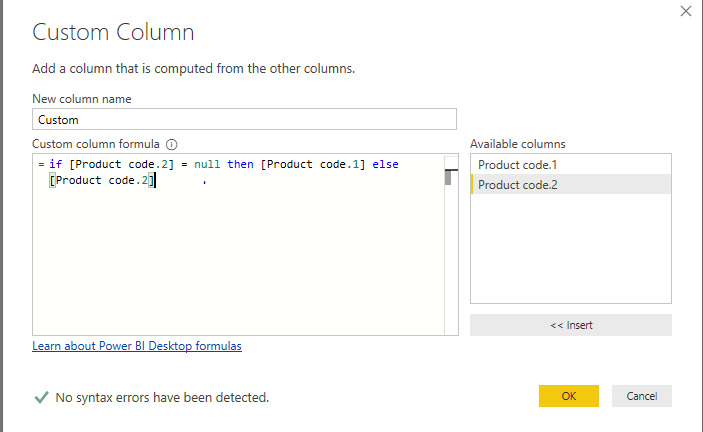
Check the result in Advanced Editor:
let
Source = Table.FromRows(Json.Document(Binary.Decompress(Binary.FromText("PcexEYBACATAXogNgAPlCjA3Z+i/DUffcbPtlqBrFFxmawFDk1/iGbiSNA04VgqHMfY35wVmuf0po8rMDQ==", BinaryEncoding.Base64), Compression.Deflate)), let _t = ((type text) meta [Serialized.Text = true]) in type table [#"Product code" = _t]),
#"Split Column by Character Transition" = Table.SplitColumn(Source, "Product code", Splitter.SplitTextByCharacterTransition((c) => not List.Contains({"0".."9"}, c), {"0".."9"}), {"Product code.1", "Product code.2"}),
#"Added Custom" = Table.AddColumn(#"Split Column by Character Transition", "Custom", each if [Product code.2] = null then [Product code.1] else [Product code.2]),
#"Changed Type" = Table.TransformColumnTypes(#"Added Custom",{{"Custom", Int64.Type}})
in
#"Changed Type"
Best Regards,
Xue Ding
If this post helps, then please consider Accept it as the solution to help the other members find it more quickly.
Hi @Anonymous
By my test, we can not convert "EP395821" to a number directly. There are two ways to try.
Choose Add Column --> Custom Column
Check the result in Advanced Editor:
let
Source = Table.FromRows(Json.Document(Binary.Decompress(Binary.FromText("PcexEYBACATAXogNgAPlCjA3Z+i/DUffcbPtlqBrFFxmawFDk1/iGbiSNA04VgqHMfY35wVmuf0po8rMDQ==", BinaryEncoding.Base64), Compression.Deflate)), let _t = ((type text) meta [Serialized.Text = true]) in type table [#"Product code" = _t]),
#"Added Custom" = Table.AddColumn(Source, "Custom", each Text.Remove([Product code], {"A".."Z"})),
#"Changed Type" = Table.TransformColumnTypes(#"Added Custom",{{"Custom", Int64.Type}})
in
#"Changed Type"
2.Use Split Column option and IF function to separate numbers and letters , then convert text to number.
Firstly, choose Home --> Split Column --> By Non-Digit to Digit
Secondly, choose Add Column --> Custom Column
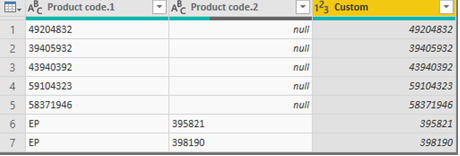
Check the result in Advanced Editor:
let
Source = Table.FromRows(Json.Document(Binary.Decompress(Binary.FromText("PcexEYBACATAXogNgAPlCjA3Z+i/DUffcbPtlqBrFFxmawFDk1/iGbiSNA04VgqHMfY35wVmuf0po8rMDQ==", BinaryEncoding.Base64), Compression.Deflate)), let _t = ((type text) meta [Serialized.Text = true]) in type table [#"Product code" = _t]),
#"Split Column by Character Transition" = Table.SplitColumn(Source, "Product code", Splitter.SplitTextByCharacterTransition((c) => not List.Contains({"0".."9"}, c), {"0".."9"}), {"Product code.1", "Product code.2"}),
#"Added Custom" = Table.AddColumn(#"Split Column by Character Transition", "Custom", each if [Product code.2] = null then [Product code.1] else [Product code.2]),
#"Changed Type" = Table.TransformColumnTypes(#"Added Custom",{{"Custom", Int64.Type}})
in
#"Changed Type"
Best Regards,
Xue Ding
If this post helps, then please consider Accept it as the solution to help the other members find it more quickly.
The Power BI Data Visualization World Championships is back! Get ahead of the game and start preparing now!
| User | Count |
|---|---|
| 41 | |
| 38 | |
| 36 | |
| 30 | |
| 28 |
| User | Count |
|---|---|
| 129 | |
| 88 | |
| 79 | |
| 68 | |
| 63 |