Join us at FabCon Atlanta from March 16 - 20, 2026, for the ultimate Fabric, Power BI, AI and SQL community-led event. Save $200 with code FABCOMM.
Register now!The Power BI Data Visualization World Championships is back! Get ahead of the game and start preparing now! Learn more
Hello guys,
we’re having an issue importing data from a SharePoint folder with Power BI Desktop.
Power BI Desktop shows this error message:
The credentials are definitive correct (we tried to sign in on SharePoint via Browser and it worked).
We also tried to sign out in Power BI Desktop and connect then to SharePoint, but we got the same error message.
One thing I have to annotate: We just switched to MS Office 365 and all Office programs had been uninstalled and installed again. Could this be the cause for the error?
Thank you and greetings!
Hi @Jan_Trummel ,
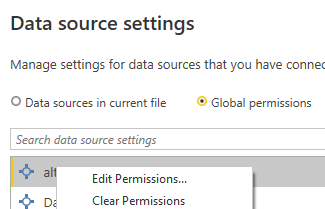
According to your description, please try to edit/clear permissions in the Power BI Desktop, from Transform data>Data source settings>Global permissions.
Best Regards,
Community Support Team _ kalyj
If this post helps, then please consider Accept it as the solution to help the other members find it more quickly.
Thank you very much for your answer!
We don't know why, but suddenly it works without changing anything. 😅
Greetings
Hi @Jan_Trummel ,
Glad your problem has been resolved, if you don't have other problems, would you mind accept the helpful replies as solutions? Then we are able to close the thread. More people who have the same requirement will find the solution quickly and benefit here. Thank you.
Best Regards,
Community Support Team _ kalyj
The Power BI Data Visualization World Championships is back! Get ahead of the game and start preparing now!
| User | Count |
|---|---|
| 41 | |
| 38 | |
| 36 | |
| 31 | |
| 28 |
| User | Count |
|---|---|
| 129 | |
| 88 | |
| 79 | |
| 68 | |
| 63 |