
Join us at FabCon Atlanta from March 16 - 20, 2026, for the ultimate Fabric, Power BI, AI and SQL community-led event. Save $200 with code FABCOMM.
Register now!The Power BI Data Visualization World Championships is back! Get ahead of the game and start preparing now! Learn more
The problem: I'm trying to perform a text string search and have my visual update it's results accordingly.
On PowerBi desktop, I've got data that's bound to an azure devops query(simply returns a list of PBI's)
One column is "Title"
What I tried: In report view, I click outside the table, and click on the Slicer icon.
I then click the field under "Data" that I wish to search on.
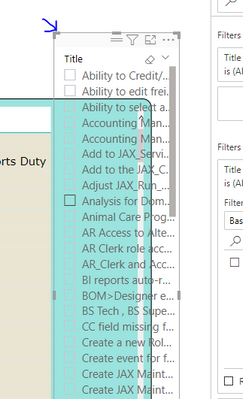
That produces the slicer as so:
I click on the "More options" and choose "search", which produces a search box.
If I type in a term I know exists in the query results, it will display fine in the slicer.
So, I drag the bottom up so that I only see the search box like so:
But I see that the search results do NOT carry over to the visual.
Is this difficult to do?
Kind thanks,
Rich
Solved! Go to Solution.
@rgouette , Not very clear. but have you tried text filter
Text Filter Slicer and how to search on Multiple columns: https://youtu.be/RbeZRJ3uAZE
https://appsource.microsoft.com/en-us/product/power-bi-visuals/WA104381309?src=office&tab=Overview
Perfect, thank you!!
@rgouette , Not very clear. but have you tried text filter
Text Filter Slicer and how to search on Multiple columns: https://youtu.be/RbeZRJ3uAZE
https://appsource.microsoft.com/en-us/product/power-bi-visuals/WA104381309?src=office&tab=Overview
The Power BI Data Visualization World Championships is back! Get ahead of the game and start preparing now!
| User | Count |
|---|---|
| 41 | |
| 38 | |
| 36 | |
| 30 | |
| 28 |
| User | Count |
|---|---|
| 128 | |
| 88 | |
| 79 | |
| 67 | |
| 62 |