cancel
Showing results for 
Search instead for 
Did you mean: 

The Power BI Data Visualization World Championships is back! Get ahead of the game and start preparing now! Learn more

Reply
pmcinnis
Helper III
Helper III

Can Power BI work without a network connection to the original data files?

I'm working from home because of the coronavirus. I want to merge two tables using Query Editor. But when I go to Query Editor I get the error message "An error occurred in the ‘Sample File’ query. DataSource.NotFound: File or Folder: We couldn't find the folder 'S:\....Excel Files\*'". I don't have VPN so my Power BI file on my home laptop doesn't have a network connection to the original data files at work; however the original data files are all loaded into my Power BI file - my Power BI file has all the data within it from the original data files. Can I operate Power BI without a network connection to the original data files? If yes, how do I do that?

2 ACCEPTED SOLUTIONS
edhans
Super User
Super User

Not in Power Query. It requires access to the data. The DAX/Visualizaition side can as it works "locally" with what Power Query loaded in the model. 


Note that PQ data can be in the cloud, so Excel or CSV files in SharePoint online will work from anywhere, but that is a network connection to those places vs a local drive.


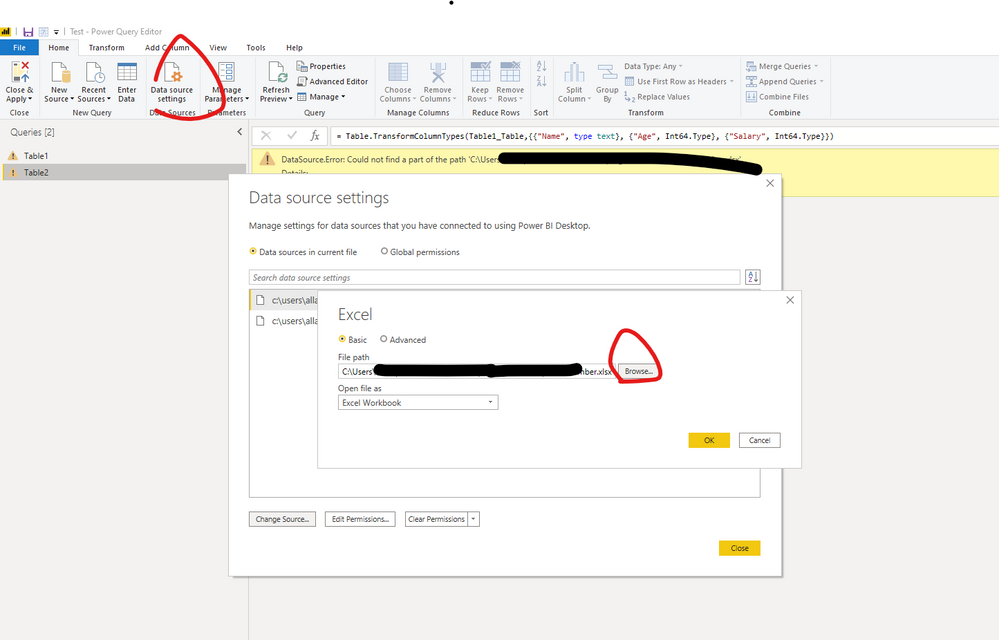
Unfortunately, you either need to get the source files, put the files in a supported cloud location, or remotely control your PC at work. If you can get the files on your local PC, you can easily change their locations in Power Query using the Data Source icon to change the file path, then change back when you get back to work.


Did I answer your question? Mark my post as a solution!
Did my answers help arrive at a solution? Give it a kudos by clicking the Thumbs Up!

DAX is for Analysis. Power Query is for Data Modeling


Proud to be a Super User!

MCSA: BI Reporting

View solution in original post

v-easonf-msft
Community Support
Community Support

Hi , @pmcinnis 

I’m afraid not unless your have the copy of your datasource in your  home laptop.

If you have the  copy of data source on your home laptop , you can  change your datasource setting.

67.png

Best Regards,
Community Support Team _ Eason
If this post helps, then please consider Accept it as the solution to help the other members find it more quickly.

View solution in original post

4 REPLIES 4
v-easonf-msft
Community Support
Community Support

Hi , @pmcinnis 

I’m afraid not unless your have the copy of your datasource in your  home laptop.

If you have the  copy of data source on your home laptop , you can  change your datasource setting.

67.png

Best Regards,
Community Support Team _ Eason
If this post helps, then please consider Accept it as the solution to help the other members find it more quickly.

Thanks for the solution @v-easonf-msft!

edhans
Super User
Super User

Not in Power Query. It requires access to the data. The DAX/Visualizaition side can as it works "locally" with what Power Query loaded in the model. 


Note that PQ data can be in the cloud, so Excel or CSV files in SharePoint online will work from anywhere, but that is a network connection to those places vs a local drive.


Unfortunately, you either need to get the source files, put the files in a supported cloud location, or remotely control your PC at work. If you can get the files on your local PC, you can easily change their locations in Power Query using the Data Source icon to change the file path, then change back when you get back to work.


Did I answer your question? Mark my post as a solution!
Did my answers help arrive at a solution? Give it a kudos by clicking the Thumbs Up!

DAX is for Analysis. Power Query is for Data Modeling


Proud to be a Super User!

MCSA: BI Reporting

Thanks for the solution!

Helpful resources

Announcements
Power BI DataViz World Championships

Power BI Dataviz World Championships

The Power BI Data Visualization World Championships is back! Get ahead of the game and start preparing now!

December 2025 Power BI Update Carousel

Power BI Monthly Update - December 2025

Check out the December 2025 Power BI Holiday Recap!

FabCon Atlanta 2026 carousel

FabCon Atlanta 2026

Join us at FabCon Atlanta, March 16-20, for the ultimate Fabric, Power BI, AI and SQL community-led event. Save $200 with code FABCOMM.