cancel
Showing results for 
Search instead for 
Did you mean: 

Level up your Power BI skills this month - build one visual each week and tell better stories with data! Get started

Reply
thatfield
Regular Visitor

Can I filter a DirectQuery using a user supplied parameter

Hello,


I'm working on building a report that is looking at a rather large dataset. However, my users do not need to see the entire dataset at one time, instead they only want to see records for a specific property. I'm still new to PowerBI but in Business Objects I was able to force the user to select a value for a given parameter before the query was sent to the database, am I able to do something similar in PowerBI?


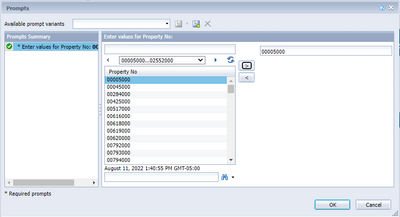
This is an example of what I am hoping to be able to do in PowerBI, it prompts the user for a parameter before even querying the data in the database.


thatfield_0-1660244241284.png


2 REPLIES 2
Anonymous
Not applicable

Hi @thatfield ,

Please check if the following methods can help you achieve your requirement.

1. URL filter

https://app.powerbi.com/groups/me/reports/8d6e300b-696f-498e-b611-41ae03366851/ReportSection3?filter=Store/TerritoryChain eq 'NC – Lindseys'

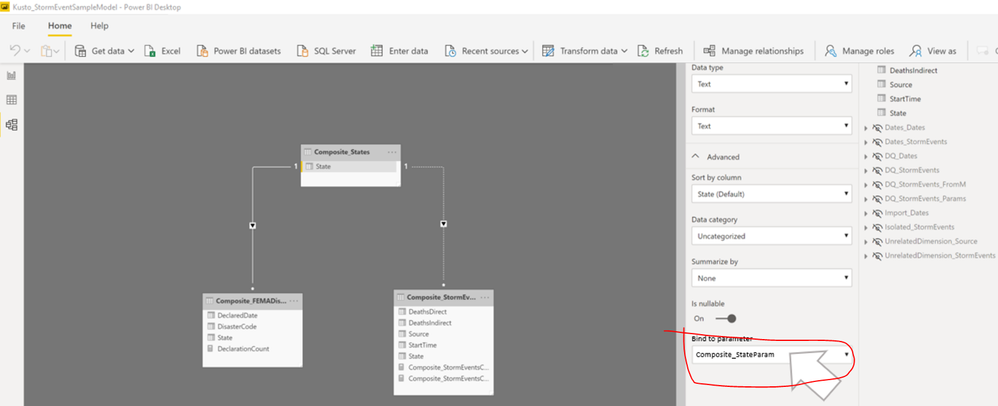
2. User editing of DirectQuery query parameters

yingyinr_0-1660721006425.png

3. RLS

Filter a directQuery with parameter and apply parameter change within URL call (PBIRS sept2021)

Unfortunately what you are trying to do is not possible. Currently the parameters in a query can only be changed at "design time" (while editing in Power BI Desktop) and cannot be changed dynamically while viewing a report. 


One other approach would be to include all the rows from your User table, then apply the url filter using the filter= syntax as documented here https://docs.microsoft.com/en-us/power-bi/collaborate-share/service-url-filters 


Another approach could be to look at using Row Level Security to filter the user table, but you would need to have some way of mapping to a login to one of your user ids in order to do that.


Best Regards

lbendlin
Super User
Super User

Helpful resources

Announcements
April Power BI Update Carousel

Power BI Monthly Update - April 2026

Check out the April 2026 Power BI update to learn about new features.

Fabric SQL PBI Data Days

Data Days 2026 coming soon!

Sign up to receive a private message when registration opens and key events begin.

New to Fabric survey Carousel

New to Fabric Survey

If you have recently started exploring Fabric, we'd love to hear how it's going. Your feedback can help with product improvements.

Power BI DataViz World Championships carousel

Power BI DataViz World Championships - June 2026

A new Power BI DataViz World Championship is coming this June! Don't miss out on submitting your entry.