
cancel
Showing results for 
Search instead for 
Did you mean: 

The Power BI Data Visualization World Championships is back! It's time to submit your entry. Live now!

Reply
ShaneH
Regular Visitor

CalendarAuto error after recent Update

Hi All,


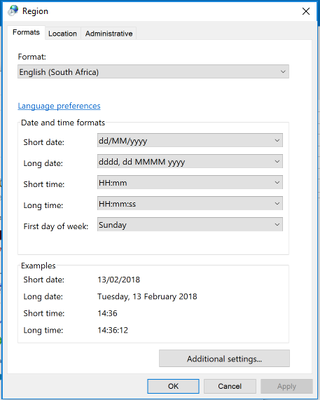
Can anybody assist please, after the recent updates , my data model using the calendarauto function have stopped working.. affecting all my live and new development modules , I have checked the regional settings on both the Servers and dev machines.


We use the South African standard of dd/mm/yyyy , which it seems is no longer in the date formats list the closest i can get to is dd/mmm/yyyy. this means I have to rewrite most of my modules to force the dates accordingly.


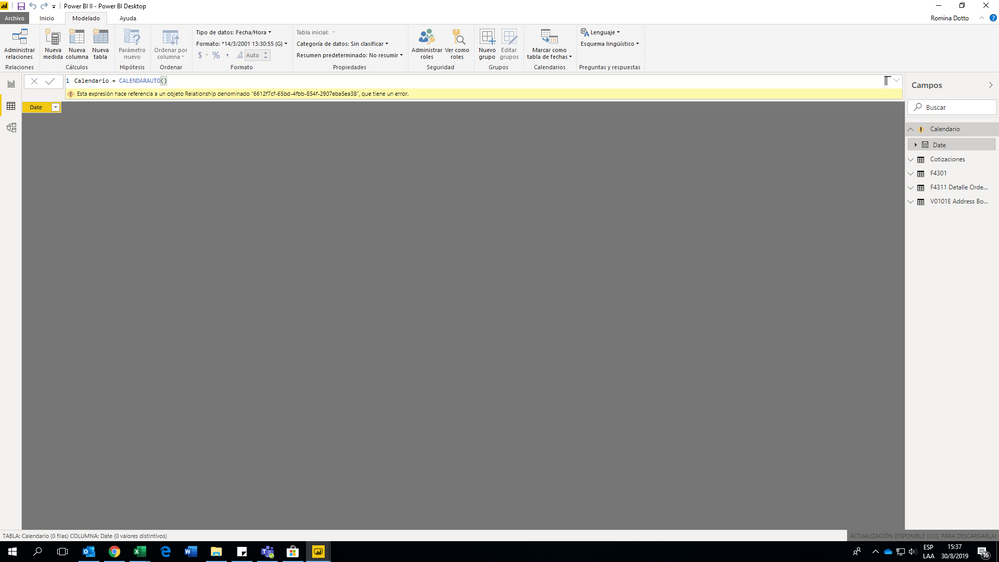
Is anyone else affected by this or aware of the issue? Below are the errors and screenshots


PBI - Date Formats.jpgPBi - Regional settings.pngPBI Cal error.pngPBI- LIVE.jpg

2 REPLIES 2
Anonymous
Not applicable

Hello, 


I´m experiencing the same issue, have you solved it?

Please see below the error, I really appreciate your help. 

image.png


regards, 


Anonymous
Not applicable

Hi @ShaneH,


I guess the issue may related to cached calendar date format not suitable for current formate.(e.g. US calendar with UK region date format)
Can you please share pbix file for test?


Regards,

Xiaoxin Sheng

Helpful resources

Announcements
Power BI DataViz World Championships

Power BI Dataviz World Championships

The Power BI Data Visualization World Championships is back! It's time to submit your entry.

January Power BI Update Carousel

Power BI Monthly Update - January 2026

Check out the January 2026 Power BI update to learn about new features.

FabCon Atlanta 2026 carousel

FabCon Atlanta 2026

Join us at FabCon Atlanta, March 16-20, for the ultimate Fabric, Power BI, AI and SQL community-led event. Save $200 with code FABCOMM.