cancel
Showing results for 
Search instead for 
Did you mean: 

Join the FabCon + SQLCon recap series. Up next: Power BI, Real-Time Intelligence, IQ and AI, and Data Factory take center stage. All sessions are available on-demand after the live show. Register now

Reply
Josearce
Regular Visitor

Calendar

Can you do one of calendars and how to put from/to week. Example: I have a list of dates from 8/27 to 9/2 and on another column I need that for those dates says 8/27 - 9/2, can that be done?
1 ACCEPTED SOLUTION

Hi @Josearce,


Have you solved your problem? If you have solved, please always accept the replies making sense as solution to your question so that people who may have the same question can get the solution directly.


If you still need help, please try the formula below.


Column =
VAR currentmonth = 'Calendar Table'[Date].[MonthNo]
VAR currentday = 'Calendar Table'[Date].[Day]
VAR maxmonth =
    MONTH ( MAX ( 'Calendar Table'[Date] ) )
VAR maxday =
    DAY ( MAX ( 'Calendar Table'[Date] ) )
RETURN
    currentmonth & "/"
        & currentday
        & "-"
        & maxmonth
        & "/"
        & maxday


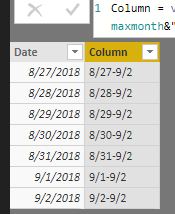
result output.PNG


Best  Regards,

Cherry

Community Support Team _ Cherry Gao
If this post helps, then please consider Accept it as the solution to help the other members find it more quickly.

View solution in original post

5 REPLIES 5
gipiluso
Resolver II
Resolver II

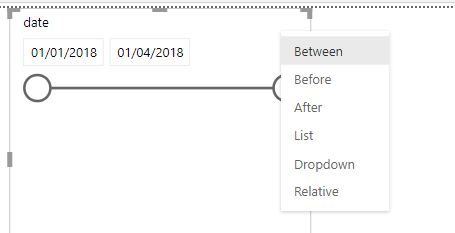
you should be able to reach your requirement just configuring the slicer with between properties (see attached)

slicer_between.PNG

Ok, sorry for not explaining. I have a calendar table with a list of dates. What I need is to add another columnn that on the row that says 8/27 indicates 8/27 - 9/2, on the row that says 8/28 says 8/27 to 9/2 and so on.
Anonymous
Not applicable

Hi @Josearce


Please clarify if


1)  "What I need is to add another columnn that on the row that says 8/27 indicates 8/27 - 9/2, on the row that says 8/28 says 8/27 to 9/2 and so on."

      The above rule is constant and that for the entire period between 8/27 to 9/2 the column should have "8/27-9/2".


2)  If the calendar has several years of data, is the same rule to be applied for other years for the period "8/27 -9/2"


Share some data / pbix file on google drive / one drive and share the link here.


Cheers


CheenuSing


Weekfromto =

VAR Desde = format(Calculate(min('Calendar Table'[Date]),ALLEXCEPT('Calendar Table','Calendar Table'[Year],'Calendar Table'[Week#])),"mmm-dd-yy")

VAR Hasta = format(Calculate(max('Calendar Table'[Date]),ALLEXCEPT('Calendar Table','Calendar Table'[Year],'Calendar Table'[Week#])),"mmm-dd-yy")


RETURN


Desde &" - "& Hasta


Desde means From

Hasta means Through

Hi @Josearce,


Have you solved your problem? If you have solved, please always accept the replies making sense as solution to your question so that people who may have the same question can get the solution directly.


If you still need help, please try the formula below.


Column =
VAR currentmonth = 'Calendar Table'[Date].[MonthNo]
VAR currentday = 'Calendar Table'[Date].[Day]
VAR maxmonth =
    MONTH ( MAX ( 'Calendar Table'[Date] ) )
VAR maxday =
    DAY ( MAX ( 'Calendar Table'[Date] ) )
RETURN
    currentmonth & "/"
        & currentday
        & "-"
        & maxmonth
        & "/"
        & maxday


result output.PNG


Best  Regards,

Cherry

Community Support Team _ Cherry Gao
If this post helps, then please consider Accept it as the solution to help the other members find it more quickly.

Helpful resources

Announcements
April Power BI Update Carousel

Power BI Monthly Update - April 2026

Check out the April 2026 Power BI update to learn about new features.

New to Fabric survey Carousel

New to Fabric Survey

If you have recently started exploring Fabric, we'd love to hear how it's going. Your feedback can help with product improvements.

Power BI DataViz World Championships carousel

Power BI DataViz World Championships - June 2026

A new Power BI DataViz World Championship is coming this June! Don't miss out on submitting your entry.

FabCon and SQLCon Highlights Carousel

FabCon &SQLCon Highlights

Experience the highlights from FabCon & SQLCon, available live and on-demand starting April 14th.