cancel
Showing results for 
Search instead for 
Did you mean: 

The Power BI Data Visualization World Championships is back! Get ahead of the game and start preparing now! Learn more

Reply
Mezzoshadee
Regular Visitor

Calendar Relationships not showing correctly on Bar/Line combo chart

Hi All,


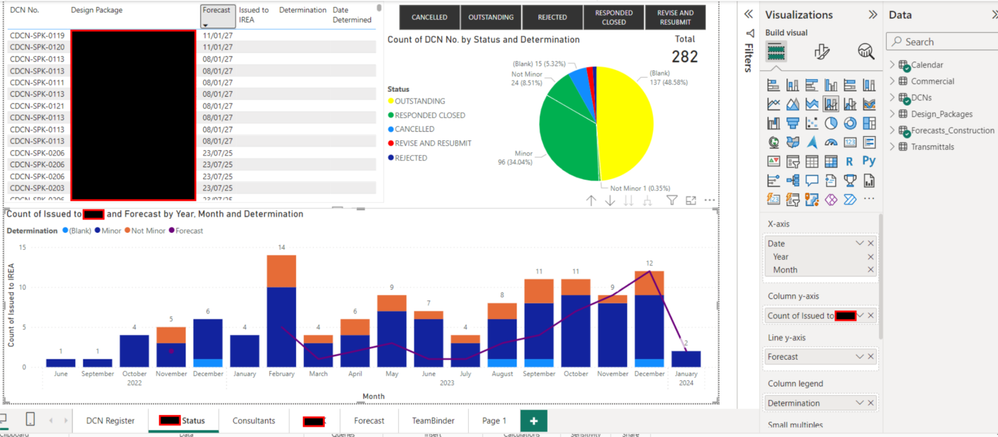
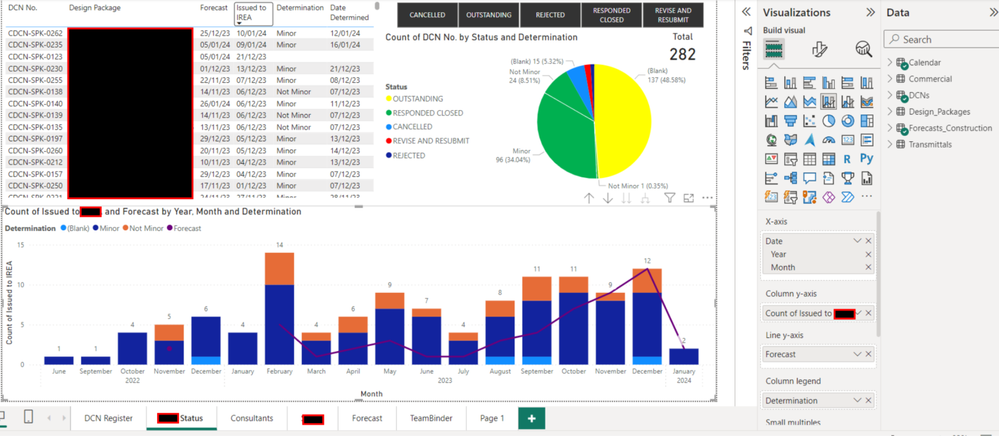
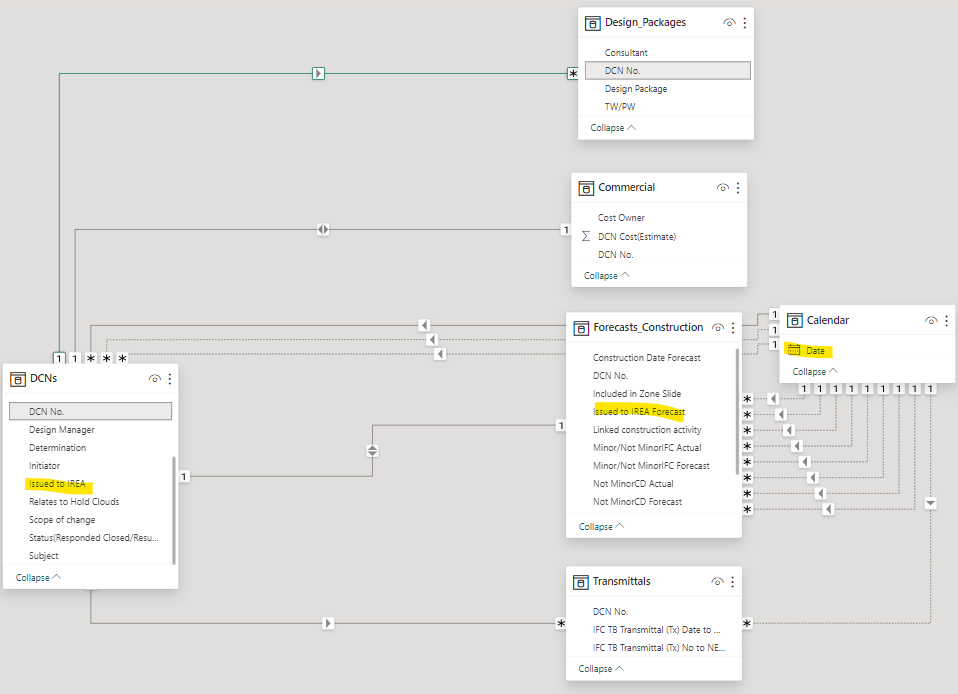
I have created a project calendar table for 2021-2028. I have linked date data across multiple tables to this project calendar in order to create visuals that can hopefully plot onto this project calendar. I am having issues where these linked tables have dates that go into 2027 (refer to Forecast data below) however my graph will only show data up to 2024. I cannot work out what is going wrong here and would appreciate some help! i have made sure that all the tables have the same date type data and same format across tables.

Line data.pngBar Data.pngRelationships.png


Ideally  should be seeing line y-axis data for the month in 2027. Bar y-axis data seems to be correctly shown.

1 ACCEPTED SOLUTION
Anonymous
Not applicable

Hi @Mezzoshadee 


Yes, your understanding is correct. To make calculations based on different date columns which is joined by an inactive relationship, you can use measures with USERELATIONSHIP function. This function can activate an inactive relationship and ingore the active relationship when evaluating a measure. 


For example, 

Count of Forecast = calculate(count('Table'[Issued to Forecast]),userelationship('Table'[Issued to Forecast], 'Calendar Table'[Date]))

Add above measure to y-axis on the chart. 


Reference: Using USERELATIONSHIP in DAX - SQLBI


Best Regards,
Jing
If this post helps, please Accept it as Solution to help other members find it. Appreciate your Kudos!


View solution in original post

4 REPLIES 4
amitchandak
Super User
Super User

@Mezzoshadee , I see all joined to the calendar are inactive . And Joining with DCN is 1-1 bi-direction. 


Make Join with DCN with Forecast and 1- M and you need to have an active join or make sure it works when using userelationship.


Can you share sample data and sample output in table format? Or a sample pbix after removing sensitive data.

Share with Power BI Enthusiasts: Full Power BI Video (20 Hours) YouTube
Microsoft Fabric Series 60+ Videos YouTube
Microsoft Fabric Hindi End to End YouTube

@amitchandak  simplistically, if i had a calendar table which i wanted as the x-axis for a column/line visual and a table with 3 columns per below:

DCN No.Forecast DateSubmitted Date
DCN11/1/241/2/24
DCN21/1/241/3/24
DCN33/2/253/3/26
DCN45/4/241/4/24


How do you link the 2 date columns to the Calendar table? at least 1 relationship will become inactive won't it? I understand Power BI does not allow multiple active relationsthips between tables.

Anonymous
Not applicable

Hi @Mezzoshadee 


Yes, your understanding is correct. To make calculations based on different date columns which is joined by an inactive relationship, you can use measures with USERELATIONSHIP function. This function can activate an inactive relationship and ingore the active relationship when evaluating a measure. 


For example, 

Count of Forecast = calculate(count('Table'[Issued to Forecast]),userelationship('Table'[Issued to Forecast], 'Calendar Table'[Date]))

Add above measure to y-axis on the chart. 


Reference: Using USERELATIONSHIP in DAX - SQLBI


Best Regards,
Jing
If this post helps, please Accept it as Solution to help other members find it. Appreciate your Kudos!


Hi, thanks for your feedback. I've done some googling and it looks like you can't have multiple active relatiosnips between tables. What is the best way to link mutliple columns of date data across tables to the project Calendar table typically? I have attempted to put all relelvant date data into one table however then i have the issue of multiple inactive relationships which it sounds like i need to avoid. If i split date data out across multiple tables and have the DCNs connected as the data which relates tables i then get an Ambiguous Error between relationships and the Calendar table.

Helpful resources

Announcements
November Power BI Update Carousel

Power BI Monthly Update - November 2025

Check out the November 2025 Power BI update to learn about new features.

Fabric Data Days Carousel

Fabric Data Days

Advance your Data & AI career with 50 days of live learning, contests, hands-on challenges, study groups & certifications and more!

FabCon Atlanta 2026 carousel

FabCon Atlanta 2026

Join us at FabCon Atlanta, March 16-20, for the ultimate Fabric, Power BI, AI and SQL community-led event. Save $200 with code FABCOMM.

Top Solution Authors
Top Kudoed Authors