cancel
Showing results for 
Search instead for 
Did you mean: 

Join the FabCon + SQLCon recap series. Up next: Power BI, Real-Time Intelligence, IQ and AI, and Data Factory take center stage. All sessions are available on-demand after the live show. Register now

Reply
rrr3521
Frequent Visitor

Calculations based on two date fields

Ok. Here's my problem. I have a table with two date fields (DateOrdered and DateInvoiced)

The DateInvoiced value typically a few weeks after the DateOrdered value (see sample below)

I'm trying to do some calculations based on both date fields. A simple example would be the SUM of sales (Price column) for last year. Using the example below, I would get $160 using DateOrdered and $40 using DateInvoiced


Ideally, we would like our user to pick that from a date slicer (as in the picture) and pick "Last 1 Year" for example. Then the result would be on a simple table with both sum of sales based on DateOrdered and also based on DateInvoiced (see picture)
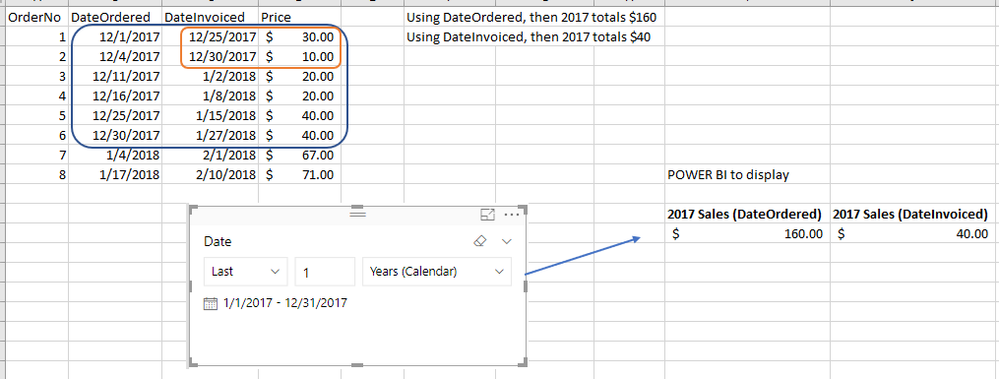
 

Question.PNG


The immediate problem is that the slicer can only be linked to one of the dates on my table. 


I have only been able to use a LIMITED number of options (YTD, MTD, etc) using the approach described in this video: https://www.youtube.com/watch?v=I0UV7bGvu_U


Notice in the video how the timeframes are defined in a table called SelectMeasures. So we would need to add in that table a limited number of options (YTD, MTD, QTD, etc). Whereas by a having a single date slicer we can pick pretty much any possible timeframe (i.e. last 7 weeks, last 3 days, last 8 months, this month, next day, etc, etc, etc)


Any possible way this can be accomplished? I already told my manager this might not be possible, but maybe there is a clever way to do it. Any help would be truly appreciated.


Thanks!


2 REPLIES 2
Greg_Deckler
Community Champion
Community Champion

Check out my Quick Measures here which might help you with your situation:


https://community.powerbi.com/t5/Quick-Measures-Gallery/Open-Tickets/m-p/409364


https://community.powerbi.com/t5/Quick-Measures-Gallery/Time-Intelligence-quot-The-Hard-Way-quot-TIT...


Follow on LinkedIn
@ me in replies or I'll lose your thread!!!
Instead of a Kudo, please vote for this idea
Become an expert!: Enterprise DNA
External Tools: MSHGQM
YouTube Channel!: Microsoft Hates Greg
Latest book!:
DAX For Humans

DAX is easy, CALCULATE makes DAX hard...

Thank you Greg! I will go ahead and see how I can use what it is demonstrated in the articles.

Helpful resources

Announcements
April Power BI Update Carousel

Power BI Monthly Update - April 2026

Check out the April 2026 Power BI update to learn about new features.

New to Fabric survey Carousel

New to Fabric Survey

If you have recently started exploring Fabric, we'd love to hear how it's going. Your feedback can help with product improvements.

Power BI DataViz World Championships carousel

Power BI DataViz World Championships - June 2026

A new Power BI DataViz World Championship is coming this June! Don't miss out on submitting your entry.

FabCon and SQLCon Highlights Carousel

FabCon &SQLCon Highlights

Experience the highlights from FabCon & SQLCon, available live and on-demand starting April 14th.