cancel
Showing results for 
Search instead for 
Did you mean: 

Vote for your favorite vizzies from the Power BI Dataviz World Championship submissions. Vote now!

Reply
aaditya2000
Helper II
Helper II

Calculation

Hello:


I need help on the calculation part & how do?


I want to display total dollars amount on CARD which is based on A & B.


(A) Tabble 1 meassure = Remote Saving

Remote Saving = COUNTROWS(FILTER(Table1,
(Table1[col1] = "N" && Table1[col4] = "N")))


This gives for e.g. Remote Saving = 80


(B) Table 2 is look up table of 9 dollars values (100,150,200,250,300,350,400,450,500)

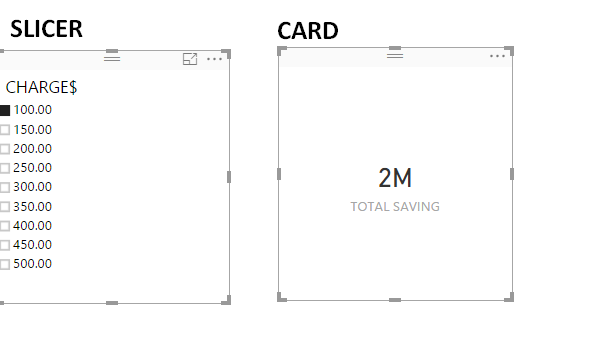
      SLICER has values from Table 2


Based on value selected in SLICER, CARD should display calculated value accordingly.


for e.g. if i select value 100 from SLICER then CARD should display value $8000 (100 * 80)

            if i select value 150 from SLICER then CARD should display value $12000 (150 * 80)


I need help how to achive above from SLICER, any help is greatly appreciated.


Thank you in advance.

Thanks


SLICER.png


1 ACCEPTED SOLUTION
Zubair_Muhammad
Community Champion
Community Champion

Hi @aaditya2000


Try this MEASURE for CARD


MEASURE =
SELECTEDVALUE ( Table2[Slicer Column] ) * [Remote Saving]

View solution in original post

2 REPLIES 2
Zubair_Muhammad
Community Champion
Community Champion

Hi @aaditya2000


Try this MEASURE for CARD


MEASURE =
SELECTEDVALUE ( Table2[Slicer Column] ) * [Remote Saving]

Thank you Zubair, it worked with minor modification but SELECTEDVALUE was key for resolution.


MEASURE = CALCULATE(
 [Remote Saving] * SELECTEDVALUE (Table2[Slicer Column])
)


Helpful resources

Announcements
Power BI DataViz World Championships

Power BI Dataviz World Championships

Vote for your favorite vizzies from the Power BI World Championship submissions!

Sticker Challenge 2026 Carousel

Join our Community Sticker Challenge 2026

If you love stickers, then you will definitely want to check out our Community Sticker Challenge!

January Power BI Update Carousel

Power BI Monthly Update - January 2026

Check out the January 2026 Power BI update to learn about new features.

FabCon Atlanta 2026 carousel

FabCon Atlanta 2026

Join us at FabCon Atlanta, March 16-20, for the ultimate Fabric, Power BI, AI and SQL community-led event. Save $200 with code FABCOMM.