I have the below dataset and user country as a filter. The task is to calculate the revenue - calculated as sum paid in this month - sum paid in the previous month. It should be calculated in USD. The solution of multiplying the exchange rate in the below table, then, creating a measure using PREVIOUSMONTH and then, doing subtraction doesn't work because of the high exchange rate fluctuation.

The solution we came with was to calculate the revenue in the local currency. And then, if a user selects Switzerland from the filter, the revenue will be multiplied by the exchange rate for the corresponding country and corresponding date.
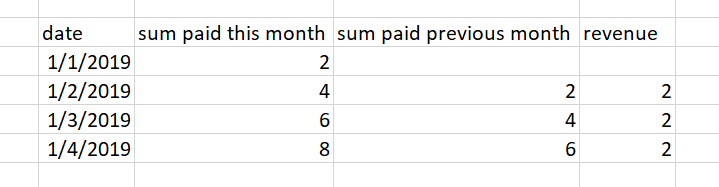
Here are the formulas in practice:
Measures:
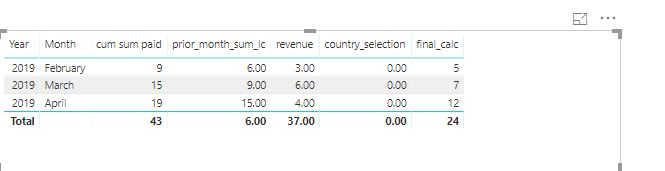
prior_month_sum_lc = CALCULATE(sum(fact_payment[sum_paid_to_date]),PREVIOUSMONTH(calendar_3[Date]))
revenue = sum(fact_payment[sum_paid_to_date])-[prior_month_sum_lc]
revenue_usd = IF(SELECTEDVALUE(fact_payment[country])="Spain",
[revenue] * AVERAGEX(fact_payment,fact_payment[xr_es]),0 )
And it is working just fine when you select a particular country, however, I cannot a formula work when no country is selected. I've uploaded the sample at
https://drive.google.com/file/d/1ADLoDNSVBFo-G_SYj30xPH490yTDNXrL/view?usp=sharing.
My attempt to do the filter is in the measure final