Get Fabric or SQL Certified for Free.
Get certified for free when you join Fabric Data Days 2026 and dive into Fabric, Power BI, SQL, AI, and other essential data skills.
Join now- Power BI forums
- Get Help with Power BI
- Desktop
- Service
- Report Server
- Power Query
- Mobile Apps
- Developer
- DAX Commands and Tips
- Custom Visuals Development Discussion
- Health and Life Sciences
- Power BI Spanish forums
- Translated Spanish Desktop
- Training and Consulting
- Instructor Led Training
- Dashboard in a Day for Women, by Women
- Galleries
- Data Stories Gallery
- Themes Gallery
- Contests Gallery
- QuickViz Gallery
- Quick Measures Gallery
- Visual Calculations Gallery
- Fabric Apps Gallery
- Notebook Gallery
- Translytical Task Flow Gallery
- TMDL Gallery
- R Script Showcase
- Webinars and Video Gallery
- Ideas
- Custom Visuals Ideas (read-only)
- Issues
- Issues
- Events
- Upcoming Events
July 7 - July 17 | Round 2 of the Power BI Dataviz World Championships. Don't miss your chance! Learn more
- Power BI forums
- Forums
- Get Help with Power BI
- Desktop
- Re: Calculation using PATH function Hierarchy
- Subscribe to RSS Feed
- Mark Topic as New
- Mark Topic as Read
- Float this Topic for Current User
- Bookmark
- Subscribe
- Printer Friendly Page


- Mark as New
- Bookmark
- Subscribe
- Mute
- Subscribe to RSS Feed
- Permalink
- Report Inappropriate Content
Calculation using PATH function Hierarchy
Hello everyone,
I am trying to do a calculation based on a hierarchy.
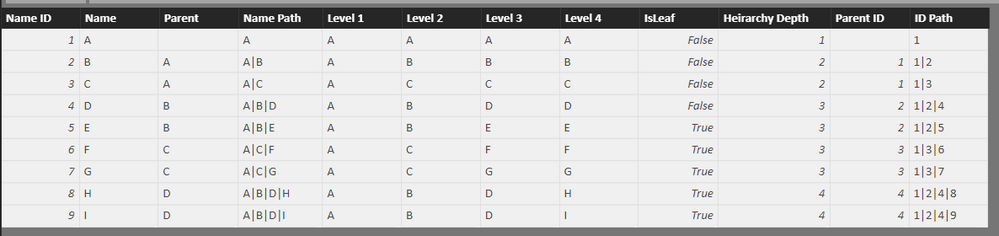
I have a table with Names and their Parents and I have created a hierarchy using the PATH function.
I have sales data in another table and from that data based on the hierarchy I am trying to calculate the commission.
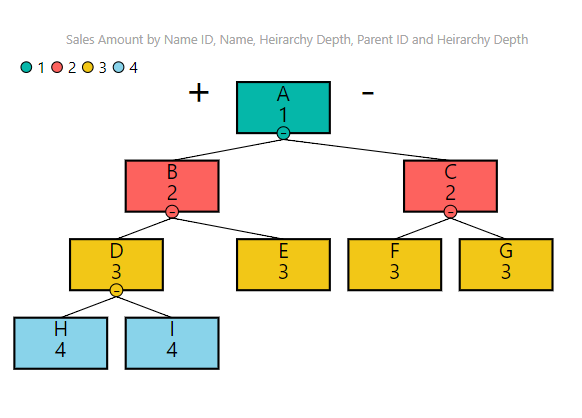
This is the picture of my hierarchy:
These are all the Paths that I have created and the link to the files is at the end of the message.
This is my Sales Table:
| Date | Name | Sales |
| 01-01-18 | A | 10 |
| 01-01-18 | B | 20 |
| 01-01-18 | C | 50 |
| 01-01-18 | D | 30 |
| 01-01-18 | E | 40 |
| 01-01-18 | F | 60 |
| 01-01-18 | G | 20 |
| 01-01-18 | H | 30 |
| 01-01-18 | I | 60 |
| 02-01-18 | A | 20 |
| 02-01-18 | B | 40 |
| 02-01-18 | C | 30 |
| 02-01-18 | D | 50 |
| 02-01-18 | E | 10 |
| 02-01-18 | F | 20 |
| 02-01-18 | G | 30 |
| 02-01-18 | H | 30 |
| 02-01-18 | I | 20 |
This is my Total Sales Table along with the Desired Commission results:
| Name | Sales | Commission 1 | Commission 2 |
| A | 30 | 10 | 14 |
| B | 60 | 12.5 | 13.9 |
| C | 80 | 14.5 | 14.5 |
| D | 80 | 15 | 11 |
| E | 50 | 5 | 5 |
| F | 80 | 8 | 8 |
| G | 50 | 5 | 5 |
| H | 60 | 6 | 6 |
| I | 80 | 8 | 8 |
I have 2 ways to calculate commission.
First:
Commission on own sale (10%) + Commission for every sub-branch of the hierarchy (5%).
For eg. For B, own sale is 60 and sub-branch sales for D and E are 80 & 50 respectively, so total is 130.
So Commission for B is (60*10%) + (130*5%) = 12.5
For eg. For D, own sale is 80 and sub-branch sales for H and I are 60 & 80 respectively, so total is 140.
So Commission for B is (80*10%) + (140*5%) = 15
Second:
Commission on own sale (10%) + Commission from every sub-branch (5%) and sub-sub branches of the hierarchy (1%).
For Eg. For A, own sale is 30, sub-branch sales for B and C are 140 and all other sub-sub-branches (D,E,F,G,H,I) total is 400
So Commission for A is (30*10%) + (140*5%) + (400*1%) = 14
Similarly Commission for B, Own Sale is 60, sub-branch sales for D and E are 80 & 50 respectively and sub-sub-branch sale for H and I are 60 and 80 respectively.
So Commission for B is (60*10%) + (130*5%) + (140*1%) = 13.9
Ths following is the link to my Excel file and the PBIX file.
https://1drv.ms/f/s!Ap0qSKP-4qpThCc1sSXanmibgIff
It would be great if anyone can help me with this.
Thank you,
Vishesh Jain


- Mark as New
- Bookmark
- Subscribe
- Mute
- Subscribe to RSS Feed
- Permalink
- Report Inappropriate Content
Hi @mail2vjj
Could you add rows with zero sales for Names missing in a month?
This will resolve the issue...of getting share for parent when they dont have sales but their children have it
For example I just added the last row in image below and I start getting A's share for B which is the Direct Child

Regards
Zubair
Please try my custom visuals
- Mark as New
- Bookmark
- Subscribe
- Mute
- Subscribe to RSS Feed
- Permalink
- Report Inappropriate Content
I am afraid I cannot do that.
This is the sales sheet and there will only be entries for the actual sales made.
This sheet will be automatically generated by a software.
Also adding 0 sales to my sheet for every single name that exists, will add rows to excel that we don't really need.
Morever, after a certain number of rows, excel slows down and becomes inefficient, so I don't know how wise it will be if we add rows that we don't need.
I am sure you are aware of this.
Sorry for throwing another stone in your way.
Vishesh Jain.
- Mark as New
- Bookmark
- Subscribe
- Mute
- Subscribe to RSS Feed
- Permalink
- Report Inappropriate Content
OK....I will check an alternate way
Regards
Zubair
Please try my custom visuals
- Mark as New
- Bookmark
- Subscribe
- Mute
- Subscribe to RSS Feed
- Permalink
- Report Inappropriate Content
Is there some way to add the rows with 0 sales using the Query Editor?
- Mark as New
- Bookmark
- Subscribe
- Mute
- Subscribe to RSS Feed
- Permalink
- Report Inappropriate Content
Hi @mail2vjj
Sorry for late reply
One way of adding the missing row is using a Calculated Table
See the attached file.
Then you have to do all the MEASURES based on this new Table
SalesNew =
VAR mytable =
    CROSSJOIN (
        SELECTCOLUMNS ( Sales, "Name", [Name] ),
        SELECTCOLUMNS (
            Sales,
            "date", [Date],
            "Location", [Location],
            "Product", [Product]
        )
    )
RETURN
    ADDCOLUMNS (
        mytable,
        "Sales", LOOKUPVALUE (
            Sales[Sales],
            Sales[Date], [date],
            Sales[Location], [Location],
            Sales[Name], [Name],
            Sales[Product], [Product]
        )
    )
Regards
Zubair
Please try my custom visuals
- Mark as New
- Bookmark
- Subscribe
- Mute
- Subscribe to RSS Feed
- Permalink
- Report Inappropriate Content
Thanks for hanging in there with me until now and taking the time to work on my problem.
I just saw your solution and I see some problems with it.
One is, as even you know, the model is getting unnecessarily big, since it is creating a row for every single combination of Date, Product, Location and Name.
So if more columns are added in the future, the number of rows will increase exponentially which will slow down the model. I am sure you saw that for only a handful of rows of sales data, the new model has created around 400 rows.
Second is that, there are multiple rows being created for the same combination of sales, which is completely wrong.

As you can see for 1st Feb 2018, Product 2, in USA for B 3 rows have been created, which will give a bloated up result.
For these reasons I am not in the favor of adding rows with 0 sales.
Please let me know if you can still come up with some other way to fix this.
Thank you for all your help.
Vishesh Jain
- Mark as New
- Bookmark
- Subscribe
- Mute
- Subscribe to RSS Feed
- Permalink
- Report Inappropriate Content
Hi @mail2vjj
Hi Vishesh,
I suggest creating a new post with this problem.....
I hope majority of your problems have been resolved...only this part is giving trouble
Wish you all the best
Regards
Zubair
Please try my custom visuals
- Mark as New
- Bookmark
- Subscribe
- Mute
- Subscribe to RSS Feed
- Permalink
- Report Inappropriate Content
I am not able to get Date Hierarchy to work either 
Regards
Zubair
Please try my custom visuals
- Mark as New
- Bookmark
- Subscribe
- Mute
- Subscribe to RSS Feed
- Permalink
- Report Inappropriate Content
I can try to manage some how if the date Hierarchy is not working.
Is it possible to get the commission calcualtions for the parent-child correclty?
I have posted another question in the community if you would like to take a dig at it, but it is more realted to Power Query and M.
I don't know if it is up your alley or not.
Thank you so much for taking the time to help me with everything.
Thank you,
Vishesh Jain
- Mark as New
- Bookmark
- Subscribe
- Mute
- Subscribe to RSS Feed
- Permalink
- Report Inappropriate Content

Regards
Zubair
Please try my custom visuals

Helpful resources

FabCon & SQLCon – Barcelona 2026
Join us in Barcelona for FabCon and SQLCon, the Fabric, Power BI, SQL, and AI community event. Save €200 with code FABCMTY200.

Power BI Monthly Update - July 2026
Check out the July 2026 Power BI update to learn about new features.

Data Days 2026
Join Data Days 2026: 60 days of free live/on-demand sessions, challenges, study groups, and certification opportunities.

Power BI DataViz World Championships - June 2026
A new Power BI DataViz World Championship is coming this June! Don't miss out on submitting your entry.

| User | Count |
|---|---|
| 29 | |
| 23 | |
| 22 | |
| 21 | |
| 13 |


| User | Count |
|---|---|
| 49 | |
| 32 | |
| 19 | |
| 17 | |
| 17 |


