cancel
Showing results for 
Search instead for 
Did you mean: 

A new Data Days event is coming soon! This time we’re going bigger than ever. Fabric, Power BI, SQL, AI and more. Don't miss out.

Reply
MichielvS
Frequent Visitor

Calculation over tables

I want to calculate the average churn, based upon two tables in my model, but with the possibility to filter the output in the report view through one or more dimensions. The content of the tables is: 


Table1

Clientnr          Month         Subscription   Product

A                     201501        1                     X

A                     201502        1                     X

A                     201501        1                     Y

B                     201501        1                     X

B                     201502        1                     Y


Table2

Clientnr          Month         Churn             Product

A                     201501        1                    X

A                     201502        0                 

B                     201501        1                    X

B                     201502        0


Resulting in a form of output where I can see that, if I filter the output for product X:

Month        Churn%

201501       100%

201502       0%


... and if I filter the output for product Y:

Month        Churn%

201501       0%

201502       0%


How do I do this in the preparation? I already have prepared:


Table11 = SUMMARIZE(Table1,Table1[Month],"count",SUM(Table1[Subscription]))
Table22 = SUMMARIZE(Table2,Table2[Month],"count",SUM(Table2[Churn]))

and

Churn% = Table22[count]/RELATED(Table11[count])


Do I have to incorporate 'Product' in the new tables? How?

1 ACCEPTED SOLUTION
v-huizhn-msft
Microsoft Employee
Microsoft Employee

Hi @MichielvS,

You should incorporate "Product" column in new table, then you can lookup related value form Table22 in Table11.

I create new tables using the following formulas.

Table11 = SUMMARIZE(Table1,Table1[Month],Table1[Product],"count",SUM(Table1[Subscription]))

Table22 = SUMMARIZE(Table2,Table2[Month],Table2[Product],"count",SUM(Table2[Churn]))


Table11
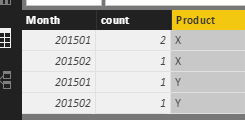
11.PNG

Table22
22.PNG

Then create a calculated to get related Table22[count] based on month and product columns. If there is no corresponding products, it will return 0.

Related Table22 = IF(ISBLANK(LOOKUPVALUE(Table22[count],Table22[Month],Table11[Month],Table22[Product],Table11[Product])),0,LOOKUPVALUE(Table22[count],Table22[Month],Table11[Month],Table22[Product],Table11[Product]))


Finally create another column to get Churn% result.

Churn% = Table11[Related Table22]/Table11[count]
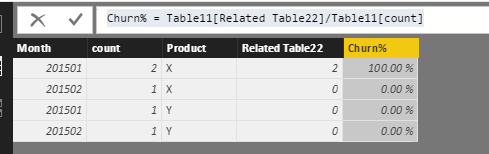
12.PNG

Create a slicer including Table11[Product] field, and a table visual to display the desired result.
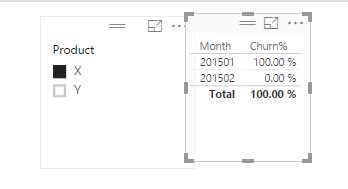
1.PNG2.PNG


If you have other issues, please feel free to ask.

Best Regards,
Angelia


View solution in original post

1 REPLY 1
v-huizhn-msft
Microsoft Employee
Microsoft Employee

Hi @MichielvS,

You should incorporate "Product" column in new table, then you can lookup related value form Table22 in Table11.

I create new tables using the following formulas.

Table11 = SUMMARIZE(Table1,Table1[Month],Table1[Product],"count",SUM(Table1[Subscription]))

Table22 = SUMMARIZE(Table2,Table2[Month],Table2[Product],"count",SUM(Table2[Churn]))


Table11
11.PNG

Table22
22.PNG

Then create a calculated to get related Table22[count] based on month and product columns. If there is no corresponding products, it will return 0.

Related Table22 = IF(ISBLANK(LOOKUPVALUE(Table22[count],Table22[Month],Table11[Month],Table22[Product],Table11[Product])),0,LOOKUPVALUE(Table22[count],Table22[Month],Table11[Month],Table22[Product],Table11[Product]))


Finally create another column to get Churn% result.

Churn% = Table11[Related Table22]/Table11[count]

12.PNG

Create a slicer including Table11[Product] field, and a table visual to display the desired result.

1.PNG2.PNG


If you have other issues, please feel free to ask.

Best Regards,
Angelia


Helpful resources

Announcements
Fabric SQL PBI Data Days

Data Days 2026 coming soon!

Sign up to receive a private message when registration opens and key events begin.

New to Fabric survey Carousel

New to Fabric Survey

If you have recently started exploring Fabric, we'd love to hear how it's going. Your feedback can help with product improvements.

Power BI DataViz World Championships carousel

Power BI DataViz World Championships - June 2026

A new Power BI DataViz World Championship is coming this June! Don't miss out on submitting your entry.