Don't miss your chance to take exam DP-600 or DP-700 on us!
Request nowLearn from the best! Meet the four finalists headed to the FINALS of the Power BI Dataviz World Championships! Register now
Hello everybody,
I need your help to make a calculate columns for my table.
I have this kind of table, Where I want to add a 3 new columns :
| activityid | ActivityCreatedat | user id |
| id1 | 4/1/21 12:00 PM | id1 |
| id2 | 4/1/21 2:30 PM | id2 |
| id3 | 4/1/21 3:00 PM | id1 |
| id4 | 7/2/21 12:00 PM | id1 |
| id5 | 8/2/21 12:00 PM | id3 |
| id6 | 9/2/21 12:00 PM | id1 |
| id7 | 10/2/21 12:00 PM | id4 |
| id8 | 11/3/21 12:00 PM | id1 |
| id9 | 12/3/21 12:00 PM | id3 |
| id10 | 13/3/21 12:00 PM | id5 |
| id11 | 14/3/21 12:00 PM | id2 |
| id12 | 13/3/21 3:00 PM | id5 |
| id13 | 16/3/21 12:00 PM | id4 |
This is the result that I look for it with the 3 new columns :
| activityid | ActivityCreatedat | user id | Weeknumber | nbr activity by user and month | nbr activity by user and by day | nbr activity by user and week |
| id1 | 4/1/21 12:00 PM | id1 | 1 | 2 | 2 | 1 |
| id2 | 4/1/21 2:30 PM | id2 | 2 | 1 | 1 | 1 |
| id3 | 4/1/21 3:00 PM | id1 | 3 | 2 | 2 | 1 |
| id4 | 7/2/21 12:00 PM | id1 | 4 | 2 | 1 | 1 |
| id5 | 8/2/21 12:00 PM | id3 | 5 | 1 | 1 | 1 |
| id6 | 9/2/21 12:00 PM | id1 | 6 | 2 | 1 | 1 |
| id7 | 10/2/21 12:00 PM | id4 | 7 | 1 | 1 | 1 |
| id8 | 11/3/21 12:00 PM | id1 | 8 | 1 | 1 | 1 |
| id9 | 12/3/21 12:00 PM | id3 | 9 | 1 | 1 | 1 |
| id10 | 13/3/21 12:00 PM | id5 | 10 | 2 | 2 | 1 |
| id11 | 14/3/21 12:00 PM | id2 | 11 | 1 | 1 | 1 |
| id12 | 13/3/21 3:00 PM | id5 | 12 | 2 | 2 | 1 |
| id13 | 16/3/21 12:00 PM | id4 | 13 | 1 | 1 | 1 |
Thank you for your help.
Best,
Solved! Go to Solution.
Hi @Anonymous
You could create below calculated columns.
nbr activity by user and by month =
COUNTX (
FILTER (
'Table',
'Table'[user id] = EARLIER ( 'Table'[user id] )
&& MONTH ( 'Table'[ActivityCreatedat] ) = MONTH ( EARLIER ( 'Table'[ActivityCreatedat] ) )
),
'Table'[activityid]
)nbr activity by user and by day =
COUNTX (
FILTER (
'Table',
'Table'[user id] = EARLIER ( 'Table'[user id] )
&& 'Table'[ActivityCreatedat].[Date] = EARLIER ( 'Table'[ActivityCreatedat].[Date] )
),
'Table'[activityid]
)nbr activity by user and week =
COUNTX (
FILTER (
'Table',
'Table'[user id] = EARLIER ( 'Table'[user id] )
&& WEEKNUM ( 'Table'[ActivityCreatedat] ) = WEEKNUM ( EARLIER ( 'Table'[ActivityCreatedat] ) )
),
'Table'[activityid]
)
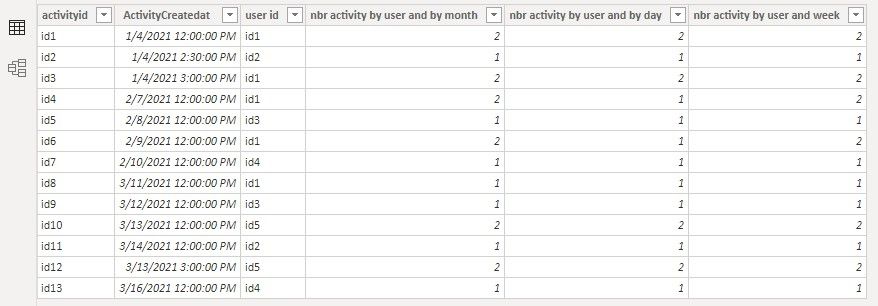
I'm not sure how your week number column is generated. But if you already have a week number column, you can modify the third formula like below, and the result is the same as what you show in the second table.
nbr activity by user and week =
COUNTX (
FILTER (
'Table',
'Table'[user id] = EARLIER ( 'Table'[user id] )
&& 'Table'[Weeknumber] = EARLIER ( 'Table'[Weeknumber] )
),
'Table'[activityid]
)
Let me know if you have any questions.
Community Support Team _ Jing
If this post helps, please Accept it as the solution to help other members find it.
Hi @Anonymous
You could create below calculated columns.
nbr activity by user and by month =
COUNTX (
FILTER (
'Table',
'Table'[user id] = EARLIER ( 'Table'[user id] )
&& MONTH ( 'Table'[ActivityCreatedat] ) = MONTH ( EARLIER ( 'Table'[ActivityCreatedat] ) )
),
'Table'[activityid]
)nbr activity by user and by day =
COUNTX (
FILTER (
'Table',
'Table'[user id] = EARLIER ( 'Table'[user id] )
&& 'Table'[ActivityCreatedat].[Date] = EARLIER ( 'Table'[ActivityCreatedat].[Date] )
),
'Table'[activityid]
)nbr activity by user and week =
COUNTX (
FILTER (
'Table',
'Table'[user id] = EARLIER ( 'Table'[user id] )
&& WEEKNUM ( 'Table'[ActivityCreatedat] ) = WEEKNUM ( EARLIER ( 'Table'[ActivityCreatedat] ) )
),
'Table'[activityid]
)
I'm not sure how your week number column is generated. But if you already have a week number column, you can modify the third formula like below, and the result is the same as what you show in the second table.
nbr activity by user and week =
COUNTX (
FILTER (
'Table',
'Table'[user id] = EARLIER ( 'Table'[user id] )
&& 'Table'[Weeknumber] = EARLIER ( 'Table'[Weeknumber] )
),
'Table'[activityid]
)
Let me know if you have any questions.
Community Support Team _ Jing
If this post helps, please Accept it as the solution to help other members find it.
@Anonymous , Try new columns like
new column by day =
var _id = [user id]
var _date = [ActivityCreatedat].date
return
countx(filter(Table, [user id] =_id && [ActivityCreatedat].date =_date ),[activityid])
new column by month =
var _id = [user id]
var _date = eomonth([ActivityCreatedat].date ,0)
return
countx(filter(Table, [user id] =_id && eomonth([ActivityCreatedat].date ,0) =_date ),[activityid])
new column by week =
var _id = [user id]
var _date = [ActivityCreatedat].date+-1*WEEKDAY([ActivityCreatedat].date,2)+1
return
countx(filter(Table, [user id] =_id && [ActivityCreatedat].date+-1*WEEKDAY([ActivityCreatedat].date,2)+1 =_date ),[activityid])
Share feedback directly with Fabric product managers, participate in targeted research studies and influence the Fabric roadmap.
Check out the February 2026 Power BI update to learn about new features.
| User | Count |
|---|---|
| 51 | |
| 40 | |
| 37 | |
| 14 | |
| 14 |
| User | Count |
|---|---|
| 85 | |
| 71 | |
| 38 | |
| 29 | |
| 26 |