Get certified for free when you join Fabric Data Days 2026 and dive into Fabric, Power BI, SQL, AI, and other essential data skills.
Join nowJuly 7 - July 17 | Round 2 of the Power BI Dataviz World Championships. Don't miss your chance! Learn more
Hello all,
I am new on PowerBI and I started to work on DAX recently. I have a question regarding a formulation in PowerBI.
I have two datasets as below:
| Name | Year | Month | Hours |
| John Doe | 2018 | August | 20 |
| John Doe | 2018 | September | 15 |
| Name | Year | Month | Charge-out rate |
| John Doe | 2018 | August | £22.00 |
| John Doe | 2018 | September | £20.00 |
What I'm trying to calculate is the monthly revenue of one person, which means that the formula will calculate John Doe's monthly revenue like this:
| Name | Year | Month | Revenue |
| John Doe | 2018 | August | £440.00 |
| John Doe | 2018 | September | £400.00 |
The formula needs to check the "Name", "Year" and "Month" in both datasets and needs the calculate the revenue by multiplying the rate with hours based on the conditions above.
Much appreciated if you could share your thoughts on this.
Thank you and Best regards,
Ugur
Solved! Go to Solution.
@Anonymous,
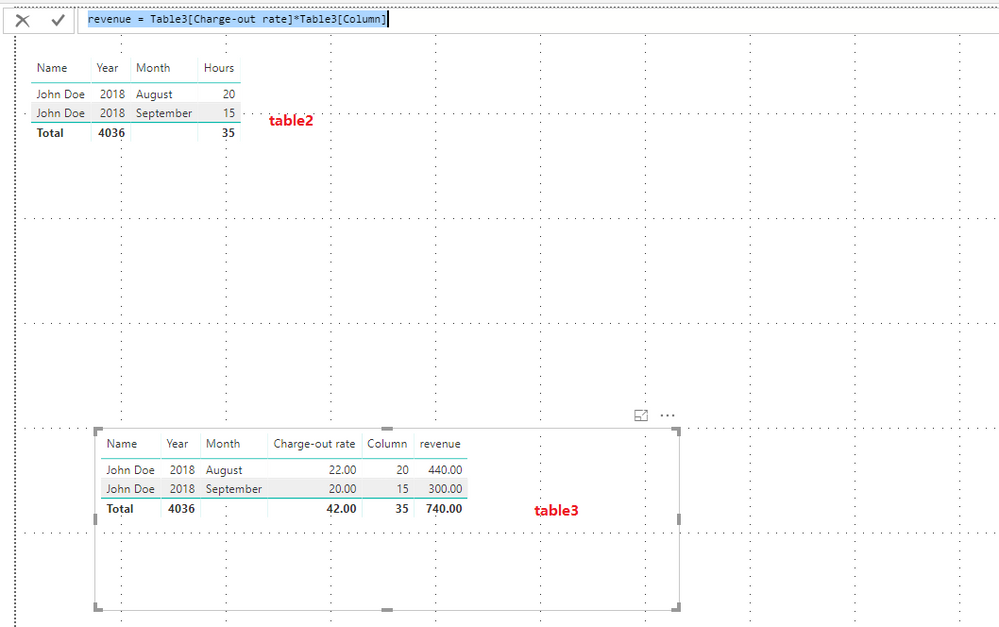
You can create the following columns in your second table.
Column = LOOKUPVALUE(Table2[Hours],Table2[Name],Table3[Name],Table2[Year],Table3[Year],Table2[Month],Table3[Month])
revenue = Table3[Charge-out rate]*Table3[Column]
Regards,
Lydia
@Anonymous,
You can create the following columns in your second table.
Column = LOOKUPVALUE(Table2[Hours],Table2[Name],Table3[Name],Table2[Year],Table3[Year],Table2[Month],Table3[Month])
revenue = Table3[Charge-out rate]*Table3[Column]
Regards,
Lydia
Hello all,
I am new on PowerBI and I started to work on DAX recently. I have a question regarding a formulation in PowerBI.
I have two datasets as below:
| Name | Year | Month | Hours |
| John Doe | 2018 | August | 20 |
| John Doe | 2018 | September | 15 |
| Name | Year | Month | Charge-out rate |
| John Doe | 2018 | August | £22.00 |
| John Doe | 2018 | September | £20.00 |
What I'm trying to calculate is the monthly revenue of one person, which means that the formula will calculate John Doe's monthly revenue like this:
| Name | Year | Month | Revenue |
| John Doe | 2018 | August | £440.00 |
| John Doe | 2018 | September | £400.00 |
The formula needs to check the "Name", "Year" and "Month" in both datasets and needs the calculate the revenue by multiplying the rate with hours based on the conditions above.
Much appreciated if you could share your thoughts on this.
Thank you and Best regards,
Ugur
See answer in other thread. Please see this post regarding How to Get Your Question Answered Quickly: https://community.powerbi.com/t5/Community-Blog/How-to-Get-Your-Question-Answered-Quickly/ba-p/38490
I would create a column in each table that concatenates those three columns. Then you can relate the two tables (not datasets) to one another and then the measure is very simple to create, just SUM([Hours]) * SUM([Revenue]) essentially.
Join us in Barcelona for FabCon and SQLCon, the Fabric, Power BI, SQL, and AI community event. Save €200 with code FABCMTY200.
Join Fabric Data Days 2026: 60 days of free live/on-demand sessions, challenges, study groups, and certification opportunities.
| User | Count |
|---|---|
| 23 | |
| 19 | |
| 18 | |
| 17 | |
| 13 |
| User | Count |
|---|---|
| 60 | |
| 52 | |
| 47 | |
| 40 | |
| 38 |