cancel
Showing results for 
Search instead for 
Did you mean: 

The Power BI Data Visualization World Championships is back! Get ahead of the game and start preparing now! Learn more

Reply
janeca
Frequent Visitor

Calculation between measures

Hello,


I need your help one more time.


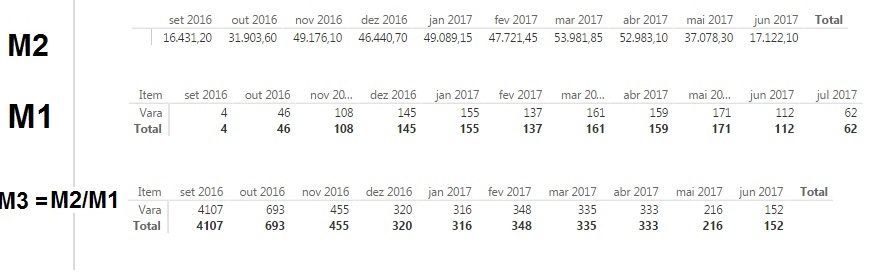
I have done two different measures to my data, and after that i have created a matrix to get a visual.


But now i want to divide measure 1 / measure 2, for this i have created a new measure (M3 = Divide(M1;M2))

but i'm getting the wrong results.


In below picture are my results, and in red my example.


11491.5/23= 499 and no 78.40


But the results for the total are correct.


Capture.PNG


Thanks


5 REPLIES 5
CahabaData
Memorable Member
Memorable Member

A measure performs within the context of its data set, (....and the context of the visual's filter - - but let's leave that issue alone for now).


For math between measures to work the visuals would have to all have the same data set.  Kind of an abstract statement I realize.


Rather than rely on the existing measures - it is my guess without seeing sample of the dataset's involved - that you need to construct this 3 rd measure from scratch.


Also I notice your 3rd measure is a different time period - that must be part of the measure's definition in using the prior period's data.

www.CahabaData.com

Hi have the above data set's.


Data Set 1 - Material per equipment

DateOperationEquipmentType MaterialQty


Data Set 2 - Work Hours per equipment


DateOperationEquipmentHours


And another one that is a calendar.


I want to calculate the qty of material by equipment per hour of work in the last 3 months.


I have created 2 measures: 

M1:  gives me the total of material in the last 3 months.

 M1 = Calculate(sum('Data Set 1'[Qty]); datesinperiod ('Calendar'[Date]; lastdate('Calendar'[Date]);-3;Month))


M2: gives the total of hour's worked in the las 3 months.

 M2 =Calculate(sum('Data Set 2'[Hours]); datesinperiod ('Calendar'[Date]; lastdate('Calendar'[Date]);-3;Month))


All this meausres work well, but when i divide hours by qty of material i get correct results for the total (picture below).

M3 = divide(M2;M1)


M3 total.jpg


But when i want result's per equipment, i get wrong results. the only resutls that are correct are the totals.


m3 eq.jpg


@janeca wrote:

Hi have the above data set's.


Data Set 1 - Material per equipment

Date Operation Equipment Type Material Qty


Data Set 2 - Work Hours per equipment


Date Operation Equipment Hours


And another one that is a calendar.


I want to calculate the qty of material by equipment per hour of work in the last 3 months.


I have created 2 measures: 

M1:  gives me the total of material in the last 3 months.

 M1 = Calculate(sum('Data Set 1'[Qty]); datesinperiod ('Calendar'[Date]; lastdate('Calendar'[Date]);-3;Month))


M2: gives the total of hour's worked in the las 3 months.

 M2 =Calculate(sum('Data Set 2'[Hours]); datesinperiod ('Calendar'[Date]; lastdate('Calendar'[Date]);-3;Month))


All this meausres work well, but when i divide hours by qty of material i get correct results for the total (picture below).

M3 = divide(M2;M1)


M3 total.jpg


But when i want result's per equipment, i get wrong results. the only resutls that are correct are the totals.


m3 eq.jpg


@janeca

Could you try

M2 =
CALCULATE (
    SUM ( 'Data Set 2'[Hours] ),
    DATESINPERIOD ( 'Calendar'[Date], LASTDATE ( 'Calendar'[Date] ), -3, MONTH ),
    ALLEXCEPT ( 'sometable', 'sometable'[jumbo] )
)

If it still doesn't work, would you mind sharing the pbix file? You could mask sensitive data before uploading it to a network drive and share the link.

@Eric_Zhang


Hi Eric, 


It still doesn´t work.


My pbix file is in the above link.


https://drive.google.com/open?id=0By056bzPjl9POFNqZzJlM1VyeVk


Thanks for your helph. 

janeca
Frequent Visitor

@Eric_Zhang could you helph me with this? 

Helpful resources

Announcements
Power BI DataViz World Championships

Power BI Dataviz World Championships

The Power BI Data Visualization World Championships is back! Get ahead of the game and start preparing now!

December 2025 Power BI Update Carousel

Power BI Monthly Update - December 2025

Check out the December 2025 Power BI Holiday Recap!

FabCon Atlanta 2026 carousel

FabCon Atlanta 2026

Join us at FabCon Atlanta, March 16-20, for the ultimate Fabric, Power BI, AI and SQL community-led event. Save $200 with code FABCOMM.