Don't miss your chance to take the Fabric Data Engineer (DP-600) exam for FREE! Find out how by attending the DP-600 session on April 23rd (pacific time), live or on-demand.
Learn moreNext up in the FabCon + SQLCon recap series: The roadmap for Microsoft SQL and Maximizing Developer experiences in Fabric. All sessions are available on-demand after the live show. Register now
Hi All,
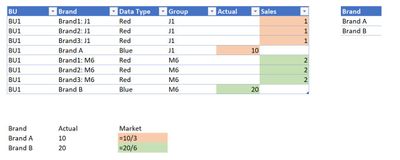
I have a Fact table (left) and Dim table (right). Below is a table visual I want to show in the dashboard.
For row Brand A, I want to show the percentage where the Denominator is 10 (actual) and Numerator is 3 (sales).
Brand A % = 10/3
Brand B % = 20/6
Is it possible to achieve this? Can anyone show me the method?
Thanks & Regards,
BK
Try this:
1. Add the Group column to the Mark table.
2. Create a relationship between the Sales and Brand tables.
3. Create measure.
Market =
VAR vNumerator =
SUM ( Sales[Actual] )
VAR vDenominator =
SUM ( Sales[Sales] )
VAR vResult =
DIVIDE ( vNumerator, vDenominator )
RETURN
vResult
4. Create a visual table, using the Mark column of the Mark table.
Proud to be a Super User!
If you have recently started exploring Fabric, we'd love to hear how it's going. Your feedback can help with product improvements.
A new Power BI DataViz World Championship is coming this June! Don't miss out on submitting your entry.
Experience the highlights from FabCon & SQLCon, available live and on-demand starting April 14th.
| User | Count |
|---|---|
| 48 | |
| 40 | |
| 40 | |
| 20 | |
| 16 |
| User | Count |
|---|---|
| 70 | |
| 67 | |
| 32 | |
| 27 | |
| 26 |