cancel
Showing results for 
Search instead for 
Did you mean: 

July 7 - July 17 | Round 2 of the Power BI Dataviz World Championships. Don't miss your chance! Learn more

Reply
fraza
Frequent Visitor

Calculation Group Simple String Format Expression Broken When Zeros Returned Anywhere In The Result

Hi,


I have created a measure in Power BI Desktop that returns from a Decimal Day (i.e. 25.50) a Day, Hour, Minute etc (25 Days 12 Hours 0 Minutes).  This works without issue.


When trying to use this measure in the 'Format String Expression' in Tabular Editor 2, I am getting some strange results whenever a Zero is returned anywhere in the whole number.


I have stripped it down to only asking Tabular Editor to return the Integer of the Decimal number and the problem remains.


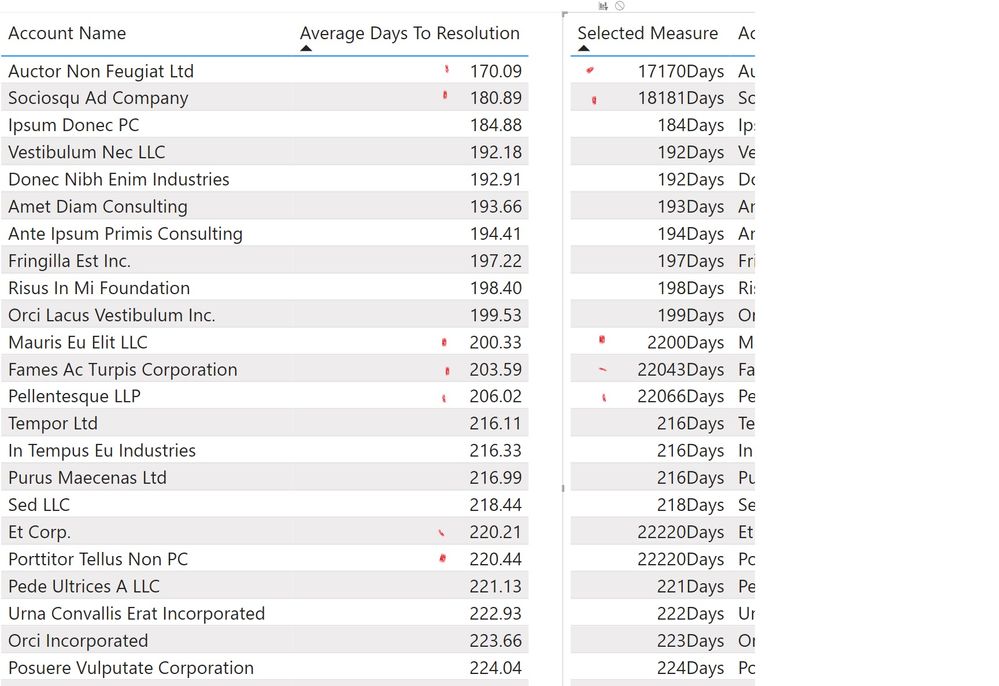
As can been seen here, whenever the whole number 'part' of the decimal has a Zero (0) located anywhere in it the Selected Measure result is wrong.  The right table should just be returning the integer of the left tables decimal number.
 

interger.jpg

The measure on the left table is ... 


ROUND(AVERAGE('Case Management'[Days to Resolution]),2)
 
This is the exact measure in the calculation group in the right table.
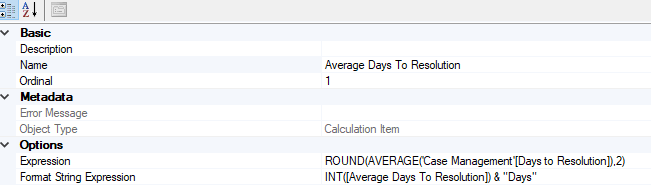
The format string expression for the calculation group is...
 
INT([Average Days To Resolution]) & "Days"
 As can be seen below:
 
fraza_0-1643757060168.png


I have been going round in circles for sometime now. 


Anyone know why this is or how to fix it?

1 ACCEPTED SOLUTION
TheoC
Community Champion
Community Champion

Hi @fraza 


INT is used for whole numbers (https://docs.microsoft.com/en-us/dax/int-function-dax) which is likely causing the issue.  If you cannot use ROUND to replace INT, can you use FIXED (https://docs.microsoft.com/en-us/dax/fixed-function-dax)?


Cheers.

Theo

If I have posted a response that resolves your question, please accept it as a solution to formally close the post.

Also, if you are as passionate about Power BI, DAX and data as I am, please feel free to reach out if you have any questions, queries, or if you simply want to connect and talk to another data geek!

Want to connect?www.linkedin.com/in/theoconias

View solution in original post

2 REPLIES 2
fraza
Frequent Visitor

Thanks for that TheoC. 


Seemingly I cant use my DAX formated expression as the format string expression in tabular editor.


Cheers.

TheoC
Community Champion
Community Champion

Hi @fraza 


INT is used for whole numbers (https://docs.microsoft.com/en-us/dax/int-function-dax) which is likely causing the issue.  If you cannot use ROUND to replace INT, can you use FIXED (https://docs.microsoft.com/en-us/dax/fixed-function-dax)?


Cheers.

Theo

If I have posted a response that resolves your question, please accept it as a solution to formally close the post.

Also, if you are as passionate about Power BI, DAX and data as I am, please feel free to reach out if you have any questions, queries, or if you simply want to connect and talk to another data geek!

Want to connect?www.linkedin.com/in/theoconias

Helpful resources

Announcements
FabCon and SQLCon Barcelona 2026

FabCon & SQLCon – Barcelona 2026

Join us in Barcelona for FabCon and SQLCon, the Fabric, Power BI, SQL, and AI community event. Save €200 with code FABCMTY200.

60 days of Data Days Carousel

Data Days 2026

Join Fabric Data Days 2026: 60 days of free live/on-demand sessions, challenges, study groups, and certification opportunities.

Power BI DataViz World Championships carousel

Power BI DataViz World Championships - June 2026

A new Power BI DataViz World Championship is coming this June! Don't miss out on submitting your entry.