Join us at FabCon Atlanta from March 16 - 20, 2026, for the ultimate Fabric, Power BI, AI and SQL community-led event. Save $200 with code FABCOMM.
Register now!The Power BI Data Visualization World Championships is back! Get ahead of the game and start preparing now! Learn more
Hi,
I have some revenue data and am struggling to calculate the variance of this. The data is formatted as below:
| Forecast | Type | Q1 | Q2 | Q3 | Q4 |
| FY19 Budget | Total | $$$ | $$ | $$$ | $ |
| FY19 Estimate 1 | Total | $$ | $$ | $$$ | $ |
| FY19 Estimate 2 | Total | $$ | $$$ | $$$$ | $$ |
| FY19 Estimate 3 | Total | $$$ | $ | $$$ | $ |
I want to be able to calculate the variance between any of the values in that table across the quarters against the FY19 Budget (i.e. be able to visualise and then conditionally format the variance between FY19 Estimate 1 and Budget, Estimate 2 and Budget and Estimate 3 and Budget (But also have ability to change it to be FY19 Estimate 3 against Estimate 1).
What is the best way to do this? Any help much appreciated.
Solved! Go to Solution.
Hi @tobiasmcbride ,
First, add a [index] column in Edit Queries;
Second, create a measures for Q1, Q2, Q3:
Measure for Q1, Other similar:
variance _Q1 =
VAR x =
CALCULATE(
MAX(Sheet2[Q1]),
FILTER(
Sheet2,
Sheet2[Index] = MIN(Sheet2[Index])
)
)
VAR y =
CALCULATE(
MAX(Sheet2[Q1]),
FILTER(
Sheet2,
Sheet2[Index] = MAX(Sheet2[Index])
)
)
RETURN
DIVIDE(
x-y,
y
)
Best regards,
Lionel Chen
If this post helps, then please consider Accept it as the solution to help the other members find it more quickly.
Hi @tobiasmcbride ,
First, add a [index] column in Edit Queries;
Second, create a measures for Q1, Q2, Q3:
Measure for Q1, Other similar:
variance _Q1 =
VAR x =
CALCULATE(
MAX(Sheet2[Q1]),
FILTER(
Sheet2,
Sheet2[Index] = MIN(Sheet2[Index])
)
)
VAR y =
CALCULATE(
MAX(Sheet2[Q1]),
FILTER(
Sheet2,
Sheet2[Index] = MAX(Sheet2[Index])
)
)
RETURN
DIVIDE(
x-y,
y
)
Best regards,
Lionel Chen
If this post helps, then please consider Accept it as the solution to help the other members find it more quickly.
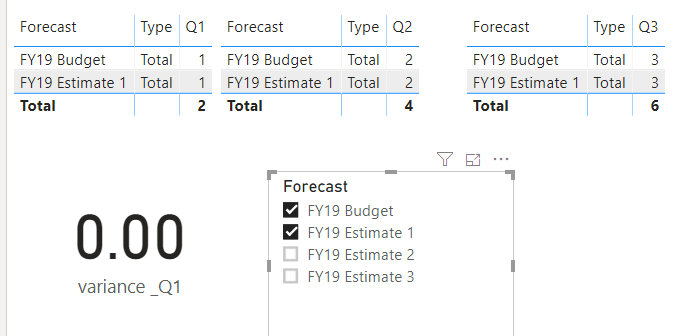
With the help of slicer/s you have control the calculation. Please find example
The Power BI Data Visualization World Championships is back! Get ahead of the game and start preparing now!
| User | Count |
|---|---|
| 40 | |
| 35 | |
| 34 | |
| 31 | |
| 28 |
| User | Count |
|---|---|
| 137 | |
| 102 | |
| 68 | |
| 66 | |
| 64 |