cancel
Showing results for 
Search instead for 
Did you mean: 

The Power BI Data Visualization World Championships is back! Get ahead of the game and start preparing now! Learn more

Reply
Anonymous
Not applicable

Calculating the no. tripled values within 12 weeks

Hello

I am currently investigating a dataset that contains the following columns below. The table refers to a series of assets that appear in a dataset if they have been verified to have failed inspection.

Asset IDDate of entry
AK-000102-03-2019
AK-001305-03-2020
AK-032117-03-2020
AK-000117-03-2020
AK-001321-03-2020
AK-001324-04-2020
AK-000130-03-2020

I'm trying to use DAX to create a new variable/measure that calculates the number of repeat errors. A repeat error would be defined as:

- The same asset (identified by Asset ID) failing three or more times...

- ... within a12-week period

Therefore, when examining the previous dataset, the AK-0013 asset made a repeat error, as it failed three times in a 12-week period, but the AK-0001 asset has zero repeat errors even if it failed three times separately, because the errors occurred over a period longer than 12 weeks.

I have used DAX several times before for different measurements and have always searched Google intensely before asking in the community (depending on the keywords). However, this is the first time I am perplexed and will gladly welcome you to any help and advice on how to create this measure! If you have any questions or require further elaboration please ask.

Thanks a lot

apb_123

1 ACCEPTED SOLUTION
v-kelly-msft
Community Support
Community Support

Hi @Anonymous ,


Create 2 measures as below:


Measure = 
var _totalrows=CALCULATE(COUNTROWS('Table'),FILTER(ALL('Table'),'Table'[Asset ID]=MAX('Table'[Asset ID])))
var _mindate=MINX(FILTER(ALL('Table'),'Table'[Asset ID]=MAX('Table'[Asset ID])&&'Table'[Date of entry]<MAX('Table'[Date of entry])),'Table'[Date of entry])
var c=DATEDIFF(_mindate,MAX('Table'[Date of entry]),WEEK)
Return
 IF(_totalrows>=3 && c<12,"repeat error",BLANK())
Repeat error = 
var a =CALCULATE(COUNTROWS('Table'),FILTER(ALL('Table'),'Table'[Asset ID]=MAX('Table'[Asset ID])))
var b=CALCULATE(COUNTROWS('Table'),FILTER(ALL('Table'),'Table'[Asset ID]=MAX('Table'[Asset ID])&&'Table'[Measure]<>BLANK()))
var c=IF(a>=3&&a-b<2,1,0) Return
SUMX(FILTER(ALL('Table'),'Table'[Asset ID]=MAX('Table'[Asset ID])),c)


Finally you will see:
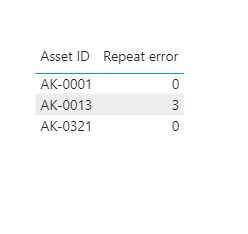
Annotation 2020-05-05 173139.png

For the related .pbix file,pls click here.


Best Regards,
Kelly
Did I answer your question? Mark my post as a solution!

View solution in original post

2 REPLIES 2
v-kelly-msft
Community Support
Community Support

Hi @Anonymous ,


Create 2 measures as below:


Measure = 
var _totalrows=CALCULATE(COUNTROWS('Table'),FILTER(ALL('Table'),'Table'[Asset ID]=MAX('Table'[Asset ID])))
var _mindate=MINX(FILTER(ALL('Table'),'Table'[Asset ID]=MAX('Table'[Asset ID])&&'Table'[Date of entry]<MAX('Table'[Date of entry])),'Table'[Date of entry])
var c=DATEDIFF(_mindate,MAX('Table'[Date of entry]),WEEK)
Return
 IF(_totalrows>=3 && c<12,"repeat error",BLANK())
Repeat error = 
var a =CALCULATE(COUNTROWS('Table'),FILTER(ALL('Table'),'Table'[Asset ID]=MAX('Table'[Asset ID])))
var b=CALCULATE(COUNTROWS('Table'),FILTER(ALL('Table'),'Table'[Asset ID]=MAX('Table'[Asset ID])&&'Table'[Measure]<>BLANK()))
var c=IF(a>=3&&a-b<2,1,0) Return
SUMX(FILTER(ALL('Table'),'Table'[Asset ID]=MAX('Table'[Asset ID])),c)


Finally you will see:

Annotation 2020-05-05 173139.png

For the related .pbix file,pls click here.


Best Regards,
Kelly
Did I answer your question? Mark my post as a solution!
amitchandak
Super User
Super User

@Anonymous 

With help of date table and week Rank you can get 12 week data like this

Last 12 week Sales = CALCULATE(Count(Table[Asset ID]),FILTER(all('Date'),'Date'[Week Rank]>=min('Date'[Week Rank])-12 && 'Date'[Week Rank]<=max('Date'[Week Rank])))


You can filter on > 3


Refer, how to deal with the week

https://community.powerbi.com/t5/Community-Blog/Week-Is-Not-So-Weak-WTD-Last-WTD-and-This-Week-vs-Last-Week/ba-p/1051123

https://community.powerbi.com/t5/Webinars-and-Video-Gallery/PowerBI-Time-Intelligence-Calendar-WTD-YTD-LYTD-Week-Over-Week/m-p/1051626#M184

Share with Power BI Enthusiasts: Full Power BI Video (20 Hours) YouTube
Microsoft Fabric Series 60+ Videos YouTube
Microsoft Fabric Hindi End to End YouTube

Helpful resources

Announcements
Power BI DataViz World Championships

Power BI Dataviz World Championships

The Power BI Data Visualization World Championships is back! Get ahead of the game and start preparing now!

December 2025 Power BI Update Carousel

Power BI Monthly Update - December 2025

Check out the December 2025 Power BI Holiday Recap!

FabCon Atlanta 2026 carousel

FabCon Atlanta 2026

Join us at FabCon Atlanta, March 16-20, for the ultimate Fabric, Power BI, AI and SQL community-led event. Save $200 with code FABCOMM.