cancel
Showing results for 
Search instead for 
Did you mean: 

The Power BI Data Visualization World Championships is back! Get ahead of the game and start preparing now! Learn more

Reply
JuliaGumina
Frequent Visitor

Calculating the amount of clients by status by particular time period.

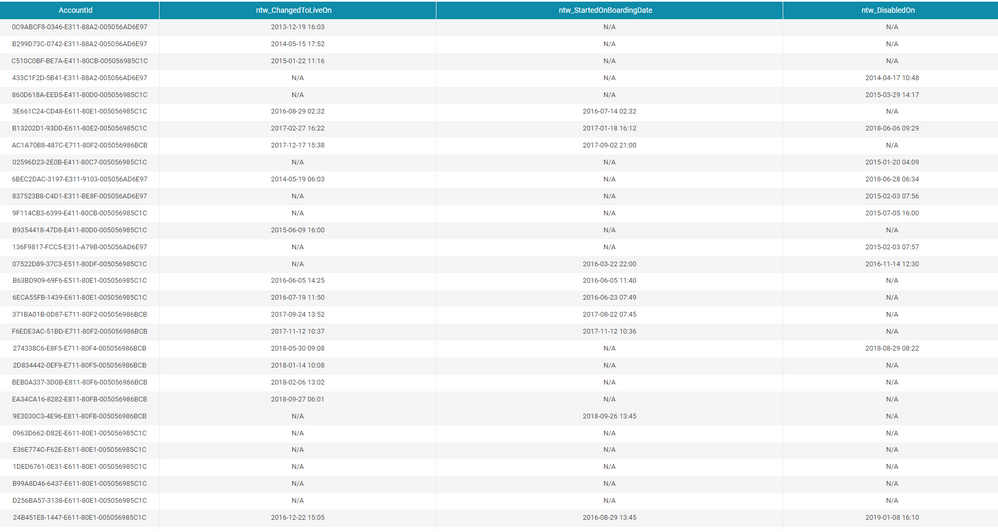
I have a table of clients in different statuses (Live,OnBoarding, Disabled). For each status I have a date (if it has happened). What I want to get is to see how many clients were in this status for each month. For instance, if I have 2 clients opened in March, 2 in April and 2 in May, I need to see 6 clients in May. But it is not cumulative cause can happen that someone was moved to the status disabled in May. Actually I am simply checking how many clients were not in each status for the particular Month.111111111111111.PNG

In SQL I use the following CASE to define each type of the client and get amount by month: count( case when ChangedToLiveOn<=last_day_of_month and (DisabledOn>last_day_of_month OR DisabledOn is null) then 1 end) as Clients_Live, count(case when StartedOnBoardingDate<=last_day_of_month and (ChangedToLiveOn>last_day_of_month OR ChangedToLiveOn is null) and (DisabledOn>last_day_of_month OR DisabledOn is null) then 1 end) OnBoarding. I also via script defined the last date of month for each client for each month. So every month I check  these conditions. The question how can I do it in Power BI.

4 REPLIES 4
v-frfei-msft
Community Support
Community Support

Hi @JuliaGumina,


To create a calculated column as below. If it doesn't meet your requirement, kindly share your pbix to me. You can upload your file to One Drive and share the link here.


Clients_Live =
IF (
    Table[case when ChangedToLiveOn] <= last_day_of_month
        && Table[DisabledOn] > last_day_of_month
        || DisabledOn = BLANK (),
    1,
    BLANK ()
)

Regards,

Frank


Community Support Team _ Frank
If this post helps, then please consider Accept it as the solution to help the others find it more quickly.

I tried to create a procedure. It works in SQL server but when I try to move it to Power BI as a query it returns only the last month. How can I move it to Power BI?

DECLARE @date DATETIME ,
@DAtediffM INT;

SET @date = GETDATE()
SET @DatediffM = 0

WHILE @DatediffM >= -12
BEGIN

DECLARE @last_day_of_month DATETIME
SET @last_day_of_month= EOMONTH ( @date, @DatediffM  )
SET @DatediffM = @DatediffM - 1

SELECT @last_day_of_month, 
COUNT(CASE WHEN ntw_ChangedToLiveOn<=@last_day_of_month and (ntw_DisabledOn>@last_day_of_month OR ntw_DisabledOn is null)  then 1 END) 
+  COUNT(CASE WHEN ntw_StartedOnBoardingDate<=@date and (ntw_ChangedToLiveOn>@last_day_of_month OR ntw_ChangedToLiveOn is null) and  (ntw_DisabledOn>@last_day_of_month OR ntw_DisabledOn is null)  then 1 END) AS Total ,
   COUNT(CASE WHEN ntw_ChangedToLiveOn<=@last_day_of_month and (ntw_DisabledOn>@last_day_of_month OR ntw_DisabledOn is null)   then 1 end) AS Clients_Live,
   COUNT(CASE WHEN ntw_StartedOnBoardingDate<=@date and (ntw_ChangedToLiveOn>@last_day_of_month OR ntw_ChangedToLiveOn is null) and 
(ntw_DisabledOn>@last_day_of_month OR ntw_DisabledOn is null)  then 1 end) OnBoarding,
	  
FROM AccountBase 

WHERE  ((DATEDIFF(month,ntw_ChangedToLiveOn, GETDATE()) <=12  OR ntw_ChangedToLiveOn is null) or(DATEDIFF(month,ntw_DisabledOn, GETDATE()) <=12  OR ntw_DisabledOn is null))  


Print @last_day_of_month
END

Hi Frank!

It is not that simple. First I need to create the columnt: last day of the month.

But what is the last day? It should be the last day of each month of the period.

That means that if I take a period of 12 month I need to check the date vs the last day of each of 12 months.


It is not  problem to write the if statement. the problem is with this last_day_of_month column.

I need to make a kind of snapshot that will reflect the situation as it was several month ago.

Thank you!

I tried to create a procedure. It works in SQL server but when I try to move it to Power BI as a query it returns only the last month
 
DECLARE @date DATETIME ,
@DAtediffM INT;

SET @date = GETDATE()
SET @DatediffM = 0

WHILE @DatediffM >= -12
BEGIN

DECLARE @last_day_of_month DATETIME
SET @last_day_of_month= EOMONTH ( @date, @DatediffM  )
SET @DatediffM = @DatediffM - 1

SELECT @last_day_of_month, 
COUNT(CASE WHEN ntw_ChangedToLiveOn<=@last_day_of_month and (ntw_DisabledOn>@last_day_of_month OR ntw_DisabledOn is null)  then 1 END) 
+  COUNT(CASE WHEN ntw_StartedOnBoardingDate<=@date and (ntw_ChangedToLiveOn>@last_day_of_month OR ntw_ChangedToLiveOn is null) and  (ntw_DisabledOn>@last_day_of_month OR ntw_DisabledOn is null)  then 1 END) AS Total ,
   COUNT(CASE WHEN ntw_ChangedToLiveOn<=@last_day_of_month and (ntw_DisabledOn>@last_day_of_month OR ntw_DisabledOn is null)   then 1 end) AS Clients_Live,
   COUNT(CASE WHEN ntw_StartedOnBoardingDate<=@date and (ntw_ChangedToLiveOn>@last_day_of_month OR ntw_ChangedToLiveOn is null) and 
(ntw_DisabledOn>@last_day_of_month OR ntw_DisabledOn is null)  then 1 end) OnBoarding,
	  
FROM AccountBase 

WHERE  ((DATEDIFF(month,ntw_ChangedToLiveOn, GETDATE()) <=12  OR ntw_ChangedToLiveOn is null) or(DATEDIFF(month,ntw_DisabledOn, GETDATE()) <=12  OR ntw_DisabledOn is null))  


Print @last_day_of_month
END

How can I move it to Power BI?


Helpful resources

Announcements
November Power BI Update Carousel

Power BI Monthly Update - November 2025

Check out the November 2025 Power BI update to learn about new features.

Fabric Data Days Carousel

Fabric Data Days

Advance your Data & AI career with 50 days of live learning, contests, hands-on challenges, study groups & certifications and more!

FabCon Atlanta 2026 carousel

FabCon Atlanta 2026

Join us at FabCon Atlanta, March 16-20, for the ultimate Fabric, Power BI, AI and SQL community-led event. Save $200 with code FABCOMM.

Top Kudoed Authors