Join us at FabCon Atlanta from March 16 - 20, 2026, for the ultimate Fabric, Power BI, AI and SQL community-led event. Save $200 with code FABCOMM.
Register now!Get Fabric Certified for FREE during Fabric Data Days. Don't miss your chance! Request now
Hi folks,
Please can you take a look at the below and see if you can help me resolve this issue, If you need anymore details please let me know.
Problem Statement: I'm encountering an issue with a DAX measure in my Power BI model where it's not returning the expected result of 5 (Max Capacity) when an employee has no work assigned to them that week.
Background:
What I've Tried:
Example of the Measure: Here is the DAX measure that I've been using:
Remaining Capacity =
VAR MaxCapacityTable = SUMMARIZE(DIM_Team_Details, DIM_Team_Details[EmployeeID], DIM_Team_Details[Max Capacity], DIM_Team_Details[Start Date], DIM_Team_Details[End Date])
RETURN
SUMX(
ADDCOLUMNS(
SUMMARIZE(
F_Capacity,
F_Capacity[EmployeeID],
DIM_Calendar[Week_Commencing]
),
"Max Capacity",
MAXX(FILTER(MaxCapacityTable, F_Capacity[EmployeeID] = DIM_Team_Details[EmployeeID]), DIM_Team_Details[Max Capacity]),
"Start Date",
MINX(FILTER(MaxCapacityTable, F_Capacity[EmployeeID] = DIM_Team_Details[EmployeeID]), DIM_Team_Details[Start Date]),
"End Date",
MAXX(FILTER(MaxCapacityTable, F_Capacity[EmployeeID] = DIM_Team_Details[EmployeeID]), DIM_Team_Details[End Date])
),
IF(
[Start Date] > [Week_Commencing] || [End Date] < [Week_Commencing],
0,
IF(
ISBLANK([Consumed Days]) || [Consumed Days] = 0,
5,
IF(
[Consumed Days] <= [Max Capacity],
[Max Capacity] - [Consumed Days],
0
)
)
)
)
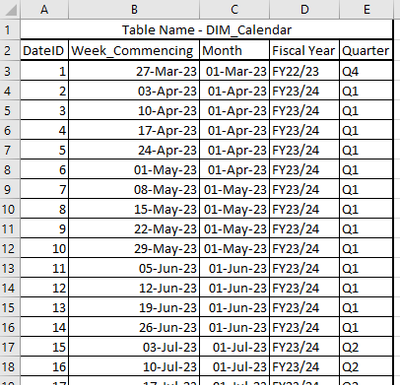
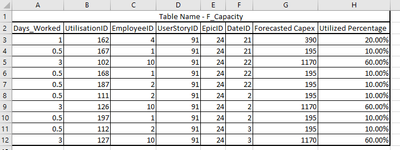
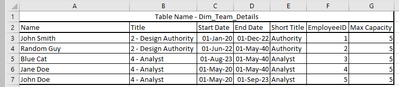
Below are the tables I am using
Finally this is the script that I am using for the measure Consumed Days
Consumed Days =
SUMX(
SUMMARIZE(
F_Capacity,
F_Capacity[EmployeeID],
DIM_Calendar[Week_Commencing],
"Consumed Days", SUM(F_Capacity[Days_Worked])
),
[Consumed Days]
)
Thank you in advance for taking a look at this.
Solved! Go to Solution.
FYI - this script manages to resolve the question
Remain Cap Test =
VAR CurrentDate = MAX(DIM_Calendar[Week_Commencing])
VAR CurrentDateID = LOOKUPVALUE(DIM_Calendar[DateID],DIM_Calendar[Week_Commencing],CALCULATE(MAX(DIM_Calendar[Week_Commencing]), FILTER(DIM_Calendar, DIM_Calendar[Week_Commencing] <= CurrentDate)))
VAR WeekCount = CALCULATE(COUNTA(DIM_Calendar[DateID]))
VAR MaxCapacity =
CALCULATE(SUM(Dim_Team_Details[Max Capacity]),
FILTER(
Dim_Team_Details,
CurrentDate >= Dim_Team_Details[Start Date] &&
CurrentDate <= Dim_Team_Details[End Date]
)
) * WeekCount
VAR FilteredCapacity =
CALCULATE(SUM(F_Capacity[Days_Worked]),
FILTER(
F_Capacity,
F_Capacity[DateID] <= CurrentDateID
)
)
RETURN
MaxCapacity - FilteredCapacity
FYI - this script manages to resolve the question
Remain Cap Test =
VAR CurrentDate = MAX(DIM_Calendar[Week_Commencing])
VAR CurrentDateID = LOOKUPVALUE(DIM_Calendar[DateID],DIM_Calendar[Week_Commencing],CALCULATE(MAX(DIM_Calendar[Week_Commencing]), FILTER(DIM_Calendar, DIM_Calendar[Week_Commencing] <= CurrentDate)))
VAR WeekCount = CALCULATE(COUNTA(DIM_Calendar[DateID]))
VAR MaxCapacity =
CALCULATE(SUM(Dim_Team_Details[Max Capacity]),
FILTER(
Dim_Team_Details,
CurrentDate >= Dim_Team_Details[Start Date] &&
CurrentDate <= Dim_Team_Details[End Date]
)
) * WeekCount
VAR FilteredCapacity =
CALCULATE(SUM(F_Capacity[Days_Worked]),
FILTER(
F_Capacity,
F_Capacity[DateID] <= CurrentDateID
)
)
RETURN
MaxCapacity - FilteredCapacity
are you able to supply the data in text format?
Proud to be a Super User!
please see data below.
| Table Name - F_Capacity | |||||||
| Days_Worked | UtilisationID | EmployeeID | UserStoryID | EpicID | DateID | Forecasted Capex | Utilized Percentage |
| 1 | 162 | 4 | 91 | 24 | 21 | 390 | 20.00% |
| 0.5 | 167 | 1 | 91 | 24 | 21 | 195 | 10.00% |
| 3 | 102 | 10 | 91 | 24 | 22 | 1170 | 60.00% |
| 0.5 | 168 | 1 | 91 | 24 | 22 | 195 | 10.00% |
| 0.5 | 187 | 2 | 91 | 24 | 22 | 195 | 10.00% |
| 0.5 | 111 | 2 | 91 | 24 | 2 | 195 | 10.00% |
| 3 | 126 | 10 | 91 | 24 | 2 | 1170 | 60.00% |
| 0.5 | 197 | 1 | 91 | 24 | 2 | 195 | 10.00% |
| 0.5 | 112 | 2 | 91 | 24 | 3 | 195 | 10.00% |
| 3 | 127 | 10 | 91 | 24 | 3 | 1170 | 60.00% |
| Table Name - Dim_Team_Details | ||||||
| Name | Title | Start Date | End Date | Short Title | EmployeeID | Max Capacity |
| John Smith | 2 - Design Authority | 01-Jan-20 | 01-Dec-22 | Authority | 1 | 5 |
| Random Guy | 2 - Design Authority | 01-Jun-22 | 01-May-40 | Authority | 2 | 5 |
| Blue Cat | 4 - Analyst | 01-Aug-23 | 01-May-40 | Analyst | 3 | 5 |
| Jane Doe | 4 - Analyst | 01-May-20 | 01-May-40 | Analyst | 4 | 5 |
| John Doe | 4 - Analyst | 01-May-20 | 01-Sep-23 | Analyst | 5 | 5 |
Table Name - DIM_Calendar | ||||
| DateID | Week_Commencing | Month | Fiscal Year | Quarter |
| 1 | 27-Mar-23 | 01-Mar-23 | FY22/23 | Q4 |
| 2 | 03-Apr-23 | 01-Apr-23 | FY23/24 | Q1 |
| 3 | 10-Apr-23 | 01-Apr-23 | FY23/24 | Q1 |
| 4 | 17-Apr-23 | 01-Apr-23 | FY23/24 | Q1 |
| 5 | 24-Apr-23 | 01-Apr-23 | FY23/24 | Q1 |
| 6 | 01-May-23 | 01-Apr-23 | FY23/24 | Q1 |
| 7 | 08-May-23 | 01-May-23 | FY23/24 | Q1 |
| 8 | 15-May-23 | 01-May-23 | FY23/24 | Q1 |
| 9 | 22-May-23 | 01-May-23 | FY23/24 | Q1 |
| 10 | 29-May-23 | 01-May-23 | FY23/24 | Q1 |
| 11 | 05-Jun-23 | 01-Jun-23 | FY23/24 | Q1 |
| 12 | 12-Jun-23 | 01-Jun-23 | FY23/24 | Q1 |
| 13 | 19-Jun-23 | 01-Jun-23 | FY23/24 | Q1 |
| 14 | 26-Jun-23 | 01-Jun-23 | FY23/24 | Q1 |
| 15 | 03-Jul-23 | 01-Jul-23 | FY23/24 | Q2 |
| 16 | 10-Jul-23 | 01-Jul-23 | FY23/24 | Q2 |
| 17 | 17-Jul-23 | 01-Jul-23 | FY23/24 | Q2 |
| 18 | 24-Jul-23 | 01-Jul-23 | FY23/24 | Q2 |
| 19 | 31-Jul-23 | 01-Jul-23 | FY23/24 | Q2 |
| 20 | 07-Aug-23 | 01-Aug-23 | FY23/24 | Q2 |
| 21 | 14-Aug-23 | 01-Aug-23 | FY23/24 | Q2 |
| 22 | 21-Aug-23 | 01-Aug-23 | FY23/24 | Q2 |
| 23 | 28-Aug-23 | 01-Aug-23 | FY23/24 | Q2 |
| 24 | 04-Sep-23 | 01-Sep-23 | FY23/24 | Q2 |
| 25 | 11-Sep-23 | 01-Sep-23 | FY23/24 | Q2 |
| 26 | 18-Sep-23 | 01-Sep-23 | FY23/24 | Q2 |
| 27 | 25-Sep-23 | 01-Sep-23 | FY23/24 | Q2 |
| 28 | 02-Oct-23 | 01-Oct-23 | FY23/24 | Q3 |
Check out the November 2025 Power BI update to learn about new features.
Advance your Data & AI career with 50 days of live learning, contests, hands-on challenges, study groups & certifications and more!