Get Fabric or SQL Certified for Free.
Get certified for free when you join Fabric Data Days 2026 and dive into Fabric, Power BI, SQL, AI, and other essential data skills.
Join now- Power BI forums
- Get Help with Power BI
- Desktop
- Service
- Report Server
- Power Query
- Mobile Apps
- Developer
- DAX Commands and Tips
- Custom Visuals Development Discussion
- Health and Life Sciences
- Power BI Spanish forums
- Translated Spanish Desktop
- Training and Consulting
- Instructor Led Training
- Dashboard in a Day for Women, by Women
- Galleries
- Data Stories Gallery
- Themes Gallery
- Contests Gallery
- QuickViz Gallery
- Quick Measures Gallery
- Visual Calculations Gallery
- Notebook Gallery
- Translytical Task Flow Gallery
- TMDL Gallery
- R Script Showcase
- Webinars and Video Gallery
- Ideas
- Custom Visuals Ideas (read-only)
- Issues
- Issues
- Events
- Upcoming Events
Data Days is here! Join us now for 60+ days of learning, challenges, and connection. Learn more
- Power BI forums
- Forums
- Get Help with Power BI
- Desktop
- Calculating previous values
- Subscribe to RSS Feed
- Mark Topic as New
- Mark Topic as Read
- Float this Topic for Current User
- Bookmark
- Subscribe
- Printer Friendly Page

- Mark as New
- Bookmark
- Subscribe
- Mute
- Subscribe to RSS Feed
- Permalink
- Report Inappropriate Content
Calculating previous values
A super user - smpa01 has helped me previously with this but I need additional help..
I am trying to calculate values for "Net Hires" the last two weeks, as you can see in my screen shot (the calculation is showing wrong because, I assume, it does not consider the newly added colums - Region and location)
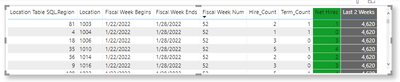
How do I ensure that when the page is being filtered, values from this measure change accordingly? I have few additional columns (Location and Region) in the dataset can be filtered by but I cannot figure out where I should add them to the statement. Are you able to help me?
Last 2 Weeks =
| Location Table SQL.Division | Location | Fiscal Week Begins | Fiscal Week Ends | Fiscal Week Num | Hire_Count | Term_Count | Net Hires |
| WEST | 10 | 12/25/2021 0:00 | 12/31/2021 0:00 | 48 | 0 | 2 | -2 |
| WEST | 11 | 1/1/2022 0:00 | 1/7/2022 0:00 | 49 | 0 | 3 | -3 |
| WEST | 12 | 1/8/2022 0:00 | 1/14/2022 0:00 | 50 | 1 | 0 | 1 |
| WEST | 10 | 1/15/2022 0:00 | 1/21/2022 0:00 | 51 | 4 | 1 | 3 |
| WEST | 10 | 1/22/2022 0:00 | 1/28/2022 0:00 | 52 | 2 | 1 | 1 |
| WEST | 10 | 1/29/2022 0:00 | 2/4/2022 0:00 | 1 | 0 | 1 | -1 |
| WEST | 10 | 2/5/2022 0:00 | 2/11/2022 0:00 | 2 | 1 | 0 | 1 |
| WEST | 1050 | 12/25/2021 0:00 | 12/31/2021 0:00 | 48 | 1 | 2 | -1 |
| WEST | 50 | 1/1/2022 0:00 | 1/7/2022 0:00 | 49 | 0 | 2 | -2 |


- Mark as New
- Bookmark
- Subscribe
- Mute
- Subscribe to RSS Feed
- Permalink
- Report Inappropriate Content
HI @Anonymous
You used ALL in the formula that blocked all filters, try this:
Last 2 Weeks =
VAR _W1 =
    MAXA ( 'Terms & Hires SQL'[Fiscal Week Ends] )
VAR _W2 =
    CALCULATE (
        MAXA ( 'Terms & Hires SQL'[Fiscal Week Ends] ),
        FILTER (
            ALL ( 'Terms & Hires SQL' ),
            'Terms & Hires SQL'[Fiscal Week Ends] < week
        )
    )
VAR cal =
    CALCULATE (
        SUM ( 'Terms & Hires SQL'[Net Hires] ),
        FILTER (
            ALL ( 'Terms & Hires SQL'[Net Hires] ),
            'Terms & Hires SQL'[Fiscal Week Ends] >= _W2
                && 'Terms & Hires SQL'[Fiscal Week Ends] <= _W1
        )
    )
RETURN
    cal
https://docs.microsoft.com/en-us/dax/all-function-dax
Check this : https://www.vahiddm.com/post/weekly-time-intelligence-dax
If this post helps, please consider accepting it as the solution to help the other members find it more quickly.
Appreciate your Kudos!!
LinkedIn: www.linkedin.com/in/vahid-dm/
- Mark as New
- Bookmark
- Subscribe
- Mute
- Subscribe to RSS Feed
- Permalink
- Report Inappropriate Content
@VahidDM does not seem to work, trying to tinker with it now...
Last 2 Weeks =
VAR _W1 =
MAXA ( 'Terms & Hires SQL'[Fiscal Week Ends] )
VAR _W2 =
CALCULATE (
MAXA ( 'Terms & Hires SQL'[Fiscal Week Ends] ),
FILTER (
ALL ( 'Terms & Hires SQL' ),
'Terms & Hires SQL'[Fiscal Week Ends] < week (This only lets me enter in _W1 as the variable)
)
)
VAR cal =
CALCULATE (
SUM ( 'Terms & Hires SQL'[Net Hires] ),
FILTER (
ALL ( 'Terms & Hires SQL'[Net Hires] ),
'Terms & Hires SQL'[Fiscal Week Ends] >= _W2
&& 'Terms & Hires SQL'[Fiscal Week Ends] <= _W1
)
)
RETURN
cal
- Mark as New
- Bookmark
- Subscribe
- Mute
- Subscribe to RSS Feed
- Permalink
- Report Inappropriate Content
@Anonymous
My bad! try this:
Last 2 Weeks =
VAR _W1 =
    MAXA ( 'Terms & Hires SQL'[Fiscal Week Ends] )
VAR _W2 =
    CALCULATE (
        MAXA ( 'Terms & Hires SQL'[Fiscal Week Ends] ),
        FILTER (
            ALL ( 'Terms & Hires SQL' ),
            'Terms & Hires SQL'[Fiscal Week Ends] < _W1
        )
    )
VAR cal =
    CALCULATE (
        SUM ( 'Terms & Hires SQL'[Net Hires] ),
        FILTER (
            ALL ( 'Terms & Hires SQL'[Net Hires] ),
            'Terms & Hires SQL'[Fiscal Week Ends] >= _W2
                && 'Terms & Hires SQL'[Fiscal Week Ends] <= _W1
        )
    )
RETURN
    cal
If this post helps, please consider accepting it as the solution to help the other members find it more quickly.
Appreciate your Kudos!!
LinkedIn: www.linkedin.com/in/vahid-dm/
- Mark as New
- Bookmark
- Subscribe
- Mute
- Subscribe to RSS Feed
- Permalink
- Report Inappropriate Content
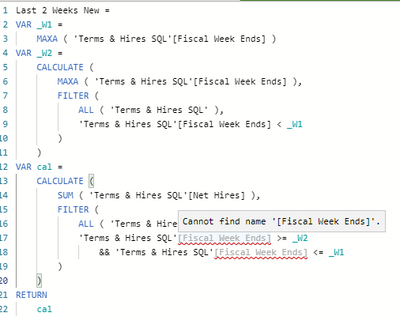
Does not seem to work
- Mark as New
- Bookmark
- Subscribe
- Mute
- Subscribe to RSS Feed
- Permalink
- Report Inappropriate Content
@Anonymous
Can you share your PBIX file with me?
Share that on https://wetransfer.com/ and past the link here
Appreciate your Kudos!!
LinkedIn: www.linkedin.com/in/vahid-dm/
- Mark as New
- Bookmark
- Subscribe
- Mute
- Subscribe to RSS Feed
- Permalink
- Report Inappropriate Content
I cannot, I am sorry, it's all coming from SQL and there is a lot of sensitve data but here is a sample of the data
| Location Table SQL.Division | Location | Fiscal Week Begins | Fiscal Week Ends | Fiscal Week Num | Hire_Count | Term_Count | Net Hires |
| WEST | 10 | 12/25/2021 0:00 | 12/31/2021 0:00 | 48 | 0 | 2 | -2 |
| WEST | 11 | 1/1/2022 0:00 | 1/7/2022 0:00 | 49 | 0 | 3 | -3 |
| WEST | 12 | 1/8/2022 0:00 | 1/14/2022 0:00 | 50 | 1 | 0 | 1 |
| WEST | 10 | 1/15/2022 0:00 | 1/21/2022 0:00 | 51 | 4 | 1 | 3 |
| WEST | 10 | 1/22/2022 0:00 | 1/28/2022 0:00 | 52 | 2 | 1 | 1 |
| WEST | 10 | 1/29/2022 0:00 | 2/4/2022 0:00 | 1 | 0 | 1 | -1 |
| WEST | 10 | 2/5/2022 0:00 | 2/11/2022 0:00 | 2 | 1 | 0 | 1 |
| WEST | 1050 | 12/25/2021 0:00 | 12/31/2021 0:00 | 48 | 1 | 2 | -1 |
| WEST | 50 | 1/1/2022 0:00 | 1/7/2022 0:00 | 49 | 0 | 2 | -2 |
- Mark as New
- Bookmark
- Subscribe
- Mute
- Subscribe to RSS Feed
- Permalink
- Report Inappropriate Content
Hi @Anonymous
Try this:
Last 2 Weeks =
VAR _W1 =
    MAX ( 'Terms & Hires SQL'[Fiscal Week Ends] )
VAR _W2 =
    CALCULATE (
        MAX ( 'Terms & Hires SQL'[Fiscal Week Ends] ),
        FILTER (
            ALL ( 'Terms & Hires SQL' ),
            'Terms & Hires SQL'[Fiscal Week Ends] < _W1
        )
    )
VAR cal =
    CALCULATE (
        SUM ( 'Terms & Hires SQL'[Net Hires] ),
        FILTER (
            ALL ( 'Terms & Hires SQL'),
            'Terms & Hires SQL'[Fiscal Week Ends] >= _W2
                && 'Terms & Hires SQL'[Fiscal Week Ends] <= _W1
        )
    )
RETURN
    _W2
In your sample Data the result is zero (11-Feb net Hire is 1 and 4-Feb it's -1)
If this post helps, please consider accepting it as the solution to help the other members find it more quickly.
Appreciate your Kudos!!
LinkedIn: www.linkedin.com/in/vahid-dm/
- Mark as New
- Bookmark
- Subscribe
- Mute
- Subscribe to RSS Feed
- Permalink
- Report Inappropriate Content
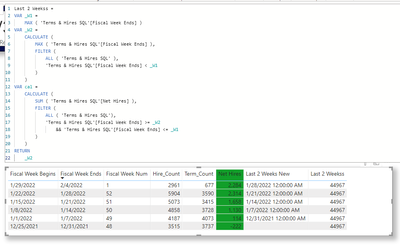
It's a date and if created as a new column and formatted as a number the values are the same
Helpful resources

Fabric Data Days 2026
Don't miss out on Data Days, June 15 through August 7. Learn Fabric, Power BI, SQL, AI and more.

Power BI Monthly Update - May 2026
Check out the May 2026 Power BI update to learn about new features.

Power BI DataViz World Championships - June 2026
A new Power BI DataViz World Championship is coming this June! Don't miss out on submitting your entry.

| User | Count |
|---|---|
| 23 | |
| 23 | |
| 21 | |
| 17 | |
| 13 |


| User | Count |
|---|---|
| 58 | |
| 50 | |
| 37 | |
| 29 | |
| 24 |


