FabCon is coming to Atlanta
Join us at FabCon Atlanta from March 16 - 20, 2026, for the ultimate Fabric, Power BI, AI and SQL community-led event. Save $200 with code FABCOMM.
Register now!- Power BI forums
- Get Help with Power BI
- Desktop
- Service
- Report Server
- Power Query
- Mobile Apps
- Developer
- DAX Commands and Tips
- Custom Visuals Development Discussion
- Health and Life Sciences
- Power BI Spanish forums
- Translated Spanish Desktop
- Training and Consulting
- Instructor Led Training
- Dashboard in a Day for Women, by Women
- Galleries
- Data Stories Gallery
- Themes Gallery
- Contests Gallery
- QuickViz Gallery
- Quick Measures Gallery
- Visual Calculations Gallery
- Notebook Gallery
- Translytical Task Flow Gallery
- TMDL Gallery
- R Script Showcase
- Webinars and Video Gallery
- Ideas
- Custom Visuals Ideas (read-only)
- Issues
- Issues
- Events
- Upcoming Events
The Power BI Data Visualization World Championships is back! Get ahead of the game and start preparing now! Learn more
- Power BI forums
- Forums
- Get Help with Power BI
- Desktop
- Re: Calculating percentile off of a measure
- Subscribe to RSS Feed
- Mark Topic as New
- Mark Topic as Read
- Float this Topic for Current User
- Bookmark
- Subscribe
- Printer Friendly Page

- Mark as New
- Bookmark
- Subscribe
- Mute
- Subscribe to RSS Feed
- Permalink
- Report Inappropriate Content
Calculating percentile off of a measure
I need to calculate a percentile off of a measure I created, but when I go to type the formula into the bar, the measure can't be selected for some reason. How should I proceed?
Solved! Go to Solution.


- Mark as New
- Bookmark
- Subscribe
- Mute
- Subscribe to RSS Feed
- Permalink
- Report Inappropriate Content
OK, I can walk you through it. Go to your modeling tab and click "New Table". Paste in a formula like the following to create your table:
Table = SUMMARIZE('My Table',[Associate],"PDH",[PDH])So, what you want is for "My Table" to be the table where you have your associate names/ids. You want to group by these, so replace [Associate] with the actual name of your associate column in "My Table". Then you specify a name for your column "PDH" and you put your PDH measure as the calculation for that column.
You should end up with a table of associates with their PDH metrics. Then, you can reference the PDH column in this new table for PERCENTILE function.
Follow on LinkedIn
@ me in replies or I'll lose your thread!!!
Instead of a Kudo, please vote for this idea
Become an expert!: Enterprise DNA
External Tools: MSHGQM
YouTube Channel!: Microsoft Hates Greg
Latest book!: DAX For Humans
DAX is easy, CALCULATE makes DAX hard...
- Mark as New
- Bookmark
- Subscribe
- Mute
- Subscribe to RSS Feed
- Permalink
- Report Inappropriate Content
Can you share your formula? Can you use the Show As | Percent of Grand Total?
Follow on LinkedIn
@ me in replies or I'll lose your thread!!!
Instead of a Kudo, please vote for this idea
Become an expert!: Enterprise DNA
External Tools: MSHGQM
YouTube Channel!: Microsoft Hates Greg
Latest book!: DAX For Humans
DAX is easy, CALCULATE makes DAX hard...
- Mark as New
- Bookmark
- Subscribe
- Mute
- Subscribe to RSS Feed
- Permalink
- Report Inappropriate Content
Can't use % of grand total, as it's a rate, and when I do that it shows values as over 100%.
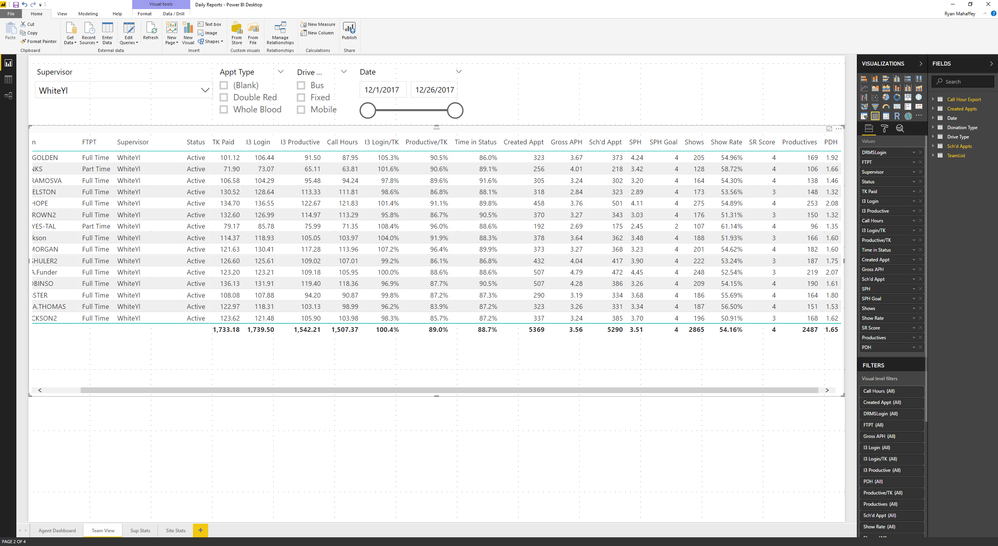
That's what the table looks like right now, and PDH is what I need to do the percentile off of. It's a custom measure.
- Mark as New
- Bookmark
- Subscribe
- Mute
- Subscribe to RSS Feed
- Permalink
- Report Inappropriate Content
Can you show the formula that you are trying to use? Are you certain it is a measure and not a calculated column? If it is a column and you are trying to use it in a measure, then you need to use an aggregation.
Follow on LinkedIn
@ me in replies or I'll lose your thread!!!
Instead of a Kudo, please vote for this idea
Become an expert!: Enterprise DNA
External Tools: MSHGQM
YouTube Channel!: Microsoft Hates Greg
Latest book!: DAX For Humans
DAX is easy, CALCULATE makes DAX hard...
- Mark as New
- Bookmark
- Subscribe
- Mute
- Subscribe to RSS Feed
- Permalink
- Report Inappropriate Content
The PDH measure formula:
PDH = sum('Sch''d Appts'[Productives])/sum('Call Hour Export'[Call Hours])
I'm trying to use PERCENTILE.EXC to calculate the percentile rank for each agent's PDH.
- Mark as New
- Bookmark
- Subscribe
- Mute
- Subscribe to RSS Feed
- Permalink
- Report Inappropriate Content
Ah, that explains it. So, the issue here is that PERCENTILE.EXC requires a column. So, what you are going to want to do is create a table as part of your measure in which you want to use PERCENTILE.EXC. So, use SUMMARIZE or ADDCOLUMN with a VAR statment to create your "temp table" essentially. I would imagine that you would summarize by agent and include your measure in this table. Then, you can use PERCENTILE.EXC against this column in your temp table. If you supply me some sample data, I can probably put together a more specific formula.
You could also use Create Table and put your SUMMARIZE or ADDCOLUMN in that and then just reference that table and stuff.
Follow on LinkedIn
@ me in replies or I'll lose your thread!!!
Instead of a Kudo, please vote for this idea
Become an expert!: Enterprise DNA
External Tools: MSHGQM
YouTube Channel!: Microsoft Hates Greg
Latest book!: DAX For Humans
DAX is easy, CALCULATE makes DAX hard...

- Mark as New
- Bookmark
- Subscribe
- Mute
- Subscribe to RSS Feed
- Permalink
- Report Inappropriate Content
when i define the temporary table with a variable and then pass that variable to the percentile function, it doesnt work. it appears that this approach only works with an iterator function (e.g. sumx, averagex, maxx)
For example, this doesnt work:
=VAR
Temp_Table = SUMMARIZE(ABSO_Table,ABSO_Table[Date],ABSO_Table[Sim_Run],"Column_4_Percentile",sum(ABSO_Table[RenewableGeneration]))
return
PERCENTILE.INC(Temp_Table[Column_4_Percentile],.05)
it says i need a base table to pass through as an argument to percentile.inc
interestingly though , if i use an iterator function, it works.
No problem with the following:
=VAR
Temp_Table = SUMMARIZE(ABSO_Table,ABSO_Table[Date],ABSO_Table[Sim_Run],"Column_4_Percentile",sum(ABSO_Table[RenewableGeneration]))
return
sumx(Temp_Table,[Column_4_Percentile])
thoughts?
- Mark as New
- Bookmark
- Subscribe
- Mute
- Subscribe to RSS Feed
- Permalink
- Report Inappropriate Content
i solved it. there is in fact a percentilex.inc function. cant believed i missed it
here is the solution
=VAR
Temp_Table = SUMMARIZE(ABSO_Table,ABSO_Table[Date],ABSO_Table[Sim_Run],"Column_4_Percentile",sumx(ABSO_Table,ABSO_Table[RenewableGeneration]))
return
PERCENTILEX.INC(Temp_Table,[Column_4_Percentile],.05)
- Mark as New
- Bookmark
- Subscribe
- Mute
- Subscribe to RSS Feed
- Permalink
- Report Inappropriate Content
Is there a percentile function that doesn't require that additional table? I'm brand new to PowerBI, so I didn't really understand most of your explanation, even though it sounds like it's correct.
- Mark as New
- Bookmark
- Subscribe
- Mute
- Subscribe to RSS Feed
- Permalink
- Report Inappropriate Content
OK, I can walk you through it. Go to your modeling tab and click "New Table". Paste in a formula like the following to create your table:
Table = SUMMARIZE('My Table',[Associate],"PDH",[PDH])So, what you want is for "My Table" to be the table where you have your associate names/ids. You want to group by these, so replace [Associate] with the actual name of your associate column in "My Table". Then you specify a name for your column "PDH" and you put your PDH measure as the calculation for that column.
You should end up with a table of associates with their PDH metrics. Then, you can reference the PDH column in this new table for PERCENTILE function.
Follow on LinkedIn
@ me in replies or I'll lose your thread!!!
Instead of a Kudo, please vote for this idea
Become an expert!: Enterprise DNA
External Tools: MSHGQM
YouTube Channel!: Microsoft Hates Greg
Latest book!: DAX For Humans
DAX is easy, CALCULATE makes DAX hard...
- Mark as New
- Bookmark
- Subscribe
- Mute
- Subscribe to RSS Feed
- Permalink
- Report Inappropriate Content
Hola, tenía la misma pregunta para poner en el foro y, ví ésta solución que he implementado, pero no me da el resultado correcto.
Tengo éste código

- Mark as New
- Bookmark
- Subscribe
- Mute
- Subscribe to RSS Feed
- Permalink
- Report Inappropriate Content
I have a similar question. But it is more complex. In my case, people can choose a time period from time slicer. For each product, the measure is the average of sale amont in that time period. My outcome needs to be the percentile of that measure for selected products. Do I need to create a summary table for all possible time periods? This will be too many of them.
- Mark as New
- Bookmark
- Subscribe
- Mute
- Subscribe to RSS Feed
- Permalink
- Report Inappropriate Content
Wow that was super easy.
Thank you so much!

Helpful resources

Power BI Dataviz World Championships
The Power BI Data Visualization World Championships is back! Get ahead of the game and start preparing now!

Power BI Monthly Update - December 2025
Check out the December 2025 Power BI Holiday Recap!

FabCon Atlanta 2026
Join us at FabCon Atlanta, March 16-20, for the ultimate Fabric, Power BI, AI and SQL community-led event. Save $200 with code FABCOMM.

| User | Count |
|---|---|
| 41 | |
| 38 | |
| 36 | |
| 30 | |
| 28 |


| User | Count |
|---|---|
| 128 | |
| 88 | |
| 79 | |
| 67 | |
| 62 |


