cancel
Showing results for 
Search instead for 
Did you mean: 

The Power BI Data Visualization World Championships is back! Get ahead of the game and start preparing now! Learn more

Reply
RingoSun
Helper II
Helper II

Calculating percentage

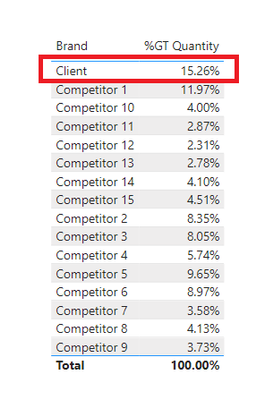
I am not quite sure how to word this question so please bear with me! So basically I want to get the percentage value of Client which is 15.26%. I got the table below by just simply choosing the Percent of grand total option.

RingoSun_1-1653733462942.png

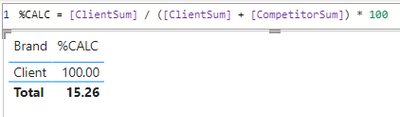
However I've been trying out calculations trying to get that same value but it keeps giving me 100% instead just like below but the total is showing the value that I want which is 15.26%. 


RingoSun_2-1653734178088.png


What can I do here? Apologies if my question isn't clear

1 ACCEPTED SOLUTION
Fowmy
Super User
Super User

@RingoSun 

It's all about modifying the filter context using CALCULATE.
Example: To get the % of grand total by brand would be as follows. Adjust this example as per your data model

Calc % of Grand Total =
DIVIDE (
    [Total Sales],
    CALCULATE ( [Total Sales], ALLSELECTED ( 'Product'[Brand] ) )
)


Did I answer your question? Mark my post as a solution! and hit thumbs up


Subscribe and learn Power BI from these videos

Website LinkedIn PBI User Group

View solution in original post

3 REPLIES 3
Fowmy
Super User
Super User

@RingoSun 

It's all about modifying the filter context using CALCULATE.
Example: To get the % of grand total by brand would be as follows. Adjust this example as per your data model

Calc % of Grand Total =
DIVIDE (
    [Total Sales],
    CALCULATE ( [Total Sales], ALLSELECTED ( 'Product'[Brand] ) )
)


Did I answer your question? Mark my post as a solution! and hit thumbs up


Subscribe and learn Power BI from these videos

Website LinkedIn PBI User Group

@Fowmy 

That seems to have done the trick, thanks! But just an additional question.


If I put the newly created percentage measure as my Y- axis in a line chart and Month name as my X - axis, I get this line graph below.

RingoSun_0-1653742666765.png

Now I know for a fact that the percentage for client is 15.26% so what I want is instead of the line graph amounting to 100% when you total all the months, I want it to amount to 15.26% instead.


How do I achieve that?

@RingoSun 

Then you will need to use ALL within Calculate instad of   ALLSELECTED

Did I answer your question? Mark my post as a solution! and hit thumbs up


Subscribe and learn Power BI from these videos

Website LinkedIn PBI User Group

Helpful resources

Announcements
Power BI DataViz World Championships

Power BI Dataviz World Championships

The Power BI Data Visualization World Championships is back! Get ahead of the game and start preparing now!

December 2025 Power BI Update Carousel

Power BI Monthly Update - December 2025

Check out the December 2025 Power BI Holiday Recap!

FabCon Atlanta 2026 carousel

FabCon Atlanta 2026

Join us at FabCon Atlanta, March 16-20, for the ultimate Fabric, Power BI, AI and SQL community-led event. Save $200 with code FABCOMM.