Join us at FabCon Atlanta from March 16 - 20, 2026, for the ultimate Fabric, Power BI, AI and SQL community-led event. Save $200 with code FABCOMM.
Register now!The Power BI Data Visualization World Championships is back! Get ahead of the game and start preparing now! Learn more
Hi there,
im facing the following problem:
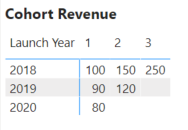
I have a table with revenue in certain years. The years are in the rows. In the columns i have the revenue for the subsequent years:
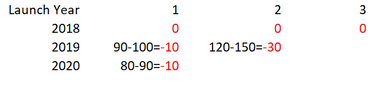
Now i want to creat the same table again but instead of revenue i want the delta values for the revenue in comparison to the previous year. So basically it should look like this:
The numbers in red should show up. In black you see the calculation behind that should be done. So for the columns the measure should go and take in each row the revenue from that year and deduct the revenue from previous year.
Here is the example file: https://www.file-upload.net/download-14036939/untitled.pbix.html
Thanks guys!
@Anonymous
if you have date try measure like this and take diff
YTD QTY = TOTALYTD(Sum('order'[Qty]),'Date'[Date])
LYTD QTY = TOTALYTD(Sum('order'[Qty]),dateadd('Date'[Date],-1,year))
Previous Year = CALCULATE(SUM('order'[Qty]), PREVIOUSYEAR('Date'[Date]))
If you have year only
This Year = CALCULATE(sum('order'[Qty]),filter(ALL('Date'),'Date'[Year]=max('Date'[Year])))
Last Year = CALCULATE(sum('order'[Qty]),filter(ALL('Date'),'Date'[Year]=max('Date'[Year])-1))
In both case have the date of year table as the separate table
Take diff this year - last year
Check out the November 2025 Power BI update to learn about new features.
Advance your Data & AI career with 50 days of live learning, contests, hands-on challenges, study groups & certifications and more!