Learn from the best! Meet the four finalists headed to the FINALS of the Power BI Dataviz World Championships! Register now
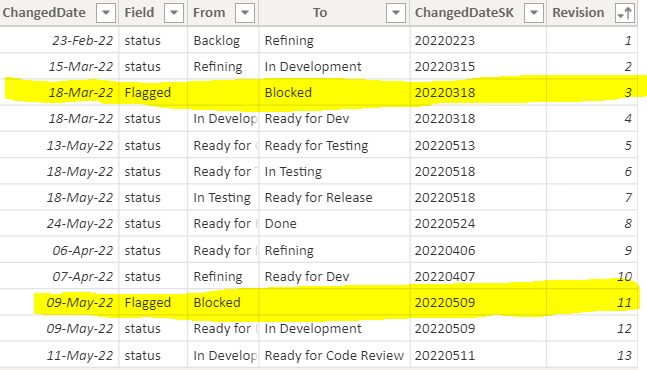
Hi there, I have the following data and want to calculate the difference in days between the two highlighted dates:
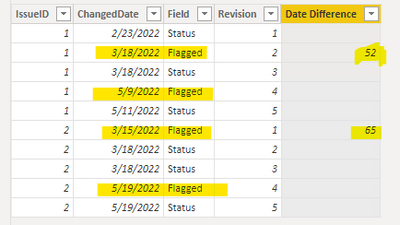
Note: this may happen multiple times within the dataset, as each 'revision' is for a different [IssueID]
Any thoughts?
Solved! Go to Solution.
Hi @FlowViz
Can you explain why you highlight these two rows? Is it because they have "Flagged" value in Field column?
If my assumption is correct, you can add a new column with below code
Date Difference =
IF (
'Table'[Field] = "Flagged",
VAR vCurDate = 'Table'[ChangedDate]
VAR vNextDate =
CALCULATE (
MIN ( 'Table'[ChangedDate] ),
ALLEXCEPT ( 'Table', 'Table'[IssueID] ),
'Table'[ChangedDate] > vCurDate,
'Table'[Field] = "Flagged"
)
RETURN
DATEDIFF ( vCurDate, vNextDate, DAY ),
BLANK ()
)
Best Regards,
Community Support Team _ Jing
If this post helps, please Accept it as Solution to help other members find it.
Hi @FlowViz
Can you explain why you highlight these two rows? Is it because they have "Flagged" value in Field column?
If my assumption is correct, you can add a new column with below code
Date Difference =
IF (
'Table'[Field] = "Flagged",
VAR vCurDate = 'Table'[ChangedDate]
VAR vNextDate =
CALCULATE (
MIN ( 'Table'[ChangedDate] ),
ALLEXCEPT ( 'Table', 'Table'[IssueID] ),
'Table'[ChangedDate] > vCurDate,
'Table'[Field] = "Flagged"
)
RETURN
DATEDIFF ( vCurDate, vNextDate, DAY ),
BLANK ()
)
Best Regards,
Community Support Team _ Jing
If this post helps, please Accept it as Solution to help other members find it.
A new Power BI DataViz World Championship is coming this June! Don't miss out on submitting your entry.
Share feedback directly with Fabric product managers, participate in targeted research studies and influence the Fabric roadmap.
| User | Count |
|---|---|
| 46 | |
| 34 | |
| 27 | |
| 15 | |
| 15 |
| User | Count |
|---|---|
| 59 | |
| 58 | |
| 39 | |
| 22 | |
| 20 |