cancel
Showing results for 
Search instead for 
Did you mean: 

The Power BI Data Visualization World Championships is back! Get ahead of the game and start preparing now! Learn more

Reply
FlowViz
Helper III
Helper III

Calculating difference between rows

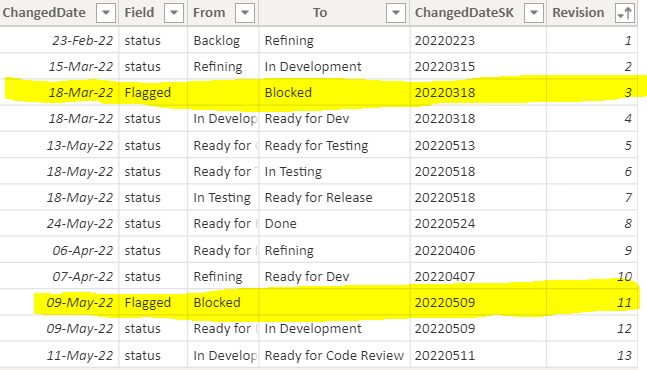
Hi there, I have the following data and want to calculate the difference in days between the two highlighted dates:


Flag.PNG


Note: this may happen multiple times within the dataset, as each 'revision' is for a different [IssueID]


Any thoughts?

1 ACCEPTED SOLUTION
v-jingzhang
Community Support
Community Support

Hi @FlowViz


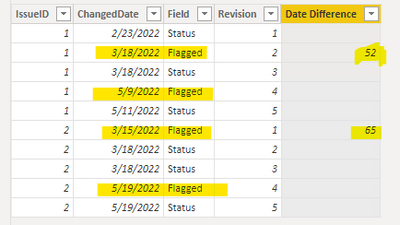
Can you explain why you highlight these two rows? Is it because they have "Flagged" value in Field column?


If my assumption is correct, you can add a new column with below code

Date Difference =
IF (
    'Table'[Field] = "Flagged",
    VAR vCurDate = 'Table'[ChangedDate]
    VAR vNextDate =
        CALCULATE (
            MIN ( 'Table'[ChangedDate] ),
            ALLEXCEPT ( 'Table', 'Table'[IssueID] ),
            'Table'[ChangedDate] > vCurDate,
            'Table'[Field] = "Flagged"
        )
    RETURN
        DATEDIFF ( vCurDate, vNextDate, DAY ),
    BLANK ()
)

vjingzhang_1-1656317823968.png


Best Regards,
Community Support Team _ Jing
If this post helps, please Accept it as Solution to help other members find it.

View solution in original post

1 REPLY 1
v-jingzhang
Community Support
Community Support

Hi @FlowViz


Can you explain why you highlight these two rows? Is it because they have "Flagged" value in Field column?


If my assumption is correct, you can add a new column with below code

Date Difference =
IF (
    'Table'[Field] = "Flagged",
    VAR vCurDate = 'Table'[ChangedDate]
    VAR vNextDate =
        CALCULATE (
            MIN ( 'Table'[ChangedDate] ),
            ALLEXCEPT ( 'Table', 'Table'[IssueID] ),
            'Table'[ChangedDate] > vCurDate,
            'Table'[Field] = "Flagged"
        )
    RETURN
        DATEDIFF ( vCurDate, vNextDate, DAY ),
    BLANK ()
)

vjingzhang_1-1656317823968.png


Best Regards,
Community Support Team _ Jing
If this post helps, please Accept it as Solution to help other members find it.

Helpful resources

Announcements
Power BI DataViz World Championships

Power BI Dataviz World Championships

The Power BI Data Visualization World Championships is back! Get ahead of the game and start preparing now!

December 2025 Power BI Update Carousel

Power BI Monthly Update - December 2025

Check out the December 2025 Power BI Holiday Recap!

FabCon Atlanta 2026 carousel

FabCon Atlanta 2026

Join us at FabCon Atlanta, March 16-20, for the ultimate Fabric, Power BI, AI and SQL community-led event. Save $200 with code FABCOMM.