
Join us at FabCon Atlanta from March 16 - 20, 2026, for the ultimate Fabric, Power BI, AI and SQL community-led event. Save $200 with code FABCOMM.
Register now!The Power BI Data Visualization World Championships is back! Get ahead of the game and start preparing now! Learn more
I am trying to show the appropriate icon for these values.
- a "-" where the percents are the same rounded to 1 decimal
- an up arrow for an increase in percent when rounded to 1 decimal
- a down arrow for a decrease in percent when rounded to 1 decimal
I used the "Percent of Row Total". rather than calculating it out by hand.
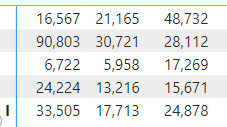
I use the visualization to calculate the row percentages. I could have a formula to do this if it's easier. Below is data as seen in the table.
Population
Regions
There are 5 regions and 3 different populations. I have the data for the current month and data for the previous month.
Solved! Go to Solution.
Hi @Marvhall ,
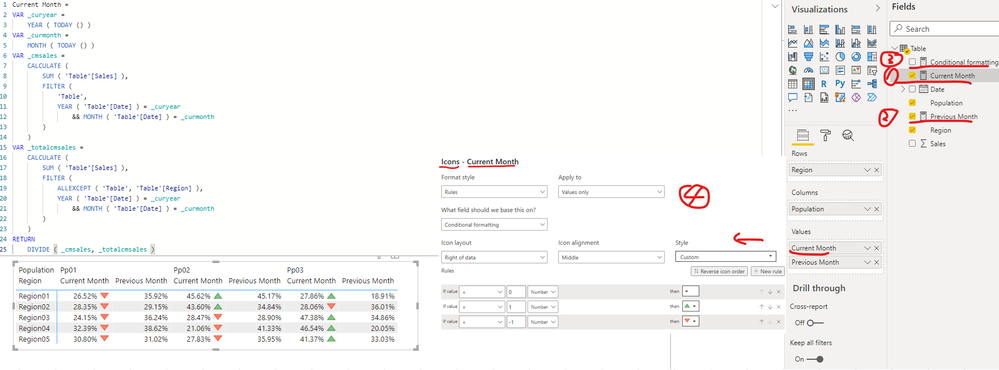
I created a sample pbix file(see attachment) for you, please check whether that is what you want.
Use conditional formatting in tables
If the above one can't help you get the desired result, please provide some sample data in your tables (exclude sensitive data) with Text format and your expected result with backend logic and special examples. It is better if you can share a simplified pbix file. You can refer the following link to upload the file to the community. Thank you.
How to upload PBI in Community
Best Regards
Hi @Marvhall ,
I created a sample pbix file(see attachment) for you, please check whether that is what you want.
Use conditional formatting in tables
If the above one can't help you get the desired result, please provide some sample data in your tables (exclude sensitive data) with Text format and your expected result with backend logic and special examples. It is better if you can share a simplified pbix file. You can refer the following link to upload the file to the community. Thank you.
How to upload PBI in Community
Best Regards
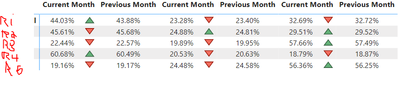
So close. See image below. The arrows are correct, technically. Is there a way to have it based on the value when rounded to 1 decimal place? See second image.
Would like the same values when rounded to 1 decimal to be a dash (no change).
Thanks!
Hi @Marvhall ,
You can select the measure [Current Month] and [Previous Month] separately and set the decimal places as 1 just as screenshot below, please find the details in the attachment.
Best Regards
The Power BI Data Visualization World Championships is back! Get ahead of the game and start preparing now!
Check out the November 2025 Power BI update to learn about new features.
| User | Count |
|---|---|
| 59 | |
| 43 | |
| 42 | |
| 23 | |
| 17 |
| User | Count |
|---|---|
| 190 | |
| 122 | |
| 96 | |
| 66 | |
| 47 |