Join us in Barcelona for FabCon and SQLCon, September 28 - October 1, 2026.
This is best Fabric, Power BI, SQL and AI community event. How do we know? The last event sold out! Save €200 with code FABCMTY200.
Register now- Power BI forums
- Get Help with Power BI
- Desktop
- Service
- Report Server
- Power Query
- Mobile Apps
- Developer
- DAX Commands and Tips
- Custom Visuals Development Discussion
- Health and Life Sciences
- Power BI Spanish forums
- Translated Spanish Desktop
- Training and Consulting
- Instructor Led Training
- Dashboard in a Day for Women, by Women
- Galleries
- Data Stories Gallery
- Themes Gallery
- Contests Gallery
- QuickViz Gallery
- Quick Measures Gallery
- Visual Calculations Gallery
- Fabric Apps Gallery
- Notebook Gallery
- Translytical Task Flow Gallery
- TMDL Gallery
- R Script Showcase
- Webinars and Video Gallery
- Ideas
- Custom Visuals Ideas (read-only)
- Issues
- Issues
- Events
- Upcoming Events
The Fabric community is upgrading! Read all of the details including the timeline and what you can expect. Learn more
- Power BI forums
- Forums
- Get Help with Power BI
- Desktop
- Re: Calculating difference between consecutive row...
- Subscribe to RSS Feed
- Mark Topic as New
- Mark Topic as Read
- Float this Topic for Current User
- Bookmark
- Subscribe
- Printer Friendly Page


- Mark as New
- Bookmark
- Subscribe
- Mute
- Subscribe to RSS Feed
- Permalink
- Report Inappropriate Content
Calculating difference between consecutive rows
Calculating difference between ROWS
Hello,
Could you please help me with advice how I could calculate the value difference between two rows?
In the table below:
ProblemID | ProblemFieldID | NumVal | Result | Temperature |
6A6C4C2A-7328-4A91-B598-6F629C905A86 | 4 | 98 | text =(Problem id 4 - problem ID 7) | 10 |
6A6C4C2A-7328-4A91-B598-6F629C905A86 | 7 | 88 |
|
|
C8E745BC-7CC2-4220-97DC-503664FF5828 | 4 | 230 | text =(Problem id 4 - problem ID 7) | 43 |
C8E745BC-7CC2-4220-97DC-503664FF5828 | 7 | 187 |
|
|
D814D0FF-3B18-4C51-990D-F6FF4CAE15F1 | 4 | 93 | text =(Problem id 4 - problem ID 7) | 10 |
D814D0FF-3B18-4C51-990D-F6FF4CAE15F1 | 7 | 83 |
|
|
As shown in the sample data, I have many “Problem ID”, and cumulative values of column “NumVal” I have to do extraction based on problem Field id and Problem ID column.
For instance
Problem ID 6A6C4C2A-7328-4A91-B598-6F629C905A86 = NumVal(ProblemFieldID=4 ) - NumVal(ProblemFieldID=7 ) will give me the temperature of that problem
The data is in no particular order, and I would like to be able to find the temperature for particular problemID by calculating the difference between two consecutive rows.
Br,
Solved! Go to Solution.


- Mark as New
- Bookmark
- Subscribe
- Mute
- Subscribe to RSS Feed
- Permalink
- Report Inappropriate Content
Probably a pivot-operations is what you're looking for:
Check column "ProblemFieldID" -> Transform -> Pivot Column -> Choose "NumVal" in Value-Field.
This will return a table with 1 additional column per ProblemFieldID which you then can build your calculations on.
Imke Feldmann (The BIccountant)
If you liked my solution, please give it a thumbs up. And if I did answer your question, please mark this post as a solution. Thanks!
How to integrate M-code into your solution -- How to get your questions answered quickly -- How to provide sample data -- Check out more PBI- learning resources here -- Performance Tipps for M-queries

- Mark as New
- Bookmark
- Subscribe
- Mute
- Subscribe to RSS Feed
- Permalink
- Report Inappropriate Content
When you say no particular order, do you mean that the row you might want to subtract might be 10 previous or 6 previous or is it always the previous row?
Follow on LinkedIn
@ me in replies or I'll lose your thread!!!
Instead of a Kudo, please vote for this idea
Become an expert!: Enterprise DNA
External Tools: MSHGQM
YouTube Channel!: Microsoft Hates Greg
Latest book!: DAX For Humans
DAX is easy, CALCULATE makes DAX hard...
- Mark as New
- Bookmark
- Subscribe
- Mute
- Subscribe to RSS Feed
- Permalink
- Report Inappropriate Content
@Greg_Deckler The rows could be not in the same order / might be 10 previous or 6 previous/.
- Mark as New
- Bookmark
- Subscribe
- Mute
- Subscribe to RSS Feed
- Permalink
- Report Inappropriate Content
OK, so then is the pattern that you always want to match problem ID's 4 and 7 or how do you know which earlier row to use?
Follow on LinkedIn
@ me in replies or I'll lose your thread!!!
Instead of a Kudo, please vote for this idea
Become an expert!: Enterprise DNA
External Tools: MSHGQM
YouTube Channel!: Microsoft Hates Greg
Latest book!: DAX For Humans
DAX is easy, CALCULATE makes DAX hard...
- Mark as New
- Bookmark
- Subscribe
- Mute
- Subscribe to RSS Feed
- Permalink
- Report Inappropriate Content
In the table, in column Problem ID every problem has 2 problemFieldID / one that show problem filed id 4 and one with problem field 7/
What I'm trying to calculate is
Problem id 6A6C4C2A-7328-4A91-B598-6F629C905A86 temprature = NumVal/Problem Field Id=4/ - (Problem id 4 - problem ID 7).
ProblemID | ProblemFieldID | NumVal | Result | Temperature |
6A6C4C2A-7328-4A91-B598-6F629C905A86 | 4 | 98 | text =(Problem id 4 - problem ID 7) | 10 |
6A6C4C2A-7328-4A91-B598-6F629C905A86 | 7 | 88 |
|
|
C8E745BC-7CC2-4220-97DC-503664FF5828 | 4 | 230 | text =(Problem id 4 - problem ID 7) | 43 |
C8E745BC-7CC2-4220-97DC-503664FF5828 | 7 | 187 |
|
|
D814D0FF-3B18-4C51-990D-F6FF4CAE15F1 | 4 | 93 | text =(Problem id 4 - problem ID 7) | 10 |
D814D0FF-3B18-4C51-990D-F6FF4CAE15F1 | 7 | 83 |
|
|
I was thinking that if the table is transpose:
Problem
ProblemID Comp T/ ProblemfieldID 4 Ref T/ ProblemfieldID 7
6A6C4C2A-7328-4A91-B598-6F629C905A86 98 88
I could say formula = Comp T - Ref t.
But I do not know how to transpose or rotate the table that way.
- Mark as New
- Bookmark
- Subscribe
- Mute
- Subscribe to RSS Feed
- Permalink
- Report Inappropriate Content
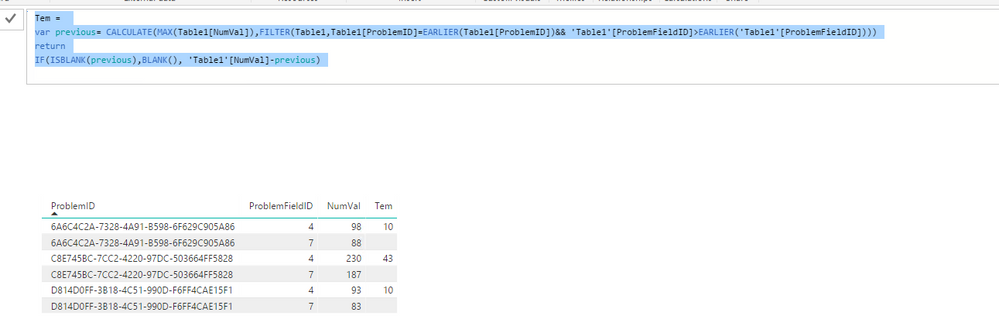
In addition to other’s post, you can directly create a column with the following formula in your current table.
Tem =
var previous= CALCULATE(MAX(Table1[NumVal]),FILTER(Table1,Table1[ProblemID]=EARLIER(Table1[ProblemID])&& 'Table1'[ProblemFieldID]>EARLIER('Table1'[ProblemFieldID])))
return
IF(ISBLANK(previous),BLANK(), 'Table1'[NumVal]-previous)
 )))))))
Regards,
- Mark as New
- Bookmark
- Subscribe
- Mute
- Subscribe to RSS Feed
- Permalink
- Report Inappropriate Content
Probably a pivot-operations is what you're looking for:
Check column "ProblemFieldID" -> Transform -> Pivot Column -> Choose "NumVal" in Value-Field.
This will return a table with 1 additional column per ProblemFieldID which you then can build your calculations on.
Imke Feldmann (The BIccountant)
If you liked my solution, please give it a thumbs up. And if I did answer your question, please mark this post as a solution. Thanks!
How to integrate M-code into your solution -- How to get your questions answered quickly -- How to provide sample data -- Check out more PBI- learning resources here -- Performance Tipps for M-queries
- Mark as New
- Bookmark
- Subscribe
- Mute
- Subscribe to RSS Feed
- Permalink
- Report Inappropriate Content

Helpful resources

FabCon & SQLCon – Barcelona 2026
Join us in Barcelona for FabCon and SQLCon, the Fabric, Power BI, SQL, and AI community event. Save €200 with code FABCMTY200.

Power BI DataViz World Championships - June 2026
A new Power BI DataViz World Championship is coming this June! Don't miss out on submitting your entry.

| User | Count |
|---|---|
| 27 | |
| 22 | |
| 20 | |
| 18 | |
| 14 |


| User | Count |
|---|---|
| 25 | |
| 20 | |
| 20 | |
| 20 | |
| 20 |


