FabCon is coming to Atlanta
Join us at FabCon Atlanta from March 16 - 20, 2026, for the ultimate Fabric, Power BI, AI and SQL community-led event. Save $200 with code FABCOMM.
Register now!- Power BI forums
- Get Help with Power BI
- Desktop
- Service
- Report Server
- Power Query
- Mobile Apps
- Developer
- DAX Commands and Tips
- Custom Visuals Development Discussion
- Health and Life Sciences
- Power BI Spanish forums
- Translated Spanish Desktop
- Training and Consulting
- Instructor Led Training
- Dashboard in a Day for Women, by Women
- Galleries
- Data Stories Gallery
- Themes Gallery
- Contests Gallery
- QuickViz Gallery
- Quick Measures Gallery
- Visual Calculations Gallery
- Notebook Gallery
- Translytical Task Flow Gallery
- TMDL Gallery
- R Script Showcase
- Webinars and Video Gallery
- Ideas
- Custom Visuals Ideas (read-only)
- Issues
- Issues
- Events
- Upcoming Events
Vote for your favorite vizzies from the Power BI Dataviz World Championship submissions. Vote now!
- Power BI forums
- Forums
- Get Help with Power BI
- Desktop
- Re: Dynamic calculate Measure value based on Slice...
- Subscribe to RSS Feed
- Mark Topic as New
- Mark Topic as Read
- Float this Topic for Current User
- Bookmark
- Subscribe
- Printer Friendly Page

- Mark as New
- Bookmark
- Subscribe
- Mute
- Subscribe to RSS Feed
- Permalink
- Report Inappropriate Content
Calculating a value from a multi column table based on multiple selections
I have a table loaded in Power BI. It has list of about 50 rows with two columns forming a category (7) and a sub-category (approx 7 per) hierarchy followed by 9 columns of characteristics with values based on the second indexed column.
I want to calculate a value as a sum of the values in the column based on a multi-select (one each in the sub-category for example).
Ideally I want to use different slicers (based on each Category) to select the sub-category and then have all NINE column values be the sum of the selections. If I don't select a sub-category, I would like it's value to be left off the sum.
If the table looks like this...
Cat Sub Cat Character 1 Character 2 ... Character 9
A X 0 2 1
A Y 1 1 2
A Z 0 0 1
B M 1 0 0
B N 2 1 0
B P 0 2 1
...
G F 1 1 0
I would like to have a slicer pick X from a list of A's, a slicer pick N from a list of B's (etc). I need the sum of each characteristic to be able to be presented in a visual with the 9 characteristics . In my example, a selection of X and N would yield
Char 1 = 2
Char 2 = 3
...
Char 9 = 1
Thus I would rank order the characteristics Char 2, Char1, Char 9 in the central visualization.
I don't know how to create the custom calculation that would work on this multi-select. Advice welcome.
Solved! Go to Solution.

- Mark as New
- Bookmark
- Subscribe
- Mute
- Subscribe to RSS Feed
- Permalink
- Report Inappropriate Content
Hi @dcasiala,
Congratulations, you find a solution at present. Please mark it as answer, so more peoplwe will get useful information from here.
Thanks,
Angelia

- Mark as New
- Bookmark
- Subscribe
- Mute
- Subscribe to RSS Feed
- Permalink
- Report Inappropriate Content
Please help,
I want Calculated Row for No of Shop Drawings with Rev 0, 1 , 2 , 3 submitted by Subcontractor, The formula I used is working fine in while creating measure but its not working when I am creating calculated column
Calculated Column = CALCULATE (COUNT('Shop Drawings'[Subcontractor]),'Shop Drawings'[Subcontractor]="ACCESS 1", 'Shop Drawings'[Rev]="0")
Subcontractor | Revo 0 | Rev 1 | Rev 2 | Rev 3 |
ACCESS 1 | 2 | 3 | 1 | 0 |
- Mark as New
- Bookmark
- Subscribe
- Mute
- Subscribe to RSS Feed
- Permalink
- Report Inappropriate Content
I have a table loaded in Power BI. It has list of about 50 rows with two columns forming a category (7) and a sub-category (approx 7 per) hierarchy followed by 9 columns of characteristics with values based on the second indexed column.
I want to calculate a value as a sum of the values in the column based on a multi-select (one each in the sub-category for example).
Ideally I want to use different slicers (based on each Category) to select the sub-category and then have all NINE column values be the sum of the selections. If I don't select a sub-category, I would like it's value to be left off the sum.
If the table looks like this...
Cat Sub Cat Character 1 Character 2 ... Character 9
A X 0 2 1
A Y 1 1 2
A Z 0 0 1
B M 1 0 0
B N 2 1 0
B P 0 2 1
...
G F 1 1 0
I would like to have a slicer pick X from a list of A's, a slicer pick N from a list of B's (etc). I need the sum of each characteristic to be able to be presented in a visual with the 9 characteristics . In my example, a selection of X and N would yield
Char 1 = 2
Char 2 = 3
...
Char 9 = 1
Thus I would rank order the characteristics Char 2, Char1, Char 9 in the central visualization.
I don't know how to create the custom calculation that would work on this multi-select. Advice welcome.
- Mark as New
- Bookmark
- Subscribe
- Mute
- Subscribe to RSS Feed
- Permalink
- Report Inappropriate Content
Hi @dcasiala,
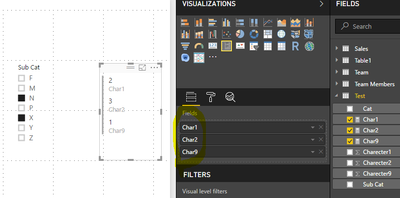
For your requirement, please create a slicer including [sub cat] field, create measure using the similar formulas.
Char1 = CALCULATE(SUM(Test[Charecter1]),ALLSELECTED(Test))

Char2 = CALCULATE(SUM(Test[Charecter2]),ALLSELECTED(Test))

Char9 = CALCULATE(SUM(Test[Charecter9]),ALLSELECTED(Test))
Then you can create a Multi-row-card, add the measures in it, please review the following screenshot.
But we can't order the measures' value to date.
Best Regards,
Angelia
- Mark as New
- Bookmark
- Subscribe
- Mute
- Subscribe to RSS Feed
- Permalink
- Report Inappropriate Content
Thanks. The calculation syntax is good but I cannot get to my intention with the multi-row card. I would like to use chiclet or the list slicer to select the different sub categories and i was hoping to use the custom visual enlighten stack shuffle to display the top score of the calculated fields.
In the end, I am hoping to enable IF A=x and B=y... G=z, then the score for Char1 = n, Char2 = m,... Char3 =p and based on those selections, the TOP CHARs are (example) 2, followed by 3 followed by 1.
The enlighten stack shuffle allows me to order the top scores of a simple table easily enough. But I need it to pull in the values of the calculations as they are created by the other slicers.
Do you know if this is possible?
- Mark as New
- Bookmark
- Subscribe
- Mute
- Subscribe to RSS Feed
- Permalink
- Report Inappropriate Content
Hi @dcasiala,
As I tested, we can add multiple measures in the order by field, but the category will order by the sum of multiple measure, and we can not add a measure in category field. So it's impossible to get your expected result.
Best Regards,
Angelia
- Mark as New
- Bookmark
- Subscribe
- Mute
- Subscribe to RSS Feed
- Permalink
- Report Inappropriate Content
Your help has been invaluable. Thank you. I have mostly what I want but wish I could find a way to make it more elegant. My solution at present uses the slicer to pick (multiples) from the list of Cat/Sub Cat list. The scores for each of the 9 dimensions accurately sums only the rows selected and each of the 9 is displayed in a KPI visualization.
By visually inspecting the nine numbers I can select the dimension from a (separate) slicer (chiclet), I can filter a list of choices that are aligned to the dimension (which was my original intention)..
I appreciate your help with the DAX code and advice on on the visuals and their limits.
- Mark as New
- Bookmark
- Subscribe
- Mute
- Subscribe to RSS Feed
- Permalink
- Report Inappropriate Content
Hi @dcasiala,
Congratulations, you find a solution at present. Please mark it as answer, so more peoplwe will get useful information from here.
Thanks,
Angelia
Helpful resources

Power BI Dataviz World Championships
Vote for your favorite vizzies from the Power BI World Championship submissions!

Join our Community Sticker Challenge 2026
If you love stickers, then you will definitely want to check out our Community Sticker Challenge!

Power BI Monthly Update - January 2026
Check out the January 2026 Power BI update to learn about new features.

FabCon Atlanta 2026
Join us at FabCon Atlanta, March 16-20, for the ultimate Fabric, Power BI, AI and SQL community-led event. Save $200 with code FABCOMM.

| User | Count |
|---|---|
| 57 | |
| 55 | |
| 42 | |
| 16 | |
| 16 |


| User | Count |
|---|---|
| 113 | |
| 106 | |
| 39 | |
| 35 | |
| 26 |


