cancel
Showing results for 
Search instead for 
Did you mean: 

The Power BI Data Visualization World Championships is back! Get ahead of the game and start preparing now! Learn more

Reply
Anonymous
Not applicable

Calculating a sum and removing duplicate values

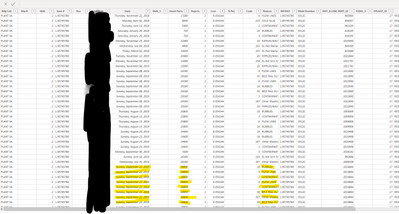
I am trying to use a measure to calculate the sum of good parts for each item number in this list of production scrap data. The problem is that an item can have multiple reasons for scrap in a day and the system repeats the number of good parts for each reason.


Scrap Data Example 020520.png

Can I get the measure to use the average or max value of good parts for each item per day in the sum?


Thanks!

4 REPLIES 4
amitchandak
Super User
Super User

You can use concatenatex, min and max

Refer

https://docs.microsoft.com/en-us/dax/concatenatex-function-dax

Concat reason measure = concatenatex(table,table[reason])


Appreciate your Kudos. In case, this is the solution you are looking for, mark it as the Solution. In case it does not help, please provide additional information and mark me with @
Thanks. My Recent Blog -
Winner-Topper-on-Map-How-to-Color-States-on-a-Map-with-Winners , HR-Analytics-Active-Employee-Hire-and-Termination-trend
Power-BI-Working-with-Non-Standard-Time-Periods And Comparing-Data-Across-Date-Ranges

Connect on Linkedin

Share with Power BI Enthusiasts: Full Power BI Video (20 Hours) YouTube
Microsoft Fabric Series 60+ Videos YouTube
Microsoft Fabric Hindi End to End YouTube
Anonymous
Not applicable

Hey @Anonymous 


You just need to embed a DISTINCT function (https://docs.microsoft.com/en-us/dax/distinct-function-dax) in each of your MAX, AVERAGE, and SUM measures.

Anonymous
Not applicable

Hey @Anonymous 


Thanks for the reply, so would the best way to go about this be to get the max value for each day in one measure then, then sum that.

=MAX(DISTINCT([Good Parts])) .

I assume I would nest that in a CALCULATE() function but what filter would make sure it looks at each day individually?

Anonymous
Not applicable

Hey @Anonymous 


Yes. Check out the thread below for more guidance:


https://community.powerbi.com/t5/Desktop/Return-MAX-of-a-Distinct-Count-per-Category/td-p/557977

Helpful resources

Announcements
Power BI DataViz World Championships

Power BI Dataviz World Championships

The Power BI Data Visualization World Championships is back! Get ahead of the game and start preparing now!

December 2025 Power BI Update Carousel

Power BI Monthly Update - December 2025

Check out the December 2025 Power BI Holiday Recap!

FabCon Atlanta 2026 carousel

FabCon Atlanta 2026

Join us at FabCon Atlanta, March 16-20, for the ultimate Fabric, Power BI, AI and SQL community-led event. Save $200 with code FABCOMM.