cancel
Showing results for 
Search instead for 
Did you mean: 

July 7 - July 17 | Round 2 of the Power BI Dataviz World Championships. Don't miss your chance! Learn more

Reply
pzinsli
Regular Visitor

Calculating a Filtered Sum

HI 


Let's say I have a table like this, table titled PROFIT AND LOSS DETAILS


ACCT NAME               Line Amount

Revenue                      20

COGS                           12

Fringe                         100

Engineering                 12


I only want to add the sume of revenue and COGS.  from what I have seen it should look something like 


Measure = CALCULATE(SUM('PROFIT AND LOSS DETAIL'[Line Amount]);filter[ACCT NAME]='Revenue' ; [ACCT NAME]='Cost of Goods Sold'

5 REPLIES 5
v-piga-msft
Resident Rockstar
Resident Rockstar

Hi @pzinsli


Try this formula below.


Measure =
CALCULATE (
    SUM ( 'PROFIT AND LOSS DETAILS'[Line Amount] ),
    FILTER (
        'PROFIT AND LOSS DETAILS',
        'PROFIT AND LOSS DETAILS'[ACCT NAME] IN { "Revenue", "COGS" }
    )
)

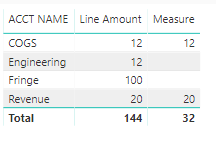
Here is the result output. 


Capture.PNG

If you need additional help, please share your desired output.


Best Regards,

Cherry

Community Support Team _ Cherry Gao
If this post helps, then please consider Accept it as the solution to help the other members find it more quickly.
drewlewis15
Solution Specialist
Solution Specialist

Try this:


Measure = CALCULATE(SUM('PROFIT AND LOSS DETAILS'[Line Amount]),'PROFIT AND LOSS DETAILS'[ACCT NAME]="Revenue" || 'PROFIT AND LOSS DETAILS'[ACCT NAME]= "COGS")

Aron_Moore
Solution Specialist
Solution Specialist

Try either:

= CALCULATE(SUM('PROFIT AND LOSS DETAIL'[Line Amount]);[ACCT NAME]='Revenue' ; [ACCT NAME]='Cost of Goods Sold')


Or the more explicit

= CALCULATE(SUM('PROFIT AND LOSS DETAIL'[Line Amount]);filter('PROFIT AND LOSS DETAIL'; [ACCT NAME]='Revenue' ; [ACCT NAME]='Cost of Goods Sold'))


 Thanks for your heIp. tried both.  It seems like the formatting causes the program to try to read "revenue" and Cost of Goods Sold" as tables, not a column result being used as a filter.  It reads error message : could not find table 'revenue'

Odd.


When you're entering the DAX does the autocomplete help at all?


I did notice your first formula example tries filter[ACCT NAME]='Revenue' which won't work as filter requires a table name not column, but my two example should have correct syntax.

Helpful resources

Announcements
FabCon and SQLCon Barcelona 2026

FabCon & SQLCon – Barcelona 2026

Join us in Barcelona for FabCon and SQLCon, the Fabric, Power BI, SQL, and AI community event. Save €200 with code FABCMTY200.

July Power BI Update Carousel

Power BI Monthly Update - July 2026

Check out the July 2026 Power BI update to learn about new features.

60 days of Data Days Carousel

Data Days 2026

Join Data Days 2026: 60 days of free live/on-demand sessions, challenges, study groups, and certification opportunities.

Power BI DataViz World Championships carousel

Power BI DataViz World Championships - June 2026

A new Power BI DataViz World Championship is coming this June! Don't miss out on submitting your entry.

Top Solution Authors