cancel
Showing results for 
Search instead for 
Did you mean: 

The Power BI Data Visualization World Championships is back! Get ahead of the game and start preparing now! Learn more

Reply
Anonymous
Not applicable

Calculating YOY Change Dynamic Date Ranges - Different End Dates

Hello - 


In a table [Dates], I have a list of products with different modification dates.


I have the live date, live date - 1 year, and live date + 1 year.
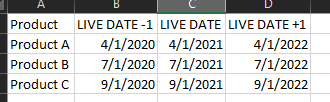
 

plopper_n0k_0-1626721093376.png


I have used these dates in calculations from another table [Products] to calculate the unit sales associated with the year before the mod, a year after the mod, and % change (calculations below).


units1yearprior =
VAR prod = MAX(Products[ProdDesc])
VAR dateprior = CALCULATE(MIN('Dates'[LIVE DATE -1]), FILTER('Dates', 'Dates'[Product] = prod))
VAR dateend = CALCULATE(MAX('Dates'[LIVE DATE]), FILTER('Dates', 'Dates'[Product] = prod))
RETURN
CALCULATE(SUM(Products[Unit Sales Total]), FILTER(Products, Products[Date] >= dateprior &&Products[Date] <= dateend && Products[ProdDesc]=prod ))
 
units1yearafter =
VAR prod = MAX(Products[ProdDesc])
VAR dateprior = CALCULATE(MIN('Dates'[LIVE DATE]), FILTER('Dates', 'Dates'[Product] = prod))
VAR dateend = CALCULATE(MAX('Dates'[LIVE DATE +1]), FILTER('Dates', 'Dates'[Product] = prod))
RETURN
CALCULATE(SUM(Products[Unit Sales Total]), FILTER(Products, Products[Date] >= dateprior &&Products[Date] <= dateend && Products[ProdDesc]=prod ))
 
Units ∆ = ([units1yearafter]-[units1yearprior])/[units1yearprior]


The issue is (if you take Product A as an example) - we will have a full years worth of data for 4/2020-4/2021 but not a full year for 4/2021-4/2022 (as it has not occurred yet).  I want to be able to get an accurate read of the unit sales change since the modification and would like to compare just the months that have occurred thus far for each product (i.e. for Product A: 4/2020-6/2020 vs 4/2021-6/2021)


Please help!

1 ACCEPTED SOLUTION
Anonymous
Not applicable

Team -


I spent the good portion of the last day working through various solutions but, figured it out (DAX below):


PY Unit Sales (Same Period) =
VAR prod = MAX(Products[ProdDesc])
VAR dateprior = CALCULATE(MIN('Dates'[LIVE DATE -1]), FILTER('Dates', 'Dates'[Product] = prod)
VAR enddate= CALCULATE(IF(DATEADD(LASTDATE(Product[Date]),-1,YEAR)<MAX('Dates'[LIVE DATE]),DATEADD(LASTDATE(Product[Date]),-1,YEAR),MAX('Dates'[LIVE DATE])),FILTER(Product,Product[ProdDesc]=prod))
RETURN
CALCULATE(
[Unit Sales],DATESBETWEEN(Product[Date],dateprior,enddate))

View solution in original post

1 REPLY 1
Anonymous
Not applicable

Team -


I spent the good portion of the last day working through various solutions but, figured it out (DAX below):


PY Unit Sales (Same Period) =
VAR prod = MAX(Products[ProdDesc])
VAR dateprior = CALCULATE(MIN('Dates'[LIVE DATE -1]), FILTER('Dates', 'Dates'[Product] = prod)
VAR enddate= CALCULATE(IF(DATEADD(LASTDATE(Product[Date]),-1,YEAR)<MAX('Dates'[LIVE DATE]),DATEADD(LASTDATE(Product[Date]),-1,YEAR),MAX('Dates'[LIVE DATE])),FILTER(Product,Product[ProdDesc]=prod))
RETURN
CALCULATE(
[Unit Sales],DATESBETWEEN(Product[Date],dateprior,enddate))

Helpful resources

Announcements
Power BI DataViz World Championships

Power BI Dataviz World Championships

The Power BI Data Visualization World Championships is back! Get ahead of the game and start preparing now!

December 2025 Power BI Update Carousel

Power BI Monthly Update - December 2025

Check out the December 2025 Power BI Holiday Recap!

FabCon Atlanta 2026 carousel

FabCon Atlanta 2026

Join us at FabCon Atlanta, March 16-20, for the ultimate Fabric, Power BI, AI and SQL community-led event. Save $200 with code FABCOMM.