We've captured the moments from FabCon & SQLCon that everyone is talking about, and we are bringing them to the community, live and on-demand. Starts on April 14th. Register now
Hi All,
I am trying to calculate week over week change percentage and display the data in a weekly format. I am usng the below measure code
Week Over Week =
VAR todaycost = CALCULATE(
COUNTROWS(Requests),
FILTER(Requests,Requests[Request Type] = "Escalation"),
DATEADD('DateTable'[Date],0,DAY)
)
VAR LastWeek =
CALCULATE (
COUNTROWS(Requests),
FILTER(Requests,Requests[Request Type] = "Escalation"),
DATEADD('DateTable'[Date],-7, DAY)
)
RETURN
DIVIDE(todaycost-LastWeek,LastWeek, 0)
This displays the week over week change for the latest data when put on a card. However, when I try and break it out by weeknumber, nothing shows. I have gotten down to the problem line being
"FILTER(Requests,Requests[Request Type] = "Escalation")". - When this line is removed, it works as expected.
However, in my table I have a column of status's and I only want the week over week change for the "Escalation" status.
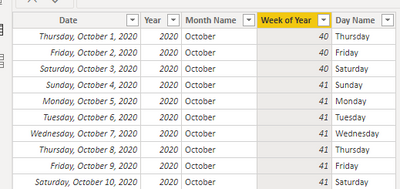
Here is a picture of my date table
Solved! Go to Solution.
Hi,
Ensure that to your visual, you drag Week of Year from the Date table. Also, does this measure work?
Week Over Week =
VAR todaycost = CALCULATE(
COUNTROWS(Requests),
Requests[Request Type] = "Escalation",
DATEADD('DateTable'[Date],0,DAY)
)
VAR LastWeek =
CALCULATE (
COUNTROWS(Requests),
Requests[Request Type] = "Escalation",
DATEADD('DateTable'[Date],-7, DAY)
)
RETURN
DIVIDE(todaycost-LastWeek,LastWeek, 0)
Hi,
Ensure that to your visual, you drag Week of Year from the Date table. Also, does this measure work?
Week Over Week =
VAR todaycost = CALCULATE(
COUNTROWS(Requests),
Requests[Request Type] = "Escalation",
DATEADD('DateTable'[Date],0,DAY)
)
VAR LastWeek =
CALCULATE (
COUNTROWS(Requests),
Requests[Request Type] = "Escalation",
DATEADD('DateTable'[Date],-7, DAY)
)
RETURN
DIVIDE(todaycost-LastWeek,LastWeek, 0)
I was using Week of Year from the date table, but what fixed it was removing "Filter" and just using "Requests =". Thankyou very much!
You are welcome.
If you have recently started exploring Fabric, we'd love to hear how it's going. Your feedback can help with product improvements.
A new Power BI DataViz World Championship is coming this June! Don't miss out on submitting your entry.
Share feedback directly with Fabric product managers, participate in targeted research studies and influence the Fabric roadmap.
| User | Count |
|---|---|
| 53 | |
| 38 | |
| 33 | |
| 16 | |
| 16 |
| User | Count |
|---|---|
| 68 | |
| 63 | |
| 38 | |
| 34 | |
| 22 |