FabCon is coming to Atlanta
Join us at FabCon Atlanta from March 16 - 20, 2026, for the ultimate Fabric, Power BI, AI and SQL community-led event. Save $200 with code FABCOMM.
Register now!- Power BI forums
- Get Help with Power BI
- Desktop
- Service
- Report Server
- Power Query
- Mobile Apps
- Developer
- DAX Commands and Tips
- Custom Visuals Development Discussion
- Health and Life Sciences
- Power BI Spanish forums
- Translated Spanish Desktop
- Training and Consulting
- Instructor Led Training
- Dashboard in a Day for Women, by Women
- Galleries
- Data Stories Gallery
- Themes Gallery
- Contests Gallery
- QuickViz Gallery
- Quick Measures Gallery
- Visual Calculations Gallery
- Notebook Gallery
- Translytical Task Flow Gallery
- TMDL Gallery
- R Script Showcase
- Webinars and Video Gallery
- Ideas
- Custom Visuals Ideas (read-only)
- Issues
- Issues
- Events
- Upcoming Events
Vote for your favorite vizzies from the Power BI Dataviz World Championship submissions. Vote now!
- Power BI forums
- Forums
- Get Help with Power BI
- Desktop
- Calculating Week Start Date from Week Number
- Subscribe to RSS Feed
- Mark Topic as New
- Mark Topic as Read
- Float this Topic for Current User
- Bookmark
- Subscribe
- Printer Friendly Page


- Mark as New
- Bookmark
- Subscribe
- Mute
- Subscribe to RSS Feed
- Permalink
- Report Inappropriate Content
Calculating Week Start Date from Week Number
Hi there,
I have data by week number like this:

but I need to add a column that will show me the week end date like this format:

The other complication is that the week numbers are set to Sunday to Saturday instead of Monday to Sunday which is what I need. I have the daily dates in as well so maybe it's easier to make a calculation off that instead?
Do you know the easiest way to create a new column or measure to get this? Thank you!

- Mark as New
- Bookmark
- Subscribe
- Mute
- Subscribe to RSS Feed
- Permalink
- Report Inappropriate Content
Hi @jnrezk,
Can you please share a pbix file with some dummy data and expected results to test coding fromula?
How to Get Your Question Answered Quickly
Regards,
Xiaoxin Sheng
- Mark as New
- Bookmark
- Subscribe
- Mute
- Subscribe to RSS Feed
- Permalink
- Report Inappropriate Content
here's a sample PBI file - as you can see week 26 should show as june 28th but its showing the week earlier. Also, I'd love the forumular for week ending so week 26 week end date is Sunday, July 4th
Thanks!
https://drive.google.com/file/d/1yVGwX_iMSKKPQPbaePE_ytaqOtQ7qmEi/view?usp=sharing
- Mark as New
- Bookmark
- Subscribe
- Mute
- Subscribe to RSS Feed
- Permalink
- Report Inappropriate Content
HI @jnrezk,
I modify the optional format to '2' and add the offset '-1' to the expression, then it will get the Sunday as result from the 'Monday to Sunday' week regular:
WeekStart =
MINX(
    FILTER (
        CALENDAR (
            DATE ( LEFT ( [ISO Week of ISO Year], 4 ), 1, 1 ),
            DATE ( LEFT ( [ISO Week of ISO Year], 4 ), 12, 31 )
        ),
        WEEKNUM ( [Date], 2 ) = VALUE ( RIGHT ( [ISO Week of ISO Year], 2 ) )
    ),
    [Date]-1
)
Regards,
Xiaoxin Sheng
- Mark as New
- Bookmark
- Subscribe
- Mute
- Subscribe to RSS Feed
- Permalink
- Report Inappropriate Content
I am getting same date values as satrtdate

need help with this
- Mark as New
- Bookmark
- Subscribe
- Mute
- Subscribe to RSS Feed
- Permalink
- Report Inappropriate Content
hmmm week 202127 should say July 11th its still off but its ok I can look for another solution
- Mark as New
- Bookmark
- Subscribe
- Mute
- Subscribe to RSS Feed
- Permalink
- Report Inappropriate Content
HI @jnrezk,
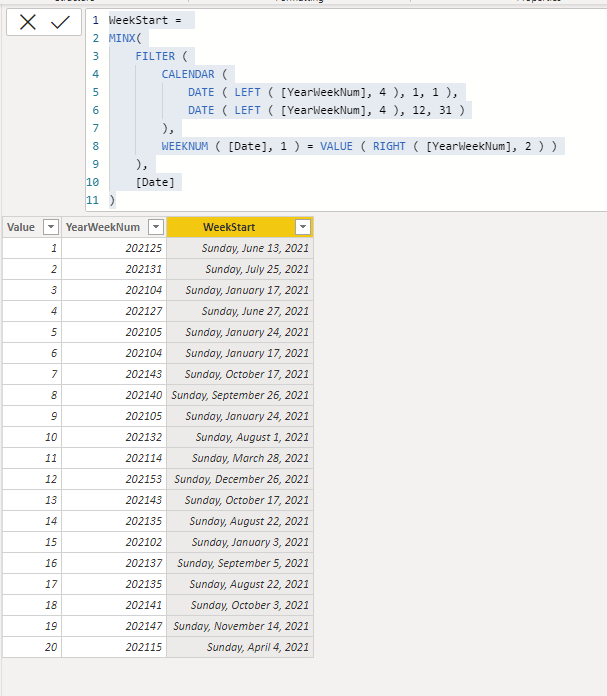
You can use the following calculated column formula to get the start date based on the year and week number:
WeekStart =
MINX(
    FILTER (
        CALENDAR (
            DATE ( LEFT ( [YearWeekNum], 4 ), 1, 1 ),
            DATE ( LEFT ( [YearWeekNum], 4 ), 12, 31 )
        ),
        WEEKNUM ( [Date], 1 ) = VALUE ( RIGHT ( [YearWeekNum], 2 ) )
    ),
    [Date]
)
If you are looking for a measure version, you can add a variable to extract the current 'year week number' to calculate:
WeekStart =
VAR cYW =
    MAX ( Table[YearWeekNum] )
RETURN
    MINX (
        FILTER (
            CALENDAR ( DATE ( LEFT ( cYW, 4 ), 1, 1 ), DATE ( LEFT ( cYW, 4 ), 12, 31 ) ),
            WEEKNUM ( [Date], 1 ) = VALUE ( RIGHT ( cYW, 2 ) )
        ),
        [Date]
    )
Regards,
Xiaoxin Sheng
- Mark as New
- Bookmark
- Subscribe
- Mute
- Subscribe to RSS Feed
- Permalink
- Report Inappropriate Content
The source is google analytics and they only provideo ISOWeeknumber which i need as a date format
- Mark as New
- Bookmark
- Subscribe
- Mute
- Subscribe to RSS Feed
- Permalink
- Report Inappropriate Content
Hi Im so sorry for the delay. I am trying the column method and having some errors:

And this was my code how I entered it in:


- Mark as New
- Bookmark
- Subscribe
- Mute
- Subscribe to RSS Feed
- Permalink
- Report Inappropriate Content
Hey @jnrezk ,
the solution provided is based on creating a calculated column using DAX. From the code you provided it's obvious that you are using Power Query / M. This explains why MINX (a DAX function is raising an error).
Create a calculated column using DAX instead of using Power Query.
Regards,
Tom
Did I answer your question? Mark my post as a solution, this will help others!
Proud to be a Super User!
I accept Kudos 😉
Hamburg, Germany
- Mark as New
- Bookmark
- Subscribe
- Mute
- Subscribe to RSS Feed
- Permalink
- Report Inappropriate Content
Sorry for the back and forth - the code worked but I need it to be for monday start so I changed the code under week Num to 2. but the data isn't correct.

- Mark as New
- Bookmark
- Subscribe
- Mute
- Subscribe to RSS Feed
- Permalink
- Report Inappropriate Content
HI @jnrezk,
The options parameter of weeknum function will change the week number calculation logic. If you want to keep the regular work schedule(Sunday to Saturday) and Monday as result, you can add a '+1' offset to my formulas to change the results.
WeekStart =
VAR cYW =
    MAX ( Table[YearWeekNum] )
RETURN
    MINX (
        FILTER (
            CALENDAR ( DATE ( LEFT ( cYW, 4 ), 1, 1 ), DATE ( LEFT ( cYW, 4 ), 12, 31 ) ),
            WEEKNUM ( [Date], 1 ) = VALUE ( RIGHT ( cYW, 2 ) )
        ),
        [Date] + 1
    )
Regards,
Xiaoxin Sheng
- Mark as New
- Bookmark
- Subscribe
- Mute
- Subscribe to RSS Feed
- Permalink
- Report Inappropriate Content
Hi - sorry no need to add the +1 I found a field that automatically counts the weeks as monday to sunday but the weeks are off as indicated in the image in my other response. I tried your new way with the sunday dates and it didnt solve it either.
- Mark as New
- Bookmark
- Subscribe
- Mute
- Subscribe to RSS Feed
- Permalink
- Report Inappropriate Content
Hey @jnrezk ,
here I provide a solution that calculates the Start and End-Date for a week:
Solved: Re: Week commencing in DAX - Microsoft Power BI Community
In combination with the following calculations
ISOWEEK = WEEKNUM([date] , 21)
ISO YEAR
=IF([ISOWeek]<5 && [CalendarWeek] > 50;
[Year]+1;
IF([ISOWeek]>50 && [CalendarWeek]<5;
[Year]-1;
[Year]))
in combination with a calendar table, you can use the calendar table as a lookup table to determine the week End Date.
Hopefully, this provides some ideas on how to tackle your challenge.
Regards,
Tom
Did I answer your question? Mark my post as a solution, this will help others!
Proud to be a Super User!
I accept Kudos 😉
Hamburg, Germany
- Mark as New
- Bookmark
- Subscribe
- Mute
- Subscribe to RSS Feed
- Permalink
- Report Inappropriate Content
sorry if im slow and dont follow but its not working - are you saying to create 2 measures first

Helpful resources

Power BI Dataviz World Championships
Vote for your favorite vizzies from the Power BI World Championship submissions!

Join our Community Sticker Challenge 2026
If you love stickers, then you will definitely want to check out our Community Sticker Challenge!

Power BI Monthly Update - January 2026
Check out the January 2026 Power BI update to learn about new features.

FabCon Atlanta 2026
Join us at FabCon Atlanta, March 16-20, for the ultimate Fabric, Power BI, AI and SQL community-led event. Save $200 with code FABCOMM.

| User | Count |
|---|---|
| 63 | |
| 51 | |
| 41 | |
| 23 | |
| 18 |


| User | Count |
|---|---|
| 134 | |
| 111 | |
| 50 | |
| 31 | |
| 29 |


