Join us at FabCon Atlanta from March 16 - 20, 2026, for the ultimate Fabric, Power BI, AI and SQL community-led event. Save $200 with code FABCOMM.
Register now!The Power BI Data Visualization World Championships is back! Get ahead of the game and start preparing now! Learn more
Hello Power BI Experts,
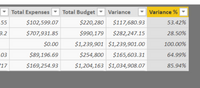
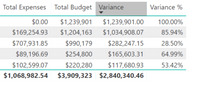
How can I display total % variance in a table. Left screenshot is my imported data. Thanks for the help!
Solved! Go to Solution.
Hi @mason23 ,
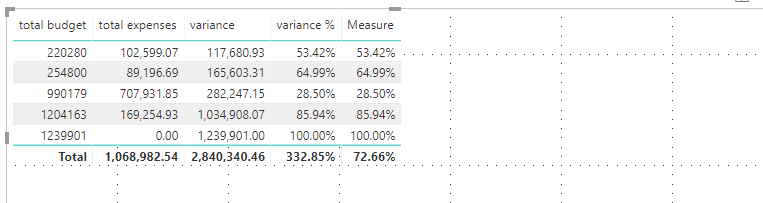
To update the formula as below.
Measure = DIVIDE(SUM(Table1[variance]),SUM(Table1[total budget]))
Pbix as attached.
Hi @mason23 ,
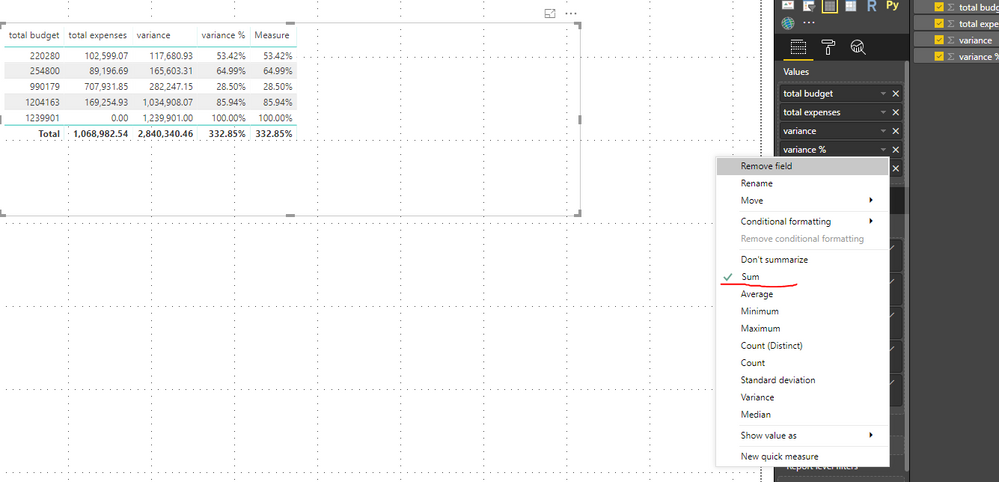
Enable the sum option for the column.
Or we can create a measure to work on it.
Measure = SUM(Table1[variance %])
Thank you for the reply. What I'm looking for is the individual row percentage. The variance % column is computed from a calculated column formula . = Variance / Total Budget. The missing Variance % is the total($2,840,340.46 / $3,909,323) This should give me 73%
with right click on selected Variance field and click on Show value > as a percent of column total
Hi @mason23 ,
To update the formula as below.
Measure = DIVIDE(SUM(Table1[variance]),SUM(Table1[total budget]))
Pbix as attached.
Thank you! That works!
Check out the November 2025 Power BI update to learn about new features.
Advance your Data & AI career with 50 days of live learning, contests, hands-on challenges, study groups & certifications and more!