We've captured the moments from FabCon & SQLCon that everyone is talking about, and we are bringing them to the community, live and on-demand. Starts on April 14th. Register now
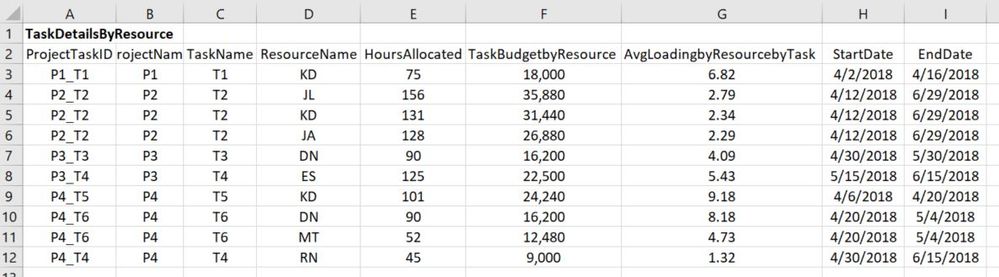
I'm new to Power BI and DAX, PQ. I'm trying to find the resource loading by date for all resources in the organization. I have the start and end dates for all tasks of the projects, and all tasks are allocated to one or more resources. I'm calculating the average resource loading per task using the total allocated hours per task per resource divided by the total duration of the task (in workdays). The table shows my Power BI input table and the graph shows the desired output. Appreciate any guidance I can get.
Sample data is located here: https://www.dropbox.com/s/av6fggigbuy15as/ResourceLoadingSample.xlsx?dl=0
Formulaically, in VBA, this is what I'm trying to achieve:
For myDate = StartDate to EndDate
For each item as string in ProjectTaskID
ResourceLoading(myDate, ResourceName) = ResourceLoading(myDate, ResourceName) +_
AverageLoadingbyResourcebyTask(ProjectTaskID, ResourceName)
Next ProjectTaskID
Next myDate
Hi was there ever provided a solution to this post?
Please provide an importable sample/dummy data, not a picture. 🙂
Done.
If you have recently started exploring Fabric, we'd love to hear how it's going. Your feedback can help with product improvements.
A new Power BI DataViz World Championship is coming this June! Don't miss out on submitting your entry.
Share feedback directly with Fabric product managers, participate in targeted research studies and influence the Fabric roadmap.
| User | Count |
|---|---|
| 57 | |
| 38 | |
| 32 | |
| 18 | |
| 16 |
| User | Count |
|---|---|
| 66 | |
| 66 | |
| 40 | |
| 34 | |
| 25 |