Get certified for free when you join Fabric Data Days 2026 and dive into Fabric, Power BI, SQL, AI, and other essential data skills.
Join nowTry your skills in the Power BI Dataviz World Championship! Round one ends June 26. Join now
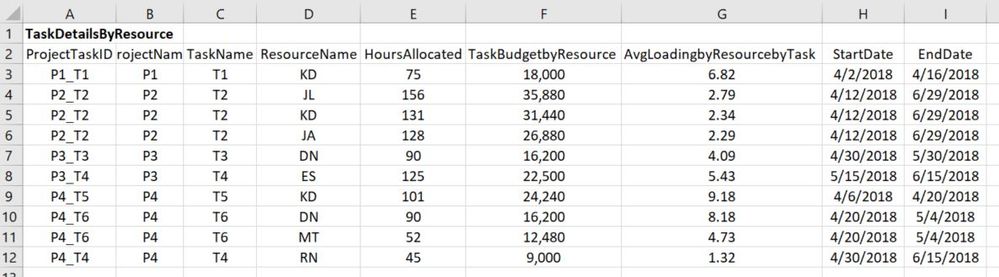
I'm new to Power BI and DAX, PQ. I'm trying to find the resource loading by date for all resources in the organization. I have the start and end dates for all tasks of the projects, and all tasks are allocated to one or more resources. I'm calculating the average resource loading per task using the total allocated hours per task per resource divided by the total duration of the task (in workdays). The table shows my Power BI input table and the graph shows the desired output. Appreciate any guidance I can get.
Sample data is located here: https://www.dropbox.com/s/av6fggigbuy15as/ResourceLoadingSample.xlsx?dl=0
Formulaically, in VBA, this is what I'm trying to achieve:
For myDate = StartDate to EndDate
For each item as string in ProjectTaskID
ResourceLoading(myDate, ResourceName) = ResourceLoading(myDate, ResourceName) +_
AverageLoadingbyResourcebyTask(ProjectTaskID, ResourceName)
Next ProjectTaskID
Next myDate
Hi was there ever provided a solution to this post?
Please provide an importable sample/dummy data, not a picture. 🙂
Done.
Don't miss out on Data Days, June 15 through August 7. Learn Fabric, Power BI, SQL, AI and more.
Check out the May 2026 Power BI update to learn about new features.
| User | Count |
|---|---|
| 22 | |
| 22 | |
| 21 | |
| 20 | |
| 12 |
| User | Count |
|---|---|
| 58 | |
| 55 | |
| 41 | |
| 36 | |
| 35 |