This is best Fabric, Power BI, SQL and AI community event. How do we know? The last event sold out! Save €200 with code FABCMTY200.
Register nowA new Data Days event is coming soon! This time we’re going bigger than ever. Fabric, Power BI, SQL, AI and more. Don't miss out.
Hi,
I have this following situation where I want to calculate = Sum of (product sale by group)/Sum of Total product in Group
From this data, desired output is: = (599/2332) = 0.25
Thanks in Advance
| Product | Group | Product sale by Group | Total product in group |
| P1 | G1 | 78 | 122 |
| P1 | G2 | 24 | 48 |
| P1 | G3 | 18 | 76 |
| P1 | G4 | 49 | 160 |
| P2 | G1 | 39 | 123 |
| P2 | G2 | 6 | 41 |
| P2 | G3 | 19 | 57 |
| P2 | G4 | 55 | 152 |
| P3 | G1 | 39 | 139 |
| P3 | G2 | 7 | 31 |
| P3 | G3 | 5 | 71 |
| P3 | G4 | 17 | 132 |
| P4 | G1 | 18 | 122 |
| P4 | G2 | 30 | 47 |
| P4 | G3 | 13 | 61 |
| P4 | G4 | 9 | 115 |
| P5 | G1 | 8 | 122 |
| P5 | G2 | 16 | 49 |
| P5 | G3 | 2 | 115 |
| P5 | G4 | 40 | 123 |
| P6 | G1 | 14 | 95 |
| P6 | G2 | 26 | 66 |
| P6 | G3 | 9 | 121 |
| P6 | G4 | 58 | 144 |
Solved! Go to Solution.
This will give you the result you say you want, regardless of what/where you filter. Not sure if that is what you are after though
New Measure = DIVIDE(
CALCULATE(
SUM(Table1[Product sale by Group]),
ALL('Table1')
)
, CALCULATE(
SUM(Table1[Total product in group]),
ALL('Table1')
)
)
Hi @aktripathi2506,
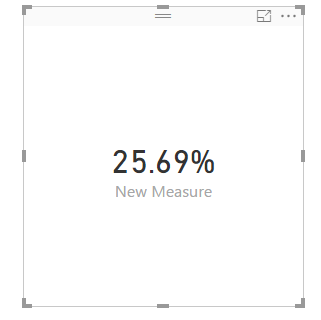
As the @Phil_Seamark posted, create a measure using the formula and create a card to display the expected result as follows.
If you have resolved your issue, please mark the right reply as answer, if it doesn't, please feel free to ask.
Best Regards,
Angelia
This will give you the result you say you want, regardless of what/where you filter. Not sure if that is what you are after though
New Measure = DIVIDE(
CALCULATE(
SUM(Table1[Product sale by Group]),
ALL('Table1')
)
, CALCULATE(
SUM(Table1[Total product in group]),
ALL('Table1')
)
)
Hi
Not sure if I got you right. The formula of your measure would be:
=DIVIDE(
SUM(product sale by group),
SUM(Total product in Group),
0)
Hope this helps
JJ
Check out the May 2026 Power BI update to learn about new features.
Sign up to receive a private message when registration opens and key events begin.
If you have recently started exploring Fabric, we'd love to hear how it's going. Your feedback can help with product improvements.
| User | Count |
|---|---|
| 29 | |
| 25 | |
| 24 | |
| 21 | |
| 14 |
| User | Count |
|---|---|
| 61 | |
| 48 | |
| 26 | |
| 21 | |
| 20 |