cancel
Showing results for 
Search instead for 
Did you mean: 

Learn from the best! Meet the four finalists headed to the FINALS of the Power BI Dataviz World Championships! Register now

Reply
MohanVanks
Helper II
Helper II

Calculating Distinct Count

Hello All,

I have a sample data of sales which has applications, their categories and sales.

I need to calculate the distinct count of applications which has sales as zero or blank.

Below is the sample data for power query.


let
    Source = Table.FromRows(Json.Document(Binary.Decompress(Binary.FromText("rZVRa4MwFIX/ysXnDnSFMR+v1m7dVidm7TZKkZBaF6oGkshgv34O1tFq7Szx0XNyvpsTQlytrOspwpJLXdEcSEGlBp/KjTWyYpGnCgquFC8z4CXIWrhiVNNcZLVvW+vRyhq/34FH2U5st5ylv7GYq536W3I7AZz1BuL4xnXs+hMZE1WpVbeTfIokxrY/F3Fb/JmO9eisLNKT1PbGj6wu+f9Crms7zslCTadZaO8fFdqLnYUOFzQKHVpdcv9CBKOkMQABC/olSlim5UZI8OutSZonuOiP72J4sTnDR3PGJDBnBMScMR3gPGYv5oyHyJwxfzNnhE/mjGgABhngfiweB2CQM0/L2VD/wVGI4D0T//6SlIevBII4gjDVquI6vSgsFPsArLSAqP5bqX7Z9Tc=", BinaryEncoding.Base64), Compression.Deflate)), let _t = ((type nullable text) meta [Serialized.Text = true]) in type table [Application = _t, Category = _t, Sales = _t]),
    #"Changed Type" = Table.TransformColumnTypes(Source,{{"Application", type text}, {"Category", type text}, {"Sales", Int64.Type}})
in
    #"Changed Type"
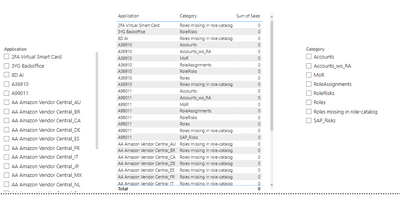


MohanVanks_0-1673970975322.png

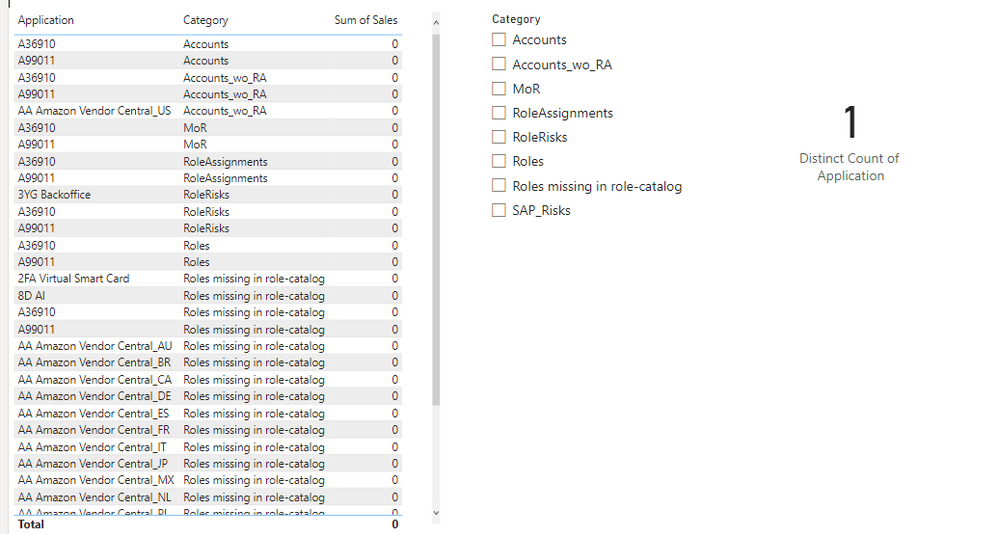
In power bi, if we dont select any value from slicer, it considers as ALL ARE SELECTED.

Problem here is there is only one application which has 0 sales for ALL the categories.

But when i do distinctcount of Application column it gives me 22 as count.

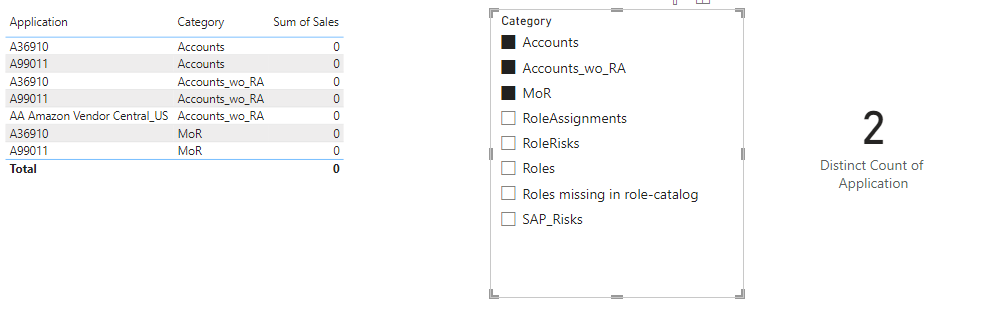
MohanVanks_1-1673971179507.png

Because, here, I believe the OR condition is been applied and hence it is giving 22 as distinct applications count.

But in my case, it should be AND, should give the distinctcount as 1 as there is only one application with all the categories as blank.

If i filter on any other category, then based on the category selection it should give the distinctcount of applications which has 0 sales. and it works fine by default.
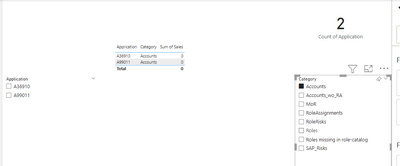
MohanVanks_0-1673971506450.png


But the problem is with when we dont select anything from category, and the OR condition is been applied by default, which results in wrong distinctcount.


Can anyone please help on this.


Thanks,

Mohan V.


1 ACCEPTED SOLUTION
v-jingzhang
Community Support
Community Support

Hi @MohanVanks 


If you add "Application" column to the card visual and select Count (Distinct) aggregation for it, the "OR condition" behavior you observed is correct. This is by design. 


To achieve your expected result like "AND" behavior, you need to create a measure to count. You can try the following measure:

Distinct Count of Application = 
var __table = SUMMARIZE('Table','Table'[Application],"countOfCategory",DISTINCTCOUNT('Table'[Category]))
var __categoryCount = DISTINCTCOUNT('Table'[Category])
RETURN
COUNTROWS(FILTER(__table,[countOfCategory]=__categoryCount))

vjingzhang_0-1674033107361.png

vjingzhang_1-1674033180962.png

I have attached the sample file at bottom. Hope it helps. 


Best Regards,
Community Support Team _ Jing
If this post helps, please Accept it as Solution to help other members find it.

View solution in original post

1 REPLY 1
v-jingzhang
Community Support
Community Support

Hi @MohanVanks 


If you add "Application" column to the card visual and select Count (Distinct) aggregation for it, the "OR condition" behavior you observed is correct. This is by design. 


To achieve your expected result like "AND" behavior, you need to create a measure to count. You can try the following measure:

Distinct Count of Application = 
var __table = SUMMARIZE('Table','Table'[Application],"countOfCategory",DISTINCTCOUNT('Table'[Category]))
var __categoryCount = DISTINCTCOUNT('Table'[Category])
RETURN
COUNTROWS(FILTER(__table,[countOfCategory]=__categoryCount))

vjingzhang_0-1674033107361.png

vjingzhang_1-1674033180962.png

I have attached the sample file at bottom. Hope it helps. 


Best Regards,
Community Support Team _ Jing
If this post helps, please Accept it as Solution to help other members find it.

Helpful resources

Announcements
New to Fabric survey Carousel

New to Fabric Survey

If you have recently started exploring Fabric, we'd love to hear how it's going. Your feedback can help with product improvements.

Power BI DataViz World Championships carousel

Power BI DataViz World Championships - June 2026

A new Power BI DataViz World Championship is coming this June! Don't miss out on submitting your entry.

Join our Fabric User Panel

Join our Fabric User Panel

Share feedback directly with Fabric product managers, participate in targeted research studies and influence the Fabric roadmap.

March Power BI Update Carousel

Power BI Community Update - March 2026

Check out the March 2026 Power BI update to learn about new features.