cancel
Showing results for 
Search instead for 
Did you mean: 

The Power BI Data Visualization World Championships is back! Get ahead of the game and start preparing now! Learn more

Reply
Prasad1
Helper I
Helper I

Calculating Averages for the same data for different time buckets (Daily/Weekly/Monthly)

Hi


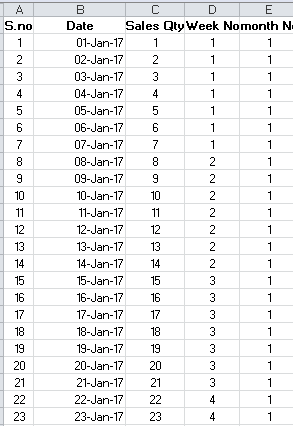
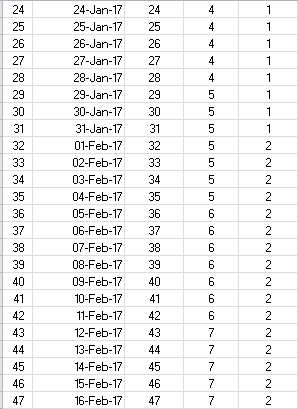
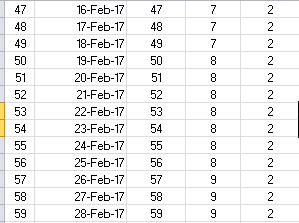
I have sales data at invoice date level. I want to have average calculations at 3 time bucket levels on the same data

a) Daily sales average: Total of the daily sales and divide by total number of days (In the example, there are 59 days. Sum of all daily sales = 1770, So daily average = 1770 / 59 = 30

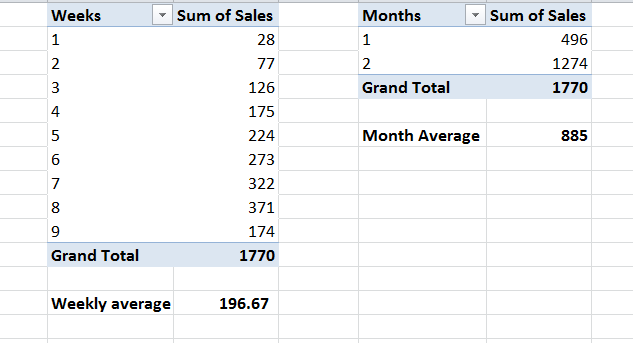
b) Weekly sales average: Arrive at sales total for each week (sum of 7 days dialy sales) and average such week totals => Sum of weekly sales total / no of weeks (in the example, sum of all week sales total = 1770. No of weeks = 9. Average weekly sales = 1770 / 9 = 196.67

c) Monthly sales Average: Arrive at monthly total for each month and average such monthly totals => Sum of monthly sales total / no of months. (in the example, sum of all months sales total = 1770. No of months = 2. Average monthly sales = 1770 / 2 = 885,


Please let me know how to do it in PowerBI. Any help is grately appreciated.


Thanks

Prasad


The simple example is attached here with.


Daily, Weekly, Monthly average problem - 1.PNGDaily, Weekly, Monthly average problem - 2.PNG

Daily, Weekly, Monthly average problem - 3.PNGDaily, Weekly, Monthly average problem - 4.PNG

1 ACCEPTED SOLUTION

Hi Xiaoxin Sheng


Thank you very much. The result is exactly what is needed. I guess, we can get daily average on the same lines. Let me try and come back to you.


Appreciate your help.


Regards

Prasad

View solution in original post

2 REPLIES 2
Anonymous
Not applicable

HI @Prasad1,


You can check below formula to use formula to get average of current group.


Measures:

Current Count = 
SWITCH (
    TRUE (),
    ISFILTERED ( 'Table'[Quarter] ) && ISFILTERED ( 'Table'[Month] ) && ISFILTERED ( 'Table'[Week] ), COUNTROWS ( SUMMARIZE (ALLSELECTED('Table'), [Quarter], [Month], [Week] ) ),
    ISFILTERED ( 'Table'[Quarter] ) && ISFILTERED ( 'Table'[Month] ), COUNTROWS ( SUMMARIZE (ALLSELECTED('Table'), [Quarter], [Month] ) ),
    ISFILTERED ( 'Table'[Quarter] ) && ISFILTERED ( 'Table'[Week] ), COUNTROWS ( SUMMARIZE ( ALLSELECTED('Table'), [Quarter], [Week] ) ),
    ISFILTERED ( 'Table'[Month] ) && ISFILTERED ( 'Table'[Week] ), COUNTROWS ( SUMMARIZE ( ALLSELECTED('Table'), [Month], [Week] ) ),
    ISFILTERED ( 'Table'[Quarter] ), COUNTROWS ( ALLSELECTED ( 'Table'[Quarter] ) ),
    ISFILTERED ( 'Table'[Month] ), COUNTROWS ( ALLSELECTED ( 'Table'[Month] ) ),
    ISFILTERED ( 'Table'[Week] ), COUNTROWS ( ALLSELECTED ( 'Table'[Week] ) ),
    COUNTROWS(ALLSELECTED('Table'))
)


Dynamic AVG = 
VAR GroupCount =
SWITCH (
    TRUE (),
    ISFILTERED ( 'Table'[Quarter] ) && ISFILTERED ( 'Table'[Month] ) && ISFILTERED ( 'Table'[Week] ), COUNTROWS ( SUMMARIZE (ALLSELECTED('Table'), [Quarter], [Month], [Week] ) ),
    ISFILTERED ( 'Table'[Quarter] ) && ISFILTERED ( 'Table'[Month] ), COUNTROWS ( SUMMARIZE (ALLSELECTED('Table'), [Quarter], [Month] ) ),
    ISFILTERED ( 'Table'[Quarter] ) && ISFILTERED ( 'Table'[Week] ), COUNTROWS ( SUMMARIZE ( ALLSELECTED('Table'), [Quarter], [Week] ) ),
    ISFILTERED ( 'Table'[Month] ) && ISFILTERED ( 'Table'[Week] ), COUNTROWS ( SUMMARIZE ( ALLSELECTED('Table'), [Month], [Week] ) ),
    ISFILTERED ( 'Table'[Quarter] ), COUNTROWS ( ALLSELECTED ( 'Table'[Quarter] ) ),
    ISFILTERED ( 'Table'[Month] ), COUNTROWS ( ALLSELECTED ( 'Table'[Month] ) ),
    ISFILTERED ( 'Table'[Week] ), COUNTROWS ( ALLSELECTED ( 'Table'[Week] ) ),
    COUNTROWS(ALLSELECTED('Table'))
)
RETURN
    DIVIDE ( SUMX ( ALLSELECTED( 'Table' ), [Amount] ), GroupCount, 0 )

Result:
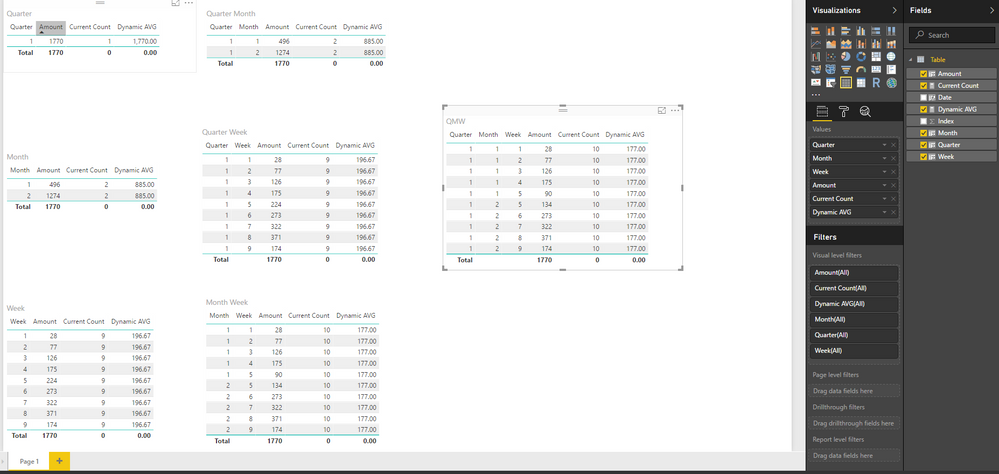
7.PNG


Regards,

Xiaoxin Sheng

Hi Xiaoxin Sheng


Thank you very much. The result is exactly what is needed. I guess, we can get daily average on the same lines. Let me try and come back to you.


Appreciate your help.


Regards

Prasad

Helpful resources

Announcements
Power BI DataViz World Championships

Power BI Dataviz World Championships

The Power BI Data Visualization World Championships is back! Get ahead of the game and start preparing now!

December 2025 Power BI Update Carousel

Power BI Monthly Update - December 2025

Check out the December 2025 Power BI Holiday Recap!

FabCon Atlanta 2026 carousel

FabCon Atlanta 2026

Join us at FabCon Atlanta, March 16-20, for the ultimate Fabric, Power BI, AI and SQL community-led event. Save $200 with code FABCOMM.